SEO
What Is a SERP?
SERP stands for Search Engine Results Page.
A SERP (search engine results page) is the page Google, Bing or another search engine shows after someone enters a query, listing ads, unpaid results and extra features such as maps, images, videos and AI summaries.
What a SERP means in plain English
Every search produces a fresh SERP. Google builds it from separate building blocks: plain text results with a title link and a short snippet, rich results that use structured data to show prices, ratings or dates, image and video results, and question boxes such as People Also Ask. Many searches now also show an AI Overview near the top, which summarizes an answer and links to supporting pages.
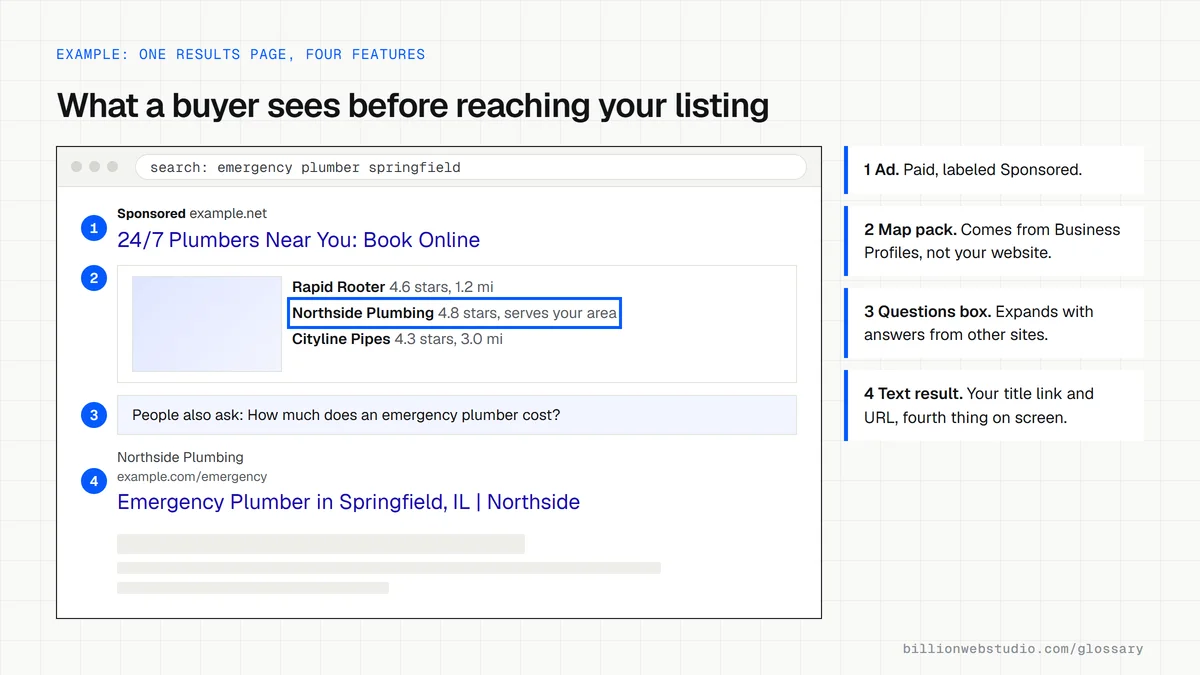
What appears on a Google SERP
- Sponsored results: paid ads, labeled as sponsored, usually at the top and bottom.
- Text results: the title link, the site name, favicon and URL, plus a snippet taken from the page.
- Rich results: listings with extra details such as star ratings, prices or event dates, usually powered by structured data.
- Local results: a map with nearby businesses drawn from Google Business Profiles.
- AI Overviews: a generated summary with links to the pages it drew from.
- People Also Ask and related searches: follow-up questions that expand as the searcher clicks.
Why the SERP matters for your business
Your listing is often the first thing a buyer sees about your company, before they ever reach the website. The title link, snippet and favicon decide whether they click you or the result below. Knowing which features show for your key searches also tells you where to compete: a map-heavy SERP rewards a strong Business Profile, while a SERP full of videos rewards video content.
How to check the SERP for your own searches
Search for the phrases your customers use in a private browser window, from the city you serve, on both a phone and a laptop. Google says relevance draws on factors such as the searcher's location, language and device, so results differ between people. For averages over time, the Performance report in Google Search Console shows the queries, clicks and average position of each page.
Which SERP feature rewards which kind of work
| SERP feature | What earns a place in it | Who usually works on it |
|---|---|---|
| Map pack (local results) | A verified Google Business Profile with the right category, hours and reviews | Owner or local SEO |
| Text result | An indexed page with a clear title element and a useful opening paragraph | Writer and developer |
| Rich result | Structured data that matches the visible page, such as Product, Review or Event markup | Developer |
| Video result | A page where the video is the main content, with a crawlable video file and thumbnail | Developer and video team |
| AI Overview link | An indexed page that is eligible for a snippet and answers the question directly | Writer |
| Sponsored result | A Google Ads campaign bidding on the query | Ads manager |
How to check how your pages appear on the SERP
- Open Google Search Console, choose Performance, then Search results, and set the date range to the last 3 months.
- Click the Search appearance tab under the chart to see which result types, such as review snippets or videos, your pages earned clicks from.
- Switch to the Queries tab, sort by Impressions and note queries with many impressions but few clicks: your listing is seen but not chosen.
- Search two of those queries in a private window on your phone and write down what sits above your listing: ads, a map pack, an AI Overview or videos.
- Compare your title link and snippet with the results around it, and rewrite the page title or opening paragraph if yours is vaguer.
What good looks like: Your main service queries show your page on the first results page with a title link that names the service and the place, and the Search appearance tab lists the rich result types you have marked up.
Free tool: Search Console Performance report
Questions to ask your web developer
“Which SERP features show for our main buyer searches, and which can we realistically win?”
A good answer: A list per query that names each feature and what it needs: the map pack needs Business Profile work, rich results need matching structured data, video results need a page built around the video. Features out of reach are said plainly.
“How will you control the title link and snippet shown for our pages?”
A good answer: Every page gets a unique, descriptive title element and a direct first paragraph, and live results are spot checked after launch, since Google can choose a different title link when the title does not match the page.
SERP: common questions
What does SERP stand for in SEO?
SERP stands for search engine results page. In SEO it usually refers to the Google results for a particular query, and phrases such as SERP position or SERP features describe where a page appears on that results page and which extra elements, such as maps, images or AI Overviews, are shown.
What are SERP features?
SERP features are any results beyond the standard blue link and snippet. Common examples on Google include AI Overviews, the local map pack, People Also Ask boxes, image and video results, and rich results showing ratings or prices. Each feature changes how many clicks the ordinary listings below it receive.
Why do my Google results look different from someone else's?
Google tailors results to the person searching. Its documentation lists the searcher's location, language and device among the factors that affect which pages are most relevant. A customer across town can therefore see a different order, especially for local searches where distance to the business plays a large part.
Sources
- Google Search Central: Visual elements gallery of Google Search
- Google Search Central: In-depth guide to how Google Search works
- Google Search Central: AI features and your website
- Search Console Help: Performance report
- Google Search Central: Influencing your title links
- Google Search Central: Video SEO best practices
- Business Profile Help: Tips to improve your local ranking
Want a website that gets this right?
Every Billion Web Studio build includes technical SEO, schema and speed work as standard, with a fixed quote within 1 business day.