Building and hosting
What Is Backend?
Backend is the behind-the-scenes part of a website or app that runs on a server: the database, business logic, user accounts and integrations that store information and decide what each visitor receives. Visitors never see backend code directly.
What backend means in plain English
When a visitor submits a form, logs in or places an order, the browser sends a request to a server. Backend code receives it, checks it, reads or writes data in a database, talks to other systems if needed, and sends back a result for the browser to display.
MDN calls this server-side programming, or back-end scripting. Unlike browser code, it has full access to the server's operating system, and it can be written in many languages, including PHP, Python, Ruby, C# and JavaScript running on Node.js. WordPress, for example, runs on a PHP backend.
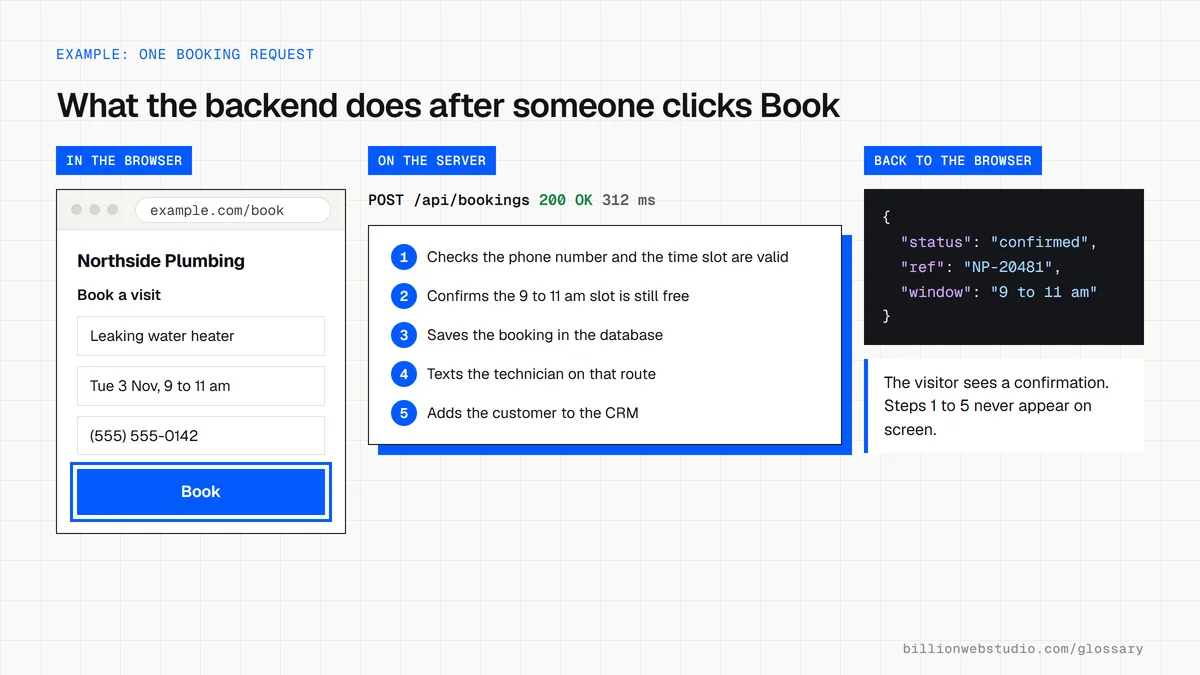
Why the backend matters for a business
Your customer data lives in the backend, so its security protects your reputation. The backend also decides how reliably forms reach you, how payments are processed and whether leads flow into your CRM. A beautiful site with a fragile backend loses inquiries silently.
Backend choices drive running costs as well. Hosting, database size, third-party API fees and ongoing security updates all sit on this side, so ask how the backend will be hosted, monitored and backed up before a build starts.
A backend example
An insurance agency adds an instant quote form. The frontend collects the visitor's age, cover type and zip code. The backend validates those answers, applies the agency's pricing rules, saves the request, emails the right agent and sends the contact to the CRM, then returns a price range to show on screen.
Common backend mistakes
- Sending form entries only by email, with no saved copy if a message is lost.
- Running outdated server software, frameworks or plugins that no longer get security fixes.
- Storing customer data without encryption, access controls or a clear retention period.
- Having no automated backups, or never testing that a backup can actually be restored.
Copy this backend handover checklist
BACKEND HANDOVER CHECKLIST: example.com
[ ] Hosting account in the company's name, admin login shared with us
[ ] Code repository (GitHub or similar) owned by the company
[ ] Server language and version, e.g. PHP 8.4, with its end-of-support date
[ ] Framework or CMS version, and how updates are applied
[ ] Database name, where it runs and who can access it
[ ] Daily backups: where stored, how long kept, date of last restore test
[ ] Integrations (payments, CRM, email) and whose account each one uses
[ ] Passwords and API keys stored outside the code, list of where
[ ] Error logs and uptime alerts: who receives them
[ ] Written steps to deploy a change and to roll it back
How to check that your website backend is still supported
- If your site runs on WordPress, log in and go to Tools > Site Health, open the Info tab and expand the Server section.
- Note the PHP version listed there and compare it with the Supported Versions page on php.net, which shows the date each version stops getting security fixes.
- On any other platform, ask your host or developer to send the server language, framework and database versions in writing.
- Send a test inquiry through your contact form, then confirm a saved copy appears in the site admin or your CRM, not only in your inbox.
- Ask when the last backup ran and when someone last restored one to a test copy of the site.
What good looks like: Every backend component is on a version that still gets security fixes (for PHP that means 8.3 or newer, because 8.2 support ends on 31 December 2026), every form entry is stored, and a backup restore has actually been tested.
Free tool: PHP supported versions
Questions to ask your web developer
“Which language, framework and database versions will the backend run, and when does each stop getting security fixes?”
A good answer: They name exact versions, such as PHP 8.4 with MySQL 8.4, give the end-of-support date for each, and build the upgrades into the maintenance plan before those dates.
“Where is every form submission and order stored, and how would we get it back if an email fails?”
A good answer: Entries are written to the database or CRM before any email goes out, failed sends are logged and retried, and staff can export entries from the admin themselves.
“How are backups taken, and how fast can you restore the site?”
A good answer: Automatic daily backups of files and database kept away from the main server, a stated restore time, and a restore test run before launch with the result written down.
Backend: common questions
What does a backend developer do?
A backend developer writes the server code that powers a site or app. That includes designing databases, building APIs, handling logins and permissions, processing payments and forms, connecting to outside services, and keeping the system secure and fast as more people use it.
Is WordPress frontend or backend?
Both. WordPress runs PHP code and a database on the server, which is backend, and it outputs the pages visitors see, which is frontend. People also call the WordPress admin dashboard the backend, meaning the private area where staff edit content.
What is an example of backend in a website?
A login system is a clear example. When you type your password, backend code checks it against the stored record, starts a session and loads your account details from the database. Shopping cart totals, stock checks and contact form storage are other common backend jobs.
Sources
Want a website that gets this right?
Every Billion Web Studio build includes technical SEO, schema and speed work as standard, with a fixed quote within 1 business day.