Building and hosting
What Is Next.js?
Next.js is an open-source React framework, maintained by Vercel, for building websites and full-stack web applications. Next.js adds routing, server rendering, data fetching and build tooling on top of React, so pages can reach visitors as ready-made HTML.
What Next.js means in plain English
React is a popular JavaScript library for building interface pieces such as menus, forms and product cards. On its own, React leaves many decisions open: how pages map to URLs, where data comes from, how the site is built for production. Next.js answers those questions with a standard structure, so a team can focus on the product itself.
In the current Next.js App Router, pages are Server Components by default. They are rendered on the server, can be prerendered at build time or generated per request, and only the interactive parts send JavaScript to the browser. The framework also handles images, fonts and caching.
Why Next.js matters for a business website
Because pages arrive as HTML, visitors see content quickly and search engines can read it without waiting for scripts to run. The same codebase can hold marketing pages, a blog and logged-in application screens, which suits companies whose website and product overlap, such as SaaS firms and online stores with custom features.
Next.js is a developer tool, not a website builder. Editing content without code requires pairing it with a headless CMS, and hosting needs a Node.js server, a container or a platform that supports it. For a simple brochure site, a mainstream CMS may be cheaper to run.
A Next.js example
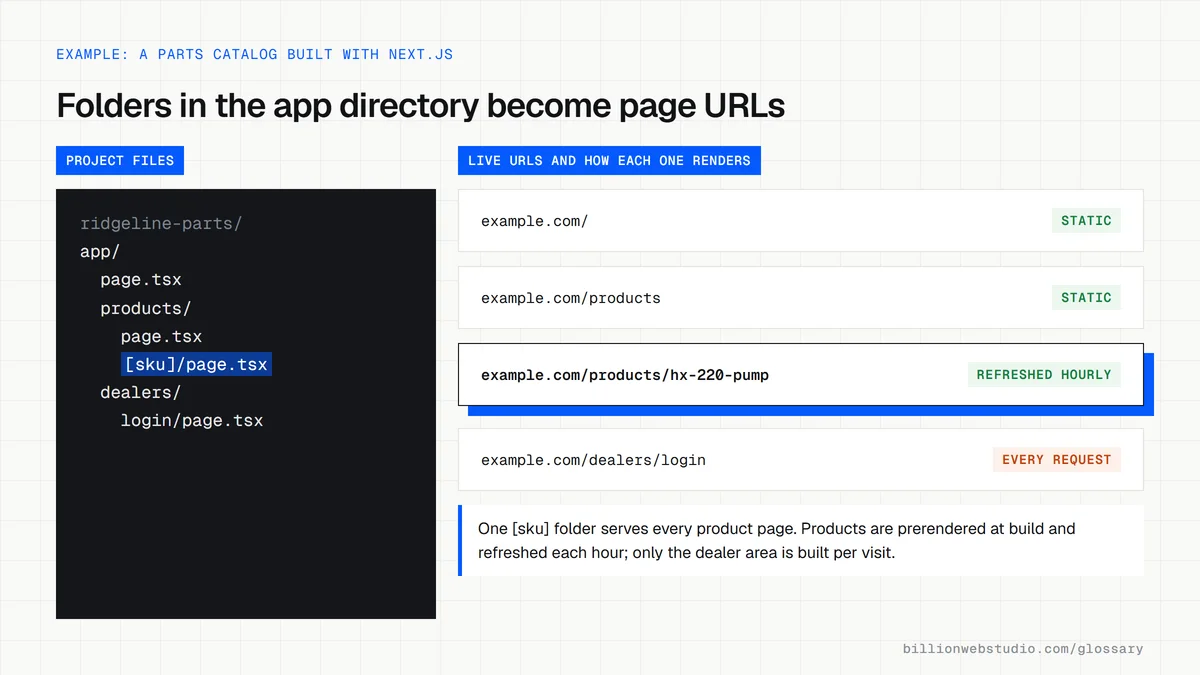
A parts manufacturer has thousands of products and wants each one to have a fast, indexable page. The developer builds the catalog in Next.js, pulls product data from the company's inventory system and prerenders the pages. The sales team edits marketing copy in a headless CMS, while engineers add a dealer login to the same site later.
When Next.js is the wrong choice
- Your team expects to edit every page in a visual builder with no developer involved.
- The site is a few pages that rarely change and needs no custom functionality.
- Nobody will own framework upgrades, dependency updates and hosting after launch.
- Most of the required features already exist in a platform such as Shopify or WordPress.
Next.js rendering options and when each one fits
| Option | When the HTML is made | Fits pages like | Watch for |
|---|---|---|---|
| Static (prerendered) | Once, during the build | Home, service and about pages | Edits go live only after the next build |
| Incremental static regeneration (ISR) | At build, then regenerated in the background after a set time or on demand | Blogs, product catalogs, location pages | A visitor can get the cached copy while the new one is generated |
| Dynamic (per request) | On the server for every visit | Account pages, search results, prices tied to the visitor | Server time and cost on every request |
| Static export | All pages as plain files at build, no Node.js server | Small brochure sites on any static host | No ISR, redirects config, Server Actions or default image optimization |
How to check which Next.js version your site runs
- Open your site in Chrome, right-click the page and choose View page source, then press Ctrl+F (Cmd+F on a Mac) and search for /_next/static. Matches mean the site is built with Next.js.
- Press F12 to open DevTools, click the Console tab, type next.version and press Enter. The first number it prints is the major version the live site runs.
- Open the official Next.js support policy page and find that major version in the Supported Versions table. Only versions listed as Active LTS or Maintenance LTS still receive security fixes.
- Back in DevTools, open the Network tab, reload, click the first request and read Response Headers. A value of HIT or STALE for x-nextjs-cache (or x-vercel-cache on Vercel) shows the page came from cache instead of being rendered again.
What good looks like: The console shows a major version the support policy lists as Active LTS or Maintenance LTS, and marketing and blog pages come back from cache rather than being rebuilt for every visitor.
Free tool: Next.js support policy
Questions to ask your web developer
“Which pages will be prerendered, which will refresh on a timer, and which must render on every request?”
A good answer: A page-by-page answer: service and blog pages are static or revalidated, for example hourly or whenever the CMS publishes, and only pages with per-visitor data, such as a dealer dashboard, render per request because those cost server time on every visit.
“How will you keep Next.js and React patched after launch?”
A good answer: Dependency updates run on a schedule, they watch the Next.js and React security advisories, critical patches go out within days, and every upgrade is checked on a preview deployment before it reaches the live site.
“Where will it be hosted, and could we move it without a rewrite?”
A good answer: They name the host and the deployment option (Node.js server, Docker container, static export or a platform adapter), confirm that ISR and image optimization work there, and keep the code in a repository your company owns.
Next.js: common questions
Is Next.js frontend or backend?
Next.js covers both. It builds the frontend interface with React, and it can also run backend code on the server, such as fetching from a database, handling form submissions or serving API routes. That is why its documentation describes it as a framework for full-stack web applications.
Is Next.js good for SEO?
Next.js is a strong base for SEO because it can send fully rendered HTML to search engines and visitors, supports metadata and sitemaps, and helps keep pages fast. Good rankings still depend on content quality, site structure and links, which the framework does not provide.
Do I need Vercel to host a Next.js site?
No. Next.js is open source under the MIT license. Its documentation explains self-hosting on a Node.js server, in a Docker container, or as a static export of plain HTML files. Vercel maintains the framework and offers hosting, but you can run it elsewhere.
Sources
Want a website that gets this right?
Every Billion Web Studio build includes technical SEO, schema and speed work as standard, with a fixed quote within 1 business day.