SEO
What Is Hreflang?
Hreflang is an HTML attribute that tells search engines which language and regional versions of a page exist, so Google can show each searcher the right version. A Spanish page and an English page for the US can each declare the other.
What hreflang means in plain English
If your site has the same content in several languages, or for several countries, hreflang links those versions together. Each tag names a language code, such as en or es, and can add a region code, such as en-GB for English in the United Kingdom. Google supports ISO 639-1 codes for languages and ISO 3166-1 Alpha 2 codes for regions.
Google accepts hreflang in three equivalent places: link elements in the page's HTML head, HTTP headers, or your XML sitemap. A reserved value, x-default, marks the fallback page for visitors whose language settings match none of your versions, such as a language selector page.
Why hreflang matters for a business website
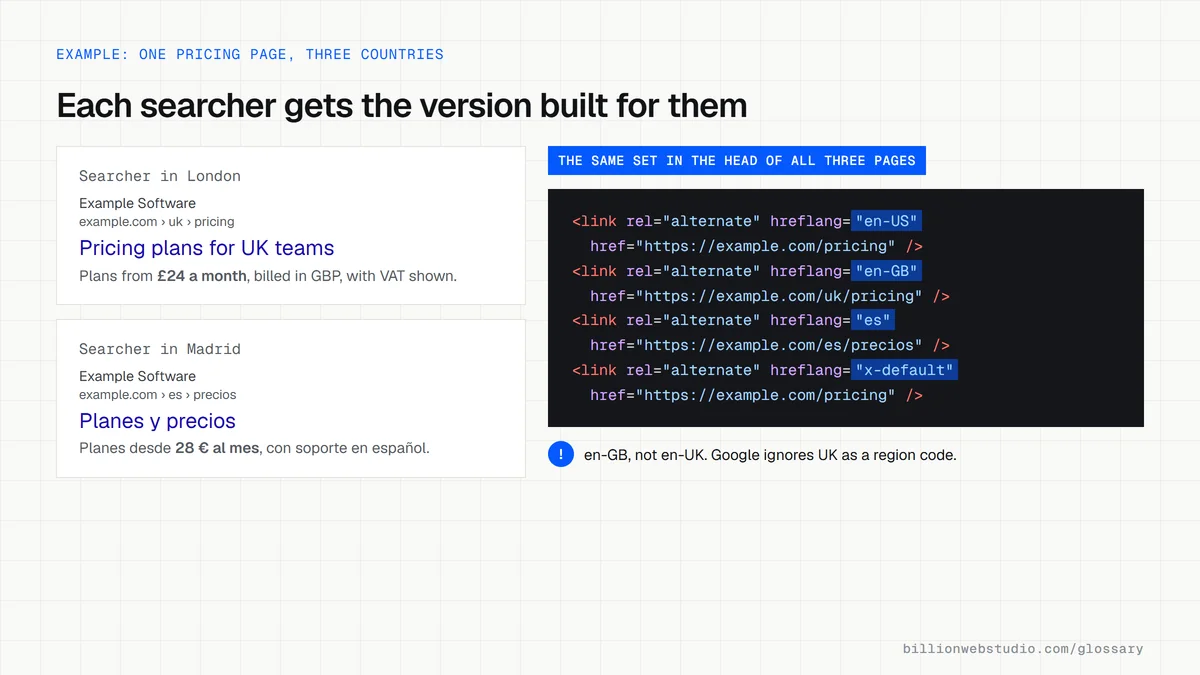
Without it, a visitor in London might land on your US page with dollar prices and US phone numbers, or a Spanish speaker might get the English page. That costs trust and sales. Hreflang helps Google send each person to the version built for them. It only matters if you run more than one language or country version of your site.
A hreflang example
A software company has three versions of its pricing page: example.com/pricing for the US, example.com/uk/pricing for the UK and example.com/es/pricing in Spanish. Each page carries three tags, en-US, en-GB and es, plus an x-default pointing to the US page. Every page lists itself and the other two, which Google requires for the tags to work.
Common hreflang mistakes
- Missing return links: each version must list itself and every other version, or Google ignores the tags.
- Using a country code on its own, which Google does not support because a language code is required.
- Using the wrong code, such as en-UK instead of en-GB for the United Kingdom.
- Pointing hreflang at URLs that redirect, are blocked or are not the canonical version.
- Adding hreflang to a single-language site that has no alternate versions.
Hreflang codes that look right but fail
| You might write | What goes wrong | Use instead |
|---|---|---|
| en-UK | UK is a reserved code that Google ignores | en-GB |
| es-419 for Latin America | 419 is not an ISO 3166-1 region, so Google does not support it | es, or one code per country such as es-MX |
| be for Belgium | A country code alone is invalid, because the language must come first | nl-BE or fr-BE |
| jp | jp is not a language code | ja, or ja-JP |
| uk for the United Kingdom | uk is the language code for Ukrainian | en-GB |
| /uk/pricing or //example.com/uk/pricing | Alternate URLs must be fully qualified | https://example.com/uk/pricing |
Copy this hreflang sitemap entry
<?xml version="1.0" encoding="UTF-8"?>
<urlset xmlns="http://www.sitemaps.org/schemas/sitemap/0.9"
        xmlns:xhtml="http://www.w3.org/1999/xhtml">
  <url>
    <loc>https://example.com/pricing</loc>
    <xhtml:link rel="alternate" hreflang="en-US" href="https://example.com/pricing"/>
    <xhtml:link rel="alternate" hreflang="en-GB" href="https://example.com/uk/pricing"/>
    <xhtml:link rel="alternate" hreflang="es" href="https://example.com/es/precios"/>
    <xhtml:link rel="alternate" hreflang="x-default" href="https://example.com/pricing"/>
  </url>
  <url>
    <loc>https://example.com/uk/pricing</loc>
    <xhtml:link rel="alternate" hreflang="en-US" href="https://example.com/pricing"/>
    <xhtml:link rel="alternate" hreflang="en-GB" href="https://example.com/uk/pricing"/>
    <xhtml:link rel="alternate" hreflang="es" href="https://example.com/es/precios"/>
    <xhtml:link rel="alternate" hreflang="x-default" href="https://example.com/pricing"/>
  </url>
  <!-- Repeat the block for https://example.com/es/precios with the same four lines -->
</urlset>
How to check the hreflang tags on your site
- Open one language version of a page in Chrome, right-click, choose View page source and press Ctrl+F (Cmd+F on a Mac) to search for hreflang.
- Confirm the set lists every version, including the page itself, with full https addresses, plus an x-default if you have a selector or main international page.
- Open each listed URL and view its source. It must carry the same set of tags, or Google may ignore them.
- Check each code: a language first (en, es, de), then an optional region (GB, US, MX). UK, EU and es-419 are not accepted.
- If the tags live in your XML sitemap instead, open it and check each url entry has an xhtml:link line for every version.
- Paste each listed URL into URL Inspection in Search Console to confirm it is indexed and is its own canonical.
What good looks like: Every version lists the same complete set, each URL returns 200, is indexable and canonical to itself, and all codes use an ISO 639-1 language with an optional ISO 3166-1 Alpha 2 region.
Free tool: Search Console URL Inspection tool
Questions to ask your web developer
“How will hreflang be generated when we add a page or a language?”
A good answer: From the CMS's links between translations, so every version gets the full set automatically, including itself and x-default, and deleting a page removes it from every set.
“Which language and region codes will you use, and why?”
A good answer: Codes chosen per market from ISO 639-1 and ISO 3166-1, such as en-GB rather than en-UK, and a language-only code like es when one Spanish page serves every Spanish-speaking country.
“How will you test hreflang after launch?”
A good answer: A crawl that checks return links and status codes for every set, plus spot checks in URL Inspection, repeated after any content migration.
Hreflang: common questions
Is hreflang a ranking factor?
Hreflang is not designed to lift rankings. It tells Google which of your existing language or regional versions to show a particular searcher. The benefit is that the right visitors land on the right page, with the right language, currency and contact details, which improves their experience and your conversions.
Where do I put hreflang tags?
Choose one of three methods Google treats as equivalent: link elements in the head of each HTML page, HTTP headers for non-HTML files such as PDFs, or entries in your XML sitemap. Sitemaps are often easiest for large sites because every version is managed in one file instead of on every page.
What is x-default in hreflang?
x-default is a reserved hreflang value that marks the page Google should show when no language or region version matches the searcher's browser settings. It usually points to a language selector page or your main international page, and it does not need a language code.
Sources
Want a website that gets this right?
Every Billion Web Studio build includes technical SEO, schema and speed work as standard, with a fixed quote within 1 business day.