SEO
What Is NAP Consistency?
NAP consistency stands for Name, Address and Phone number.
NAP consistency means a business's name, address and phone number appear in exactly the same way on its website, Google Business Profile, directories and social profiles, so customers and search engines never see conflicting details.
What NAP consistency means in plain English
NAP stands for name, address and phone number, the three details that identify a local business. Consistency means one official version of each, used everywhere. Small formatting differences such as Street and St. are rarely a problem, but a former address, an old phone number or a different trading name on some listings creates real confusion.
Some marketers add a W for website, since your site address should match across listings too. The copies that matter most are on your own website, usually in the footer and on the contact page, and on your Google Business Profile, because those are the versions you control directly and customers see most.
Why NAP consistency matters for a business website
Google's guidelines say a business name should reflect the real-world name used consistently on the storefront, website and stationery, and that the address should be precise and accurate. Google also says businesses with complete and accurate information are more likely to appear in local results. Beyond rankings, a customer who rings a disconnected number from an old listing is a lost lead.
An example of NAP consistency
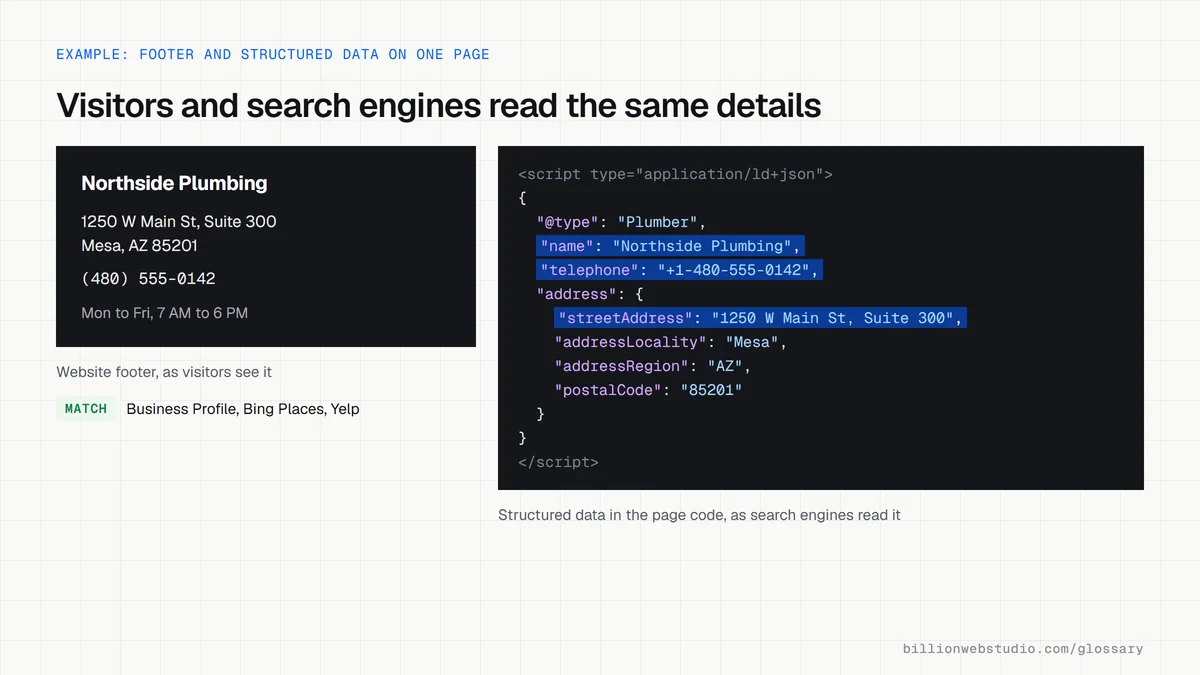
A dental practice moves from Suite 120 to Suite 300 in the same building and changes its phone system. On the same day, the office updates its Google Business Profile, website footer, LocalBusiness structured data and its listings on Bing Places, Apple Business (formerly Apple Business Connect), Yelp and two dental directories. It keeps a simple spreadsheet of every listing, its login and the date it was last checked.
How to check NAP consistency on your site
- Write down the one official version of your name, address and phone number, including suite numbers and formatting.
- Compare it with your website footer, contact page and every location page.
- Check that your LocalBusiness structured data, if you have it, uses the same details as the visible page.
- Search your business name with old addresses and phone numbers to find listings that still show them.
- Plan any call tracking so that your main local number still appears in your footer and on your listings.
Which NAP differences to fix and which to leave
| Difference | Example | What to do |
|---|---|---|
| Missing or old suite number | Suite 120 on Yelp, Suite 300 everywhere else | Fix: customers and couriers go to the wrong door |
| Old phone number | A disconnected line on a trade directory | Fix first: every call to it is a lost lead |
| Legal term in the profile name | Northside Plumbing LLC on Google, no LLC on the van | Remove it unless your signage and invoices use it |
| Keywords added to the name | Northside Plumbing Mesa Water Heaters | Remove: Google's guidelines do not allow extra information in names |
| Call center number on the profile | A national 800 number instead of the local line | Switch to the local number where possible |
Copy this LocalBusiness markup and match it to your footer
<script type="application/ld+json">
{
  "@context": "https://schema.org",
  "@type": "Plumber",
  "name": "Northside Plumbing",
  "url": "https://www.example.com/",
  "telephone": "+1-480-555-0142",
  "address": {
    "@type": "PostalAddress",
    "streetAddress": "1250 W Main St, Suite 300",
    "addressLocality": "Mesa",
    "addressRegion": "AZ",
    "postalCode": "85201",
    "addressCountry": "US"
  },
  "openingHoursSpecification": [{
    "@type": "OpeningHoursSpecification",
    "dayOfWeek": ["Monday", "Tuesday", "Wednesday", "Thursday", "Friday"],
    "opens": "07:00",
    "closes": "18:00"
  }]
}
</script>
How to check NAP consistency in your site code and listings
- Paste your homepage address into Google's Rich Results Test, click Test URL and open the LocalBusiness or Organization item under Detected structured data.
- Compare the name, telephone and address values in that item with the footer you see on the page. They should be character for character the same apart from formatting.
- Search Google for your business name and open your Business Profile. Check the name has no extra keywords or legal terms such as LLC that are not on your signage.
- Check whether the profile uses a local phone number rather than a central call center line, since Google's guidelines prefer a local number whenever possible.
- Open your three busiest directory listings, such as Bing Places, Yelp and your trade directory, and compare each against the same reference details.
What good looks like: The structured data, footer, Business Profile and main listings all show one name, one address with the same suite number and one local phone number.
Free tool: Rich Results Test
Questions to ask your web developer
“Where on the site do our name, address and phone number come from?”
A good answer: From one setting or data file that feeds the footer, contact page, location pages and structured data, so a change in one place updates every page at once.
“If we use call tracking, how do we keep our main number consistent?”
A good answer: Tracking numbers are swapped in only for visitors from specific campaigns, while the footer in the page code, the structured data and every listing keep the main local number.
NAP consistency: common questions
Does NAP consistency affect local SEO rankings?
Google has not named NAP consistency as a ranking factor. It does say businesses with complete and accurate information are more likely to show up in local results. Matching details everywhere is the simplest way to keep your information accurate for Google and for customers deciding whether to call.
Does my address format need to match exactly everywhere?
Minor formatting differences, such as Street and St., are unlikely to confuse anyone. What matters is that the real details agree: the same business name, the same street number and suite, and the same phone number. Pick one format for your own website and listings and use it wherever you can.
How does a service-area business keep NAP consistency without showing an address?
Google's guidelines say businesses that serve customers at the customer's location should not show a home address on their profile. In that case, keep the business name, phone number and service area identical everywhere, and hide the street address on any directory that lets you.
Sources
Want a website that gets this right?
Every Billion Web Studio build includes technical SEO, schema and speed work as standard, with a fixed quote within 1 business day.