SEO
What Is an XML Sitemap?
An XML sitemap is a file that lists the URLs on a website that the owner wants search engines to find, often with the date each page last changed, so crawlers can discover new and updated pages efficiently.
What an XML sitemap means in plain English
Think of an XML sitemap as a delivery list for search engines. It is written in code for machines, unlike an HTML sitemap page meant for people, and usually sits at an address such as example.com/sitemap.xml. Each entry holds a full URL and, optionally, a lastmod date. Most modern platforms, including WordPress and Shopify, build and update the file automatically as pages are added.
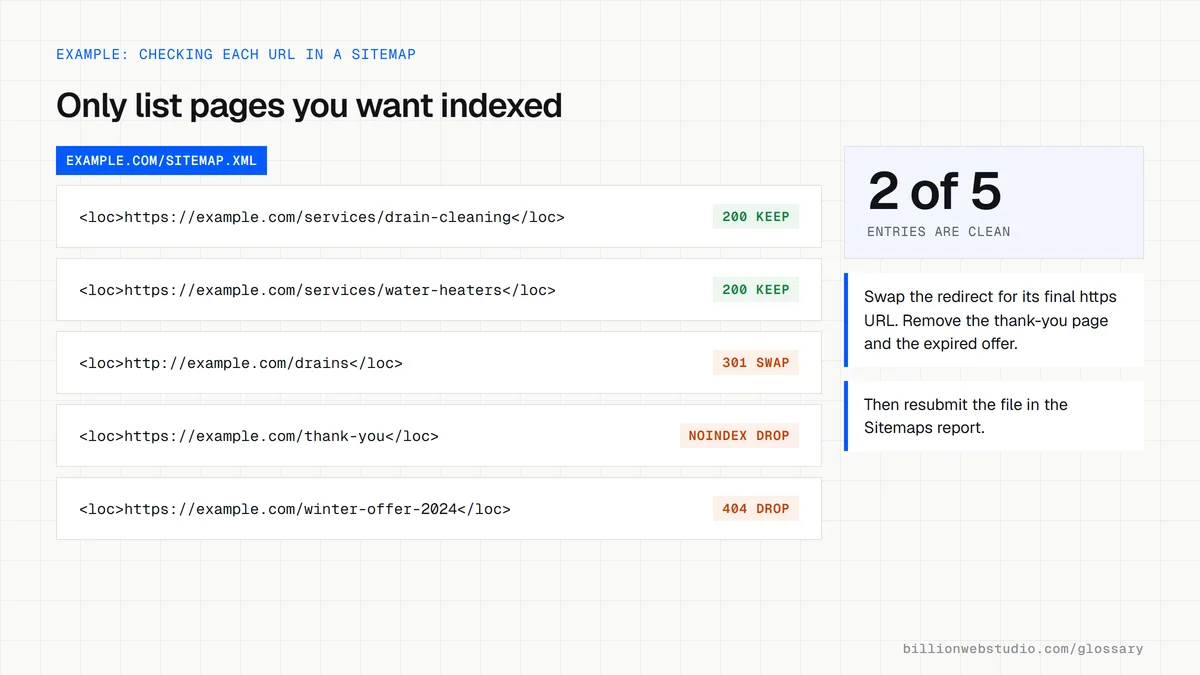
Why an XML sitemap matters for your website
Google finds most pages by following links, so a sitemap helps most on new sites with few backlinks, large sites with deep pages, and sites that publish often. A single sitemap can hold up to 50,000 URLs or 50MB uncompressed; bigger sites split it into several files grouped by a sitemap index. Submitting a sitemap is a hint, not a guarantee that every listed page gets crawled.
An example XML sitemap entry
A law firm publishes a new page about wrongful dismissal claims. Its sitemap gains an entry with the full address, https://www.example.com/wrongful-dismissal, and a lastmod date matching the day the page went live. When Googlebot next reads the sitemap, it sees a URL it has not crawled before and can fetch it without waiting to discover a link from another page.
Common XML sitemap mistakes
- Listing URLs that redirect, return errors or carry noindex, which sends Google mixed signals.
- Using relative paths such as /services instead of fully qualified https addresses.
- Setting every lastmod to today's date, which Google ignores when dates are not accurate.
- Spending time on priority and changefreq values, which Google says it ignores.
- Forgetting to replace the old sitemap after a redesign changes the site's URLs.
Copy this XML sitemap template
<?xml version="1.0" encoding="UTF-8"?>
<urlset xmlns="http://www.sitemaps.org/schemas/sitemap/0.9">
  <!-- List only canonical https URLs that return 200; save the file as UTF-8 -->
  <url>
    <loc>https://www.example.com/</loc>
    <lastmod>2026-10-01</lastmod>
  </url>
  <url>
    <loc>https://www.example.com/services/drain-cleaning</loc>
    <lastmod>2026-09-18</lastmod>
  </url>
  <url>
    <loc>https://www.example.com/services/water-heater-repair</loc>
    <lastmod>2026-08-27</lastmod>
  </url>
</urlset>
How to check your XML sitemap in Search Console
- Open your sitemap in a browser, usually yourdomain.com/sitemap.xml (WordPress core uses /wp-sitemap.xml and Yoast uses /sitemap_index.xml), and confirm it lists full https addresses.
- In Search Console, open Indexing, then Sitemaps, and read the Status column: Success, Has errors or Couldn't fetch.
- Compare Discovered pages with the number of pages you actually want in search; a big gap either way needs a look.
- Click the sitemap row and open its index coverage link to see how many of its URLs Google has indexed and why the rest were left out.
- Remove or replace any listed URL that redirects, returns 404 or carries noindex, then submit the sitemap again.
What good looks like: Status shows Success, Discovered pages is close to your real page count, and every listed URL returns 200, is indexable and is the canonical version of the page.
Free tool: Search Console Help: Sitemaps report
Questions to ask your web developer
“Is the sitemap generated automatically, and what keeps it accurate?”
A good answer: The CMS rebuilds it whenever pages are published, changed or deleted. Noindexed, redirected and draft pages are excluded, and lastmod changes only when the main content changes.
“How will the sitemap be split as the site grows?”
A good answer: A sitemap index that points to separate files by type, such as pages, posts and products, so errors are easy to trace to one section of the site.
XML sitemap: common questions
How do I submit an XML sitemap to Google?
Open the Sitemaps report in Google Search Console, enter the sitemap address and click submit. The report then shows when Google last read the file and any errors. You can also add a line such as Sitemap: https://www.example.com/sitemap.xml to robots.txt so every crawler can find it.
Does an XML sitemap guarantee my pages will be indexed?
No. Google treats a submitted sitemap as a hint about which URLs matter and may not crawl or index every one. Pages still need to be reachable, return a successful status code, and offer content worth indexing. Check the Page indexing report in Search Console to see which listed URLs were left out and why.
What is the difference between an XML sitemap and an HTML sitemap?
An XML sitemap is a machine-readable file written for search engine crawlers and is rarely seen by visitors. An HTML sitemap is an ordinary web page that lists links to the main sections of a site for people to browse. Many sites only need the XML version plus clear menus.
Sources
Want a website that gets this right?
Every Billion Web Studio build includes technical SEO, schema and speed work as standard, with a fixed quote within 1 business day.