SEO
What Is a Canonical Tag?
A canonical tag is a line of HTML, written as rel="canonical", that tells search engines which URL is the main version of a page when the same or very similar content can be reached at more than one address.
What a canonical tag means in plain English
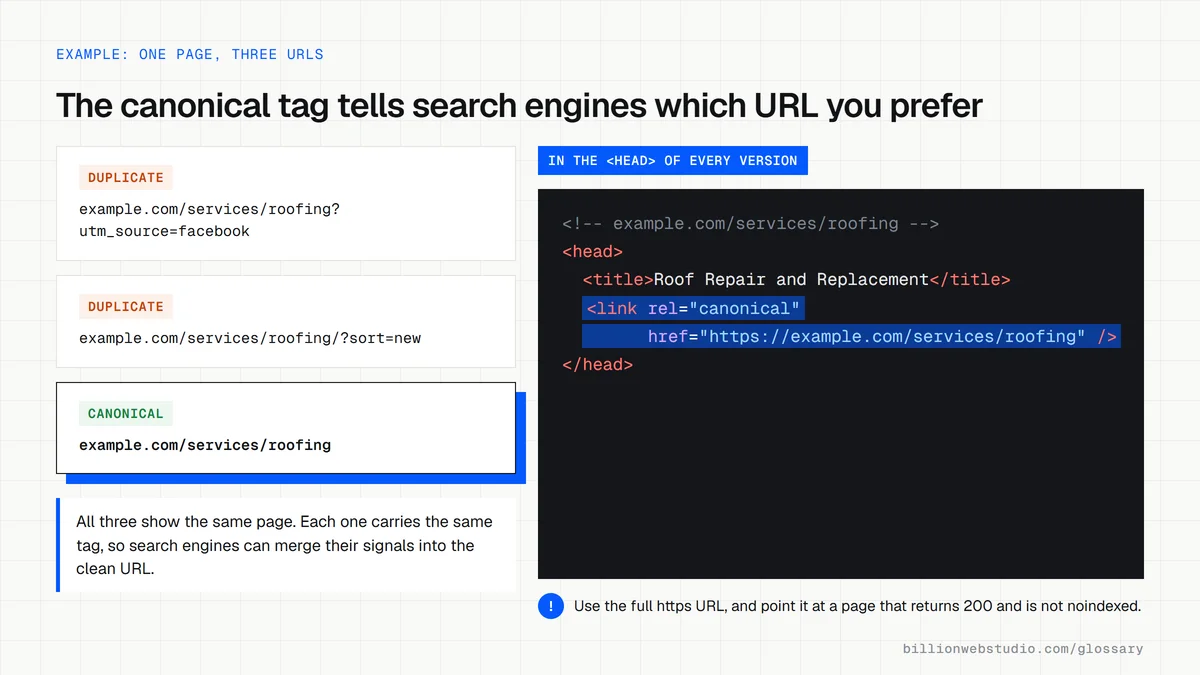
Websites often show one page at several addresses: with and without www, with tracking codes such as ?utm_source added, or through different product filters. A canonical tag sits in the page's head section, for example <link rel="canonical" href="https://www.example.com/blue-boots">, and points every copy back to the preferred address. For PDFs and other non-HTML files, the same signal can be sent as an HTTP header.
Why a canonical tag matters for your rankings
When Google finds duplicates, it groups them and chooses one URL to show in results. A canonical tag helps it combine signals, such as links, onto that one address instead of splitting them, and saves crawl time on copies. Google describes your choice as a hint, not a rule, so the tag works best when redirects, internal links and the sitemap all point to the same URL.
An example of a canonical tag
An online shoe store lists the same boot under Women, Sale and Winter, creating three URLs with identical content. Each version carries a canonical tag pointing to /blue-boots, and every menu link uses that address too. Google then shows /blue-boots in search, and links that bloggers made to the sale version still count toward the main page.
Common canonical tag mistakes
- Using relative paths such as /blue-boots instead of the full https address.
- Blocking duplicate URLs in robots.txt, so Google cannot read their canonical tags and may index them without content.
- Adding noindex to duplicates instead, which removes them from Search entirely rather than merging signals.
- Declaring one canonical in the HTML and a different one in the sitemap or HTTP header.
- Letting JavaScript change the canonical tag after the page loads.
Copy this canonical tag
<!-- Put this inside <head> on the page and on every duplicate version of it -->
<link rel="canonical" href="https://www.example.com/services/roof-repair" />
How to check the canonical tag on any page of your site
- Open the page in Chrome, right-click and choose View page source.
- Press Ctrl+F (Cmd+F on a Mac) and search for rel="canonical".
- Read the href value: it should be the full https address of the page you are on, or of the main version if this page is a duplicate.
- Paste that same address into the URL Inspection tool in Google Search Console and compare the user-declared canonical with the Google-selected canonical.
What good looks like: Exactly one canonical tag per page, an absolute https URL, pointing at a live page that returns 200, and Search Console showing Google picked the same URL you declared.
Free tool: Google Search Console URL Inspection
Questions to ask your web developer
“Does every page set its own canonical URL automatically, including filtered and paginated pages?”
A good answer: Yes, the template outputs one absolute canonical per page. Filter and tracking parameters point back to the clean URL, while each paginated page points to itself rather than to page one.
“What happens to canonicals if we move to a new domain or change URLs?”
A good answer: Canonicals are updated to the new URLs on the same day the 301 redirects go live, and the XML sitemap lists only the canonical URLs, so the signals all agree.
Canonical tag: common questions
Does Google always follow the canonical tag?
No. Google calls a canonical preference a hint, not a rule, and may pick a different URL if other signals disagree. The URL Inspection tool in Google Search Console shows both the user-declared canonical and the Google-selected canonical, so you can confirm which address Google actually treats as the main version.
What is the difference between a canonical tag and a 301 redirect?
A 301 redirect sends every visitor and crawler to the new URL, so the old address stops working as a page. A canonical tag leaves every version reachable and only tells search engines which one to show. Use a redirect when retiring a duplicate page and a canonical tag when the duplicates must stay live.
Should a page have a canonical tag pointing to itself?
Google does not require it, but a self-referencing canonical is a sensible default. It tells search engines which address to prefer when tracking codes, session IDs or filters create extra versions of the URL. Most modern CMS platforms and SEO plugins add one automatically, so check page source to confirm the address is correct.
Sources
Want a website that gets this right?
Every Billion Web Studio build includes technical SEO, schema and speed work as standard, with a fixed quote within 1 business day.