SEO
What Is Keyword Cannibalization?
Keyword cannibalization is when two or more pages on the same website target the same search query and intent, so they compete with each other in search results. Google may then rank neither page as well as one stronger, combined page.
What keyword cannibalization means in plain English
Google tends to show only a small number of results from any one site for a single search. If you have three pages that all try to answer the same question, Google has to pick one, and its choice may change from week to week. Your links, clicks and content end up spread across several weak pages instead of one strong one.
The term comes from SEO practitioners, not from Google, and it is not a penalty. Two pages on related topics are not cannibalization either. The problem only appears when pages target the same keyword and the same intent, such as two separate pages both aiming at "web design cost".
Why keyword cannibalization matters for your website
The wrong page often wins. A short blog post can outrank your service page for a buying search, sending ready-to-buy visitors to an article with no clear way to get a quote. Rankings can also swing as Google switches between pages, and backlinks earned by each page are split instead of strengthening one.
A keyword cannibalization example
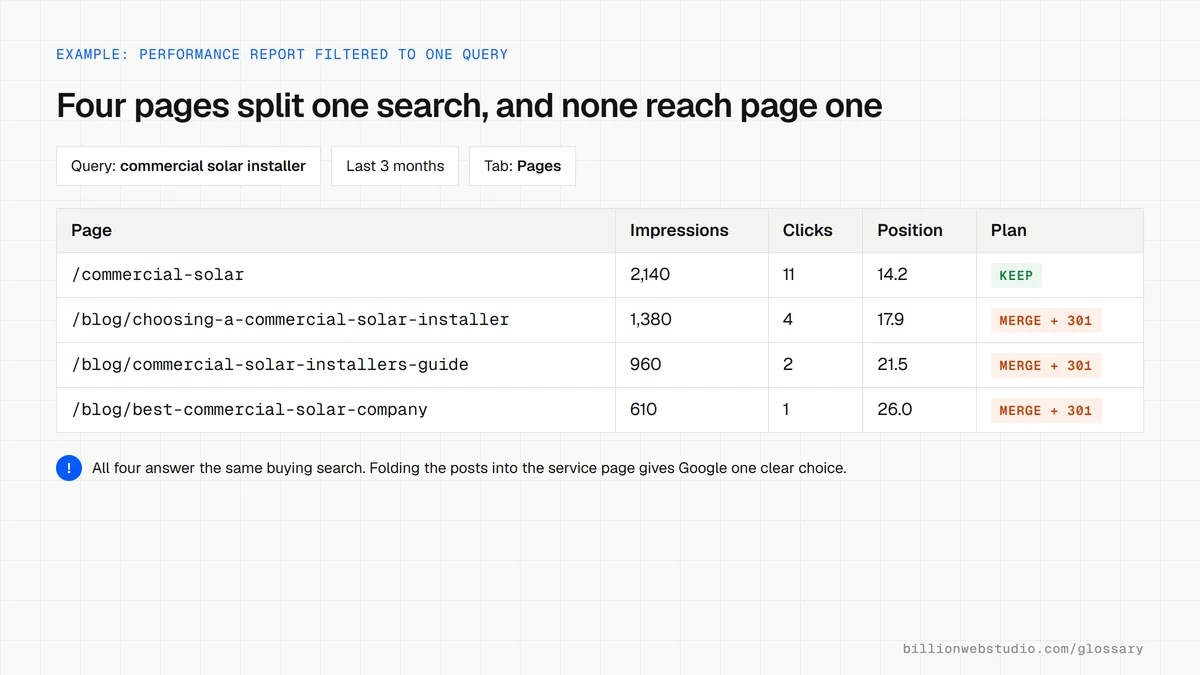
A solar installer has a service page for commercial solar installation and, over two years, publishes three blog posts with near-identical titles on the same subject. In Search Console, the query "commercial solar installer" shows impressions spread across all four URLs, each stuck on page two or three. Merging the posts into the service page and redirecting them gives Google one clear answer.
How to find and fix keyword cannibalization
- In Google Search Console, open the Performance report, filter by a query and check the Pages tab for more than one URL.
- Merge overlapping pages into the strongest one and set up a 301 redirect from each old URL.
- Rewrite a page to target a different, more specific intent if it is worth keeping separately.
- Use a canonical tag when near-duplicate pages must both stay live, such as filtered product listings.
- Point internal links for the keyword to the one page you want to rank.
Merge, refocus, canonical or leave alone: which fix
| Situation | Example | Fix |
|---|---|---|
| Two pages, same query, same intent | Two blog posts both built around web design cost | Merge into the stronger page and 301 redirect the other |
| A blog post outranks the service page for a buying search | A guide beats the quote page for commercial solar installer | Link the post to the service page and refocus the post on a narrower question |
| Near duplicates that must stay live | Filtered product listings | Canonical tag pointing to the main listing |
| Same keyword, different intent | A roof repair cost guide and a roof repair service page | Leave both, and make each title and heading show its own intent |
| An old version and a new one | 2023 and 2026 editions of a price guide | Update the newer page and 301 redirect the older one |
How to check for keyword cannibalization in Search Console
- In Google Search Console, open Performance, then Search results, and set the date range to the last 3 months.
- Click + Add filter, choose Query, select Exact query and type the search you care about.
- Open the Pages tab below the chart. More than one of your URLs with impressions means pages are competing.
- Change the date range to single weeks and see whether the URL with the most impressions keeps changing. Switching means Google cannot decide.
- Open each competing URL and decide whether they serve the same intent or different ones.
What good looks like: For each important query, one URL collects nearly all the impressions and clicks, and it is the page you want to rank, usually the service or product page for buying searches.
Free tool: Search Console Performance report
Questions to ask your web developer
“Before writing a new page, how do you check it will not compete with one we already have?”
A good answer: They keep a keyword map that assigns one main query and intent to each URL, and check Search Console for existing pages already ranking for the target before writing.
“When two of our pages compete, how do you decide which one to keep?”
A good answer: The page that best matches the intent, with the most links and conversions, stays. Useful content from the others moves into it, the old URLs get 301 redirects and internal links are updated.
Keyword cannibalization: common questions
Is keyword cannibalization bad for SEO?
It can be. When several pages target the same query and intent, they split links and clicks, and Google may rank the weaker page or alternate between them. It is not a penalty, and related pages covering different angles are fine. It only becomes a problem when pages truly compete for the same search.
How do I check for keyword cannibalization?
Open the Performance report in Google Search Console, click a query you care about, then open the Pages tab. If two or more of your URLs collect impressions for that query, check whether they serve the same intent. Searching Google for site: plus your domain and the keyword is a quick second check.
How do you fix keyword cannibalization?
Choose the page that best matches the search, usually the one with the most links and conversions. Merge useful content from the others into it, 301 redirect the old URLs and update internal links to point to the winner. If a page serves a different intent, retarget it instead of deleting it.
Sources
Want a website that gets this right?
Every Billion Web Studio build includes technical SEO, schema and speed work as standard, with a fixed quote within 1 business day.