SEO
What Is IndexNow?
IndexNow is a free, open protocol that lets a website instantly notify participating search engines, such as Microsoft Bing and Yandex, when a page is added, updated or deleted. Google is not listed among the participating search engines.
What IndexNow means in plain English
Normally a search engine finds changes by recrawling your site on its own schedule. With IndexNow, your site sends a short message listing which URLs changed, so the engine can check them sooner. The participating endpoints listed on indexnow.org include Amazon, Microsoft Bing, Naver, Seznam.cz, Yandex and Yep, and a URL submitted to one is automatically shared with the others.
To use IndexNow, you create a key of 8 to 128 hexadecimal characters, host it as a text file at the root of your site to prove ownership, then send changed URLs to an IndexNow endpoint. A single request can carry up to 10,000 URLs. Many CMS plugins and hosting platforms can handle this automatically.
Why IndexNow matters for a business website
When you change a price, publish a new service page or remove an expired offer, IndexNow helps participating engines reflect that faster. It does not affect Google, which finds changes through its own crawling, sitemaps and Search Console. Submitting a URL also does not guarantee indexing: each engine still decides what to crawl and index.
An IndexNow example
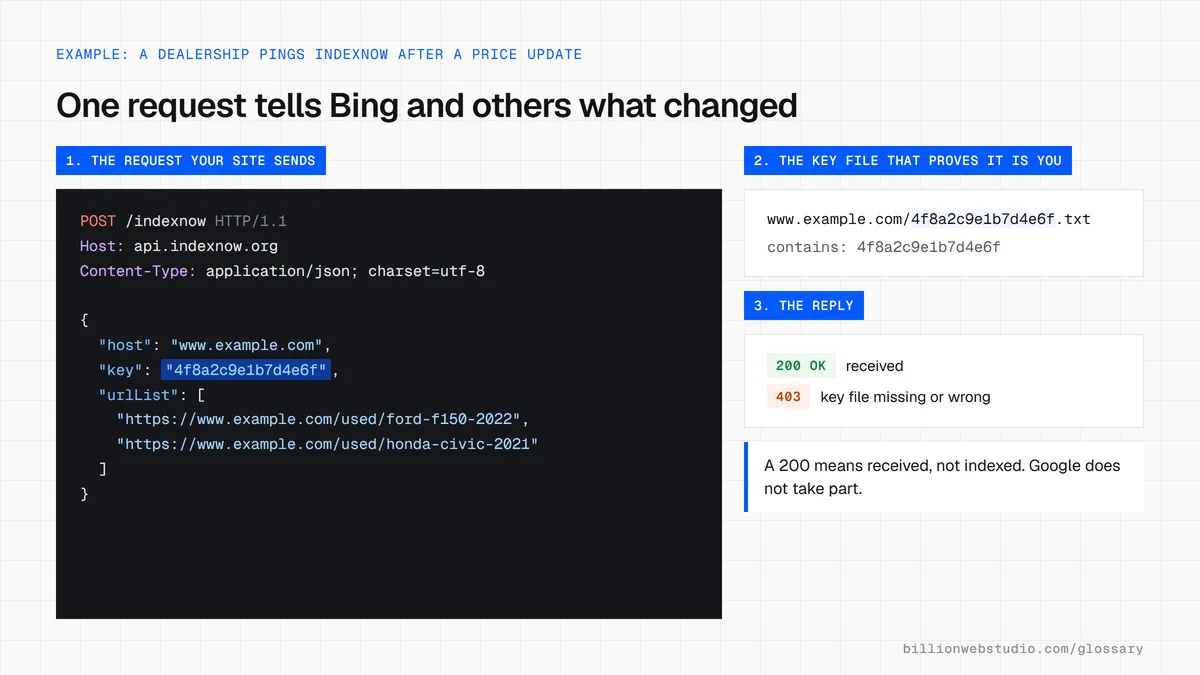
A car dealership updates prices on 300 used vehicles every morning. As soon as the update runs, its website sends all 300 changed URLs to IndexNow in one request. Bing and the other participating engines learn about the changes right away instead of waiting for their next scheduled crawl, so searchers on those engines are more likely to see current prices.
Common IndexNow mistakes
- Expecting IndexNow to speed up Google, which is not listed as a participating search engine.
- Submitting URLs that have not actually changed, which adds noise to the signal.
- Deleting or moving the key file, which stops engines from verifying your submissions.
- Treating a submission as a guarantee of indexing, when each search engine still decides.
- Running two plugins that both submit the same URLs every time a page is saved.
IndexNow response codes and what each one means
| Code | Meaning | What to do |
|---|---|---|
| 200 OK | The URL was submitted successfully | Nothing. Each engine still decides whether to index it |
| 202 Accepted | The URL was received and key validation is pending | Check that the key file loads |
| 400 Bad Request | The request format is invalid | Check the JSON fields and URL encoding |
| 403 Forbidden | The key is not valid: the file was not found or the key is not in it | Fix the key file at your site root |
| 422 Unprocessable Entity | The URLs do not belong to the host, or the key does not match the protocol schema | Submit only URLs on the host named in the request |
| 429 Too Many Requests | Too many submissions, which may be treated as spam | Send only changed URLs, batched into fewer requests |
Copy this IndexNow request
POST /indexnow HTTP/1.1
Host: api.indexnow.org
Content-Type: application/json; charset=utf-8

{
  "host": "www.example.com",
  "key": "4f8a2c9e1b7d4e6f",
  "keyLocation": "https://www.example.com/4f8a2c9e1b7d4e6f.txt",
  "urlList": [
    "https://www.example.com/used/ford-f150-2022",
    "https://www.example.com/used/honda-civic-2021"
  ]
}
How to check that IndexNow is working on your site
- Find your key in your CMS plugin, CDN or hosting settings. It is also the name of a .txt file at your site root.
- Open your domain followed by /your-key.txt in a browser, for example www.example.com/4f8a2c9e1b7d4e6f.txt, and confirm it loads and contains only the key.
- Sign in to Bing Webmaster Tools and open the IndexNow page to see your recently submitted URLs, their index status and where each submission came from.
- Edit and save a page, then refresh the IndexNow page and check that the URL appears among the latest submissions.
- If submissions fail, read the response code your plugin logs. A 403 means the key file was not found or does not contain the key.
What good looks like: The key file loads with a 200 status and contains only the key, each real edit produces one submission, and Bing's IndexNow report shows submitted URLs being crawled without errors.
Free tool: Bing Webmaster Tools: IndexNow
Questions to ask your web developer
“Does our site send IndexNow pings automatically, and from where?”
A good answer: One named source, such as the CMS plugin, the CDN or a deploy script, pings on publish, update and delete. If two systems send the same URLs, one is switched off.
“What will help Google find our changes, since Google does not use IndexNow?”
A good answer: An XML sitemap with accurate lastmod dates, internal links to every new page and URL Inspection requests in Search Console for the most important updates.
IndexNow: common questions
Does Google support IndexNow?
Google is not listed among the participating search engines on indexnow.org. To help Google find new or changed pages, use an up-to-date XML sitemap, strong internal links and the URL Inspection tool in Google Search Console. IndexNow is still worth using for Bing and the other engines that support it.
Is IndexNow free?
Yes. IndexNow is a free, open-source protocol with no account or fee. You generate a key, host the key file on your site and send requests to an endpoint. Many content management systems and plugins handle the setup and send notifications automatically whenever you publish or update a page.
Does IndexNow guarantee my page will be indexed?
No. The IndexNow FAQ states that submitting a URL does not guarantee immediate indexing. A submission only tells search engines that a URL has changed. Each engine still decides whether and when to crawl and index the page, based on its own crawl scheduling and quality signals.
Sources
Want a website that gets this right?
Every Billion Web Studio build includes technical SEO, schema and speed work as standard, with a fixed quote within 1 business day.