SEO
What Is a Meta Title?
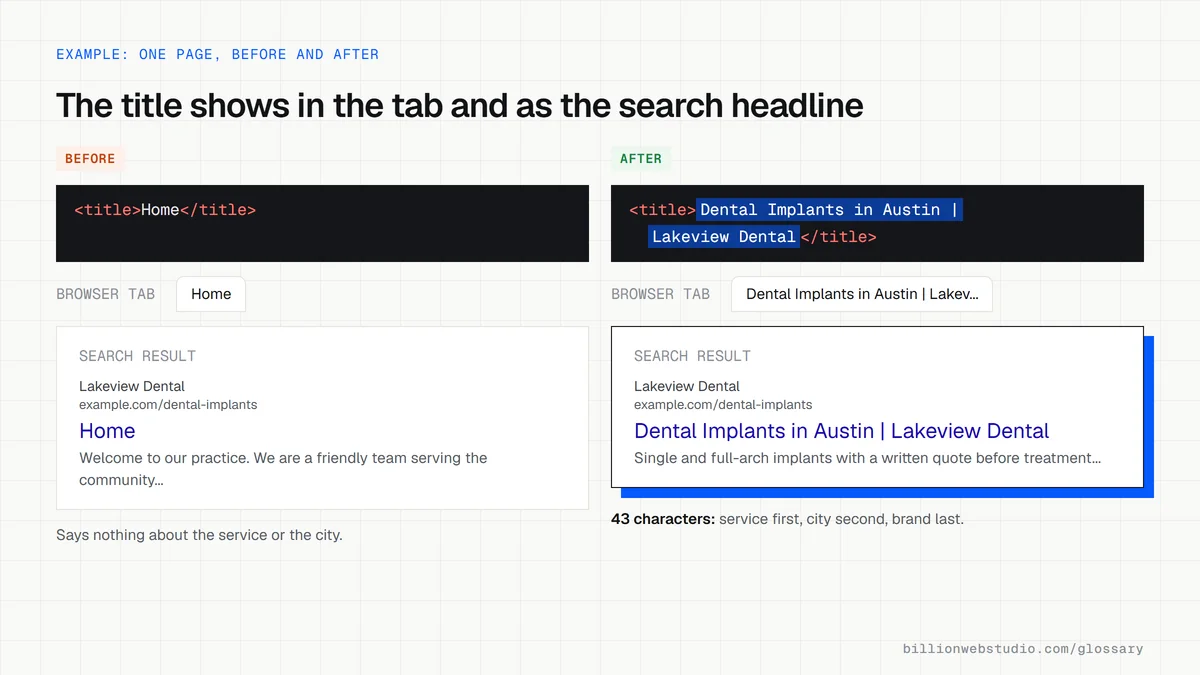
A meta title, also called a title tag, is the HTML title element that names a web page. It appears in the browser tab and is the main source Google uses for the page's clickable headline in search results.
What a meta title means in plain English
Every page has one title element inside the head section of its HTML, for example <title>Emergency Plumber in Dallas | Smith Plumbing</title>. Visitors rarely see it on the page itself. They see it on the browser tab and, most importantly, as the headline of your listing in search results, which Google calls a title link.
Despite the name, the meta title is not a meta tag. SEO plugins and website builders call it that because it sits in the same settings box as the meta description. Google builds the title link automatically, mostly from the title element, but it can also draw on the main heading, other prominent text and links pointing to the page.
Why a meta title matters for a business website
The title is often the first thing a searcher reads about your business, and it decides whether they click your result or the next one. It also tells Google what the page is about. A page titled Home or Services gives neither people nor search engines a reason to choose it, while a clear title naming the service and the place wins clicks from people ready to call.
An example of a meta title
A law firm's personal injury page is titled Page 2 | Johnson Law, a leftover from the website template. The firm changes it to Personal Injury Lawyer in Tampa | Johnson Law. The new title names the service, the city and the brand, reads naturally, and puts the most important words first so they survive if Google shortens the headline on a phone.
How to write a good meta title
- Give every page its own title, because near-identical titles across many pages are one reason Google rewrites them.
- Put the main topic or service first and the brand name last, separated by a simple divider.
- Aim for roughly 50 to 60 characters, since Google sets no limit but cuts title links to fit the device width.
- Keep the title accurate to the page, including any year or date, so it matches what visitors see.
- Avoid stuffing in a list of keywords, which Google's title link guidance warns against.
Copy these title patterns
<!-- Homepage: brand plus what you do and where -->
<title>Northside Plumbing: Licensed Plumbers in Mesa, AZ</title>

<!-- Service page: service, place, brand -->
<title>Water Heater Repair in Mesa, AZ | Northside Plumbing</title>

<!-- Location page -->
<title>Plumber in Tempe, AZ: Same Day Visits | Northside Plumbing</title>

<!-- Blog post: the question, then the brand -->
<title>How Long Does a Water Heater Last? | Northside Plumbing</title>
How to check the meta title on every key page
- Open the page in Chrome and hover over its browser tab: the text that appears is the title element.
- Right-click the page, choose View page source, press Ctrl+F (Cmd+F on a Mac) and search for <title to confirm there is exactly one.
- Search Google for site:yourdomain.com followed by the page topic, and compare the headline Google shows with your title. A different headline means Google rewrote it.
- Repeat for your homepage and your five most visited service or product pages, and list them side by side to spot titles that repeat or still say Home, Page 2 or the template name.
What good looks like: Each page has one title that names its topic and your brand, roughly 50 to 60 characters with the key words first, and no two pages share the same title.
Free tool: Google title link guidelines
Questions to ask your web developer
“Can we edit the title of each page ourselves, separately from the on-page heading?”
A good answer: Yes, every page and post has its own title field in the CMS, and when it is left empty the template falls back to the page name plus the brand, never to Home or Untitled.
“How are titles written for pages created from a template, such as products or locations?”
A good answer: A pattern fills in unique details for each page, such as product name and size or service and city, and a crawl report after launch lists any duplicate or empty titles to fix.
Meta title (title tag): common questions
Is a meta title the same as an H1?
No. The meta title lives in the page's HTML head and shows in browser tabs and search results, while the H1 is the main heading visitors see on the page. They can match or differ slightly, but both should describe the same topic. Google may use the H1 when the title is poor.
How long should a meta title be?
Google sets no character limit for the title element, but it truncates title links to fit the screen. MDN notes that search engines typically display about the first 55 to 60 characters. Writing 50 to 60 characters with the key words first keeps the important part visible.
Why does Google show a different title from mine?
Google generates title links automatically and may replace a title that is half empty, outdated, inaccurate, stuffed with keywords or repeated across many pages. It then draws on the page's main heading or other prominent text. A clear, accurate and unique title on each page is the best way to keep yours.
Sources
Want a website that gets this right?
Every Billion Web Studio build includes technical SEO, schema and speed work as standard, with a fixed quote within 1 business day.