SEO
What Is SEO?
SEO stands for Search Engine Optimization.
SEO (search engine optimization) is the work of making a website easy for search engines to find, understand and rank, so the right people reach it through unpaid results on Google, Bing and AI assistants.
What SEO means in plain English
Google's own starter guide describes SEO as helping search engines understand your content and helping people find your site. In practice the work splits into three parts: technical SEO, which makes pages crawlable and indexable; on-page SEO, which makes each page answer a specific search; and off-page SEO, which builds the links, reviews and mentions that show other people vouch for you.
Google Search runs in three stages: crawling, where bots fetch pages; indexing, where Google stores and analyzes them; and serving, where it picks results for each query. Money cannot buy a better organic position, because Google says it takes no payment to crawl sites more often or to rank them higher. Organic rankings are earned by the site itself, which is the key difference between SEO and paid search ads.
Why SEO matters for a business website
People who search for a service are already looking for a supplier, so a page that ranks for those searches brings in buyers rather than browsers. Paid ads stop the moment the budget runs out, while a well ranked page can keep producing calls and form fills for years. The same groundwork also feeds AI answers: Google says pages need no special extra steps beyond normal SEO to appear as links in AI Overviews or AI Mode.
An example of SEO in practice
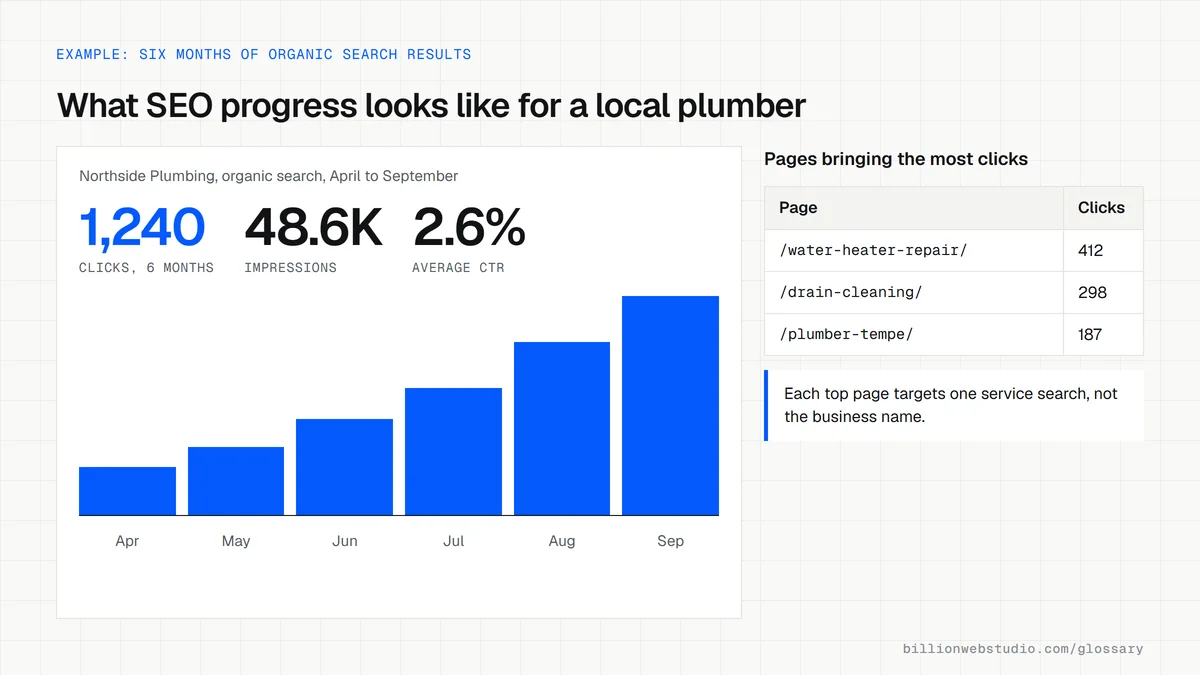
A plumbing company has one Services page that lists twelve jobs in a single paragraph. Searchers typing water heater replacement plus their city land on competitors instead. The fix is a separate page for each main service, a clear title naming the service and area, real photos with descriptive alt text, prices or price ranges, and links between related pages. Each page now matches one search and has a reason to rank.
Common SEO mistakes
- Judging results after a week, when Google says some changes take effect in hours and others take several months.
- Buying links or joining link swaps, which Google's spam policies treat as link spam.
- Launching a redesign that changes URLs without redirecting the old ones, which throws away rankings the old pages had built.
- Writing pages around a keyword list instead of the questions buyers actually ask before they hire someone.
- Leaving a noindex tag or a blocking robots.txt rule in place after a new site goes live.
SEO vs paid search ads: how they differ
| SEO (organic results) | Paid search ads | |
|---|---|---|
| How you pay | Time and work on the site, not per click | Per click, priced through an ad auction |
| How fast it starts | Hours to several months per change, by Google's own guide | As soon as ads are approved and running |
| When spending stops | Pages keep ranking until competitors or changes overtake them | Ads stop showing at once |
| Can position be bought? | No, Google takes no payment for organic ranking | Yes, within the ad slots |
| How results are labeled | No label | Marked as sponsored |
How to check your SEO health in Search Console in 15 minutes
- In Google Search Console, open Performance, then Search results, set the date range to the last 12 months and look at the trend of Total clicks and Total impressions.
- Open the Queries tab. If the top queries are only your business name, people find you when they already know you, not when they search for your service.
- Open Indexing, then Pages, and compare the indexed count with the number of pages you have published. Read the reasons in the Why pages aren't indexed table.
- Open the Manual actions report. A green check mark means Google has not penalized the site.
- Open the Core Web Vitals report and check for URLs marked Poor on mobile and desktop.
What good looks like: Impressions and clicks trending up over the year, service searches among the top queries, every key page indexed, a green check under Manual actions and no Poor URLs in Core Web Vitals.
Free tool: Google Search Console
Questions to ask your web developer
“What will you report each month, and from which tools?”
A good answer: Search Console clicks and impressions by page group, top non-brand queries, indexed page count and leads from organic search tracked as GA4 key events, with direct access to the raw accounts.
“What results do you expect, by when, and what can you not promise?”
A good answer: A plan with dated milestones for the work itself, an honest range of months for results, and a plain statement that no one can guarantee a number one ranking on Google.
“Do you follow Google Search Essentials, and can we see past results?”
A good answer: Yes, and they share examples with Search Console graphs from past clients, explain what they changed, and do not buy links or promise shortcuts.
SEO: common questions
How long does SEO take to work?
Google's starter guide says some changes show up within hours while others take several months, and it suggests waiting a few weeks before judging whether a change helped. New sites and competitive local markets usually take longer, because rankings depend on how quickly Google recrawls pages and how strong competing pages are.
Can you pay Google to rank higher in search results?
No. Google states that it does not accept payment to crawl a site more frequently or to rank it higher, and that ranking is done programmatically. Paying Google buys ads, which appear in labeled sponsored slots and disappear when spending stops. Organic positions have to be earned through the site itself.
Is SEO still worth doing now that AI answers appear in search?
Yes. Google says there are no extra requirements to appear in AI Overviews or AI Mode beyond being indexed and eligible for a normal snippet. A page that is crawlable, clearly written and trusted is the same page AI features cite, so classic SEO work now earns visibility in both places.
Sources
- Google Search Central: SEO Starter Guide
- Google Search Central: In-depth guide to how Google Search works
- Google Search Central: AI features and your website
- Google Search Central: Spam policies for Google web search
- Google Search Central: Do you need an SEO?
- Search Console Help: Manual actions report
- Search Console Help: Core Web Vitals report
Want a website that gets this right?
Every Billion Web Studio build includes technical SEO, schema and speed work as standard, with a fixed quote within 1 business day.