SEO
What Is Local SEO?
Local SEO is the practice of improving how a business appears in location-based searches, such as plumber near me or dentist in Austin, across Google Maps, the local map results and the regular search results below them.
What local SEO means in plain English
Local SEO has two halves. The first is your Google Business Profile, the listing that powers the map results. The second is your website: pages for each service and area you cover, with consistent business details. Google says local results are ranked mainly on relevance, how well a listing matches the search; distance, how far the business is from the searcher; and prominence, how well known it is.
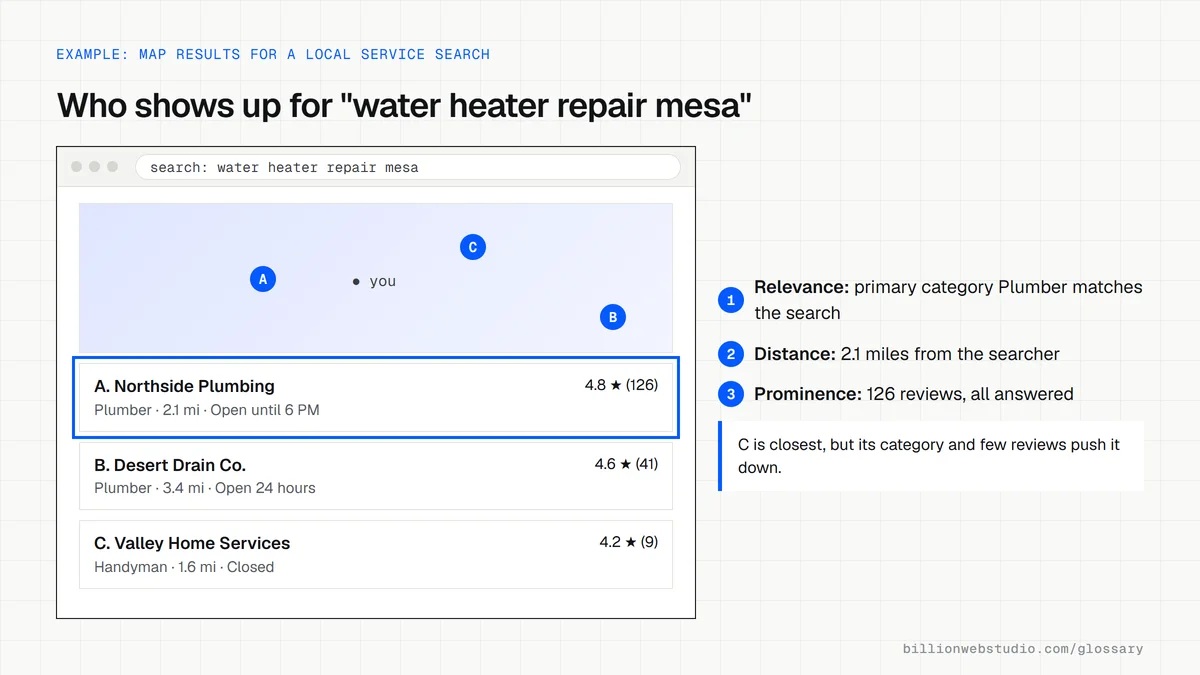
Why local SEO matters for a business website
Someone searching emergency electrician near me usually wants to call within minutes, so the businesses shown in the map results receive a large share of those calls. Google states that there is no way to request or pay for a better local ranking, so the position has to be earned through an accurate profile, real reviews and a website that clearly covers the service and the area.
An example of local SEO
An HVAC company serving three suburbs verifies its Business Profile, picks heating contractor as its primary category, sets a service area instead of showing a home address, and replies to every review. On its website it builds one page per suburb with real local detail: jobs completed there, typical housing types and travel times. The name, phone number and address match everywhere.
Common local SEO mistakes
- Creating dozens of near-identical city pages that only swap the town name, which Google's spam policies describe as doorway abuse.
- Adding keywords or locations to the business name on the profile, which Google's guidelines do not allow.
- Showing different phone numbers or addresses on the website, profile and directories.
- Leaving holiday and special hours out of date, so customers arrive to a closed door.
- Never answering reviews, even though Google lists responding to reviews as a way to improve prominence.
What Google weighs in local results and what you control
| Factor | What Google looks at | What you can do this month |
|---|---|---|
| Relevance | How well your profile and website match the search | Pick the primary category that names your main service and list every service you offer |
| Distance | How far the business is from the searcher or the place they typed | Set an accurate address or service area; distance itself cannot be changed |
| Prominence | How well known the business is, including links, articles, directories, reviews and web ranking | Ask every happy customer for a review, reply to reviews and earn local links and mentions |
| Complete information | Whether hours, phone, website, photos and services are filled in and accurate | Fill every field, add real photos and update holiday hours before each holiday |
How to check your local SEO from your Business Profile
- On your phone, with location turned on, search for your main service plus "near me" from an area you serve, and note whether your business appears in the map results.
- On a computer, sign in to the Google Account that manages your Business Profile and search Google for your exact business name. Your profile appears with owner tools above it.
- Click Performance, choose the last six months and click Apply. Read Views, Calls, Website clicks and Directions, then open the Searches list to see the terms that showed your profile.
- Click the website link on your profile and check that it opens the page for your main service and area, not a generic homepage or a broken link.
- In Google Search Console, open Performance, click + Add filter, choose Queries and enter your city name to see which local searches already bring the website impressions.
What good looks like: The profile is verified, its Searches list includes service terms and not only your business name, and calls and website clicks hold steady or grow month to month.
Free tool: Business Profile performance help
Questions to ask your web developer
“Which page on the website will the Business Profile link to, and how will we see visits from it?”
A good answer: The profile links to the page that matches the primary category, such as the main service page, with UTM tags on the link so profile visits show up as their own source in GA4.
“How will you decide which towns get their own page?”
A good answer: Only towns where the business really works and can show local detail, such as completed jobs, photos or local rules, get a page. Each page is written separately, and towns without real detail are listed on the service area page instead.
“What will you report each month for local search?”
A good answer: Business Profile calls, website clicks and direction requests from the Performance view, review count and rating, and Search Console clicks for local queries, all compared with the same month last year.
Local SEO: common questions
What is the difference between local SEO and regular SEO?
Regular SEO aims to rank pages for searches regardless of where the searcher is, such as how to fix a leaking tap. Local SEO targets searches with local intent, where Google shows a map and nearby businesses. It adds work on the Google Business Profile, reviews and area pages on top of normal SEO.
Do I need a physical office for local SEO?
No. Businesses that visit customers, such as plumbers or cleaners, can set a service area on their Google Business Profile, and Google's guidelines say service-area businesses should hide a home address. Online-only businesses with no in-person contact, however, are not eligible for a Business Profile.
How do I rank higher in the Google map results?
Google lists the steps itself: verify your profile, complete every detail, choose accurate categories, keep hours current, add photos, and collect and respond to reviews. Distance to the searcher cannot be changed, so a strong website and steady reviews matter most for the relevance and prominence you can control.
Sources
- Google Business Profile Help: Tips to improve your local ranking on Google
- Google Business Profile Help: Guidelines for representing your business on Google
- Google Business Profile Help: About Business Profile
- Google Search Central: Spam policies for Google web search
- Business Profile Help: Understand your Business Profile performance
- Search Console Help: Performance report filtering
Want a website that gets this right?
Every Billion Web Studio build includes technical SEO, schema and speed work as standard, with a fixed quote within 1 business day.