SEO
What Is Mobile-First Indexing?
Mobile-first indexing is Google's practice of crawling, indexing and ranking web pages using the mobile version of their content, fetched by its smartphone crawler, rather than the desktop version, for all search results.
What mobile-first indexing means in plain English
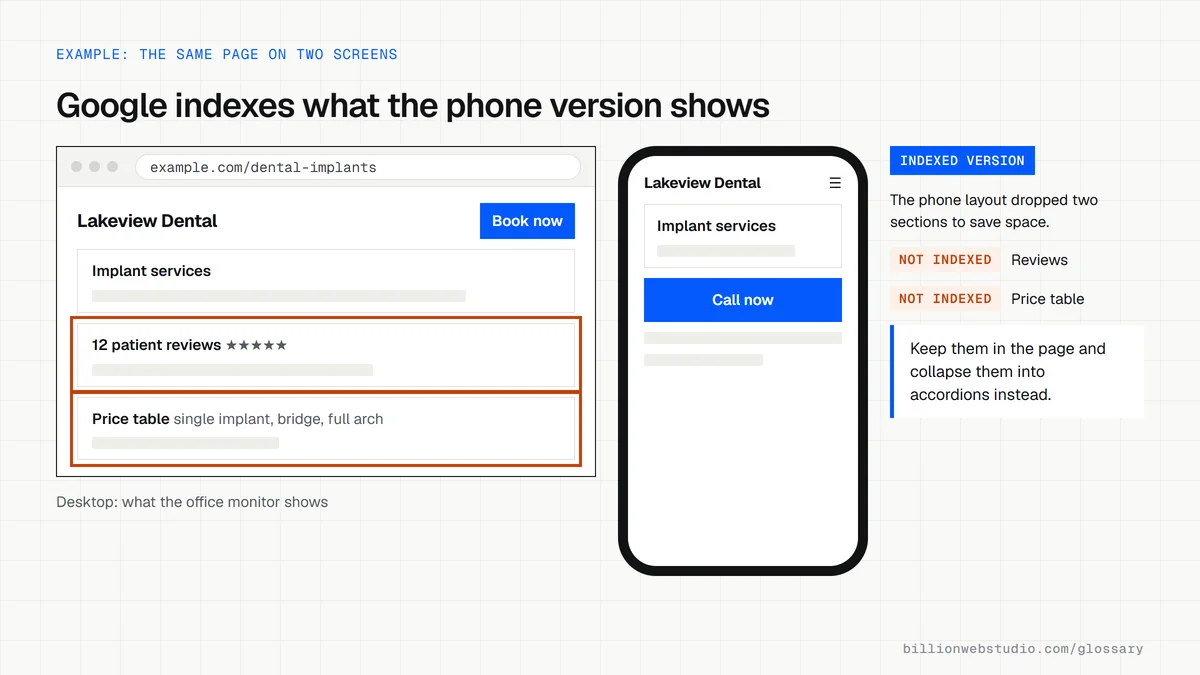
Google keeps one search index. Under mobile-first indexing, the copy of your page that goes into that index is the one Googlebot Smartphone sees. If text, images, links or structured data appear on your desktop site but not on your mobile site, Google treats them as if they do not exist, even when someone searches from a desktop computer.
Responsive websites, which serve the same HTML at the same URL to every device, usually pass without extra effort. Problems tend to appear on sites that serve different code to phones or run a separate m. subdomain, because the mobile version is often a trimmed-down copy.
Mobile-first indexing timeline
- Google first announced its move toward mobile-first indexing in November 2016.
- On October 31, 2023, Google said the switch to mobile-first indexing was complete.
- In June 2024, Google said that after July 5, 2024 it would crawl the remaining desktop-crawled sites only with Googlebot Smartphone.
- The same post said sites whose content is not accessible at all on a mobile device would no longer be indexable.
Why mobile-first indexing matters for a business website
Your rankings depend on what your phone site shows, not what you see on your office monitor. Trimming service details, reviews or FAQs from the mobile layout to save space can quietly remove them from Google's view. Google's guidance is to keep primary content, headings, structured data, image alt text and robots meta tags equivalent on both versions.
An example of mobile-first indexing
A law firm's desktop practice area pages list each attorney's credentials and a page of client reviews, but its older separate mobile site shows only a short summary and a call button. Under mobile-first indexing, Google indexes the short version, so searches for specific case types stop finding the firm. Rebuilding as one responsive site restores the full content on every device.
How to check your site for mobile-first indexing
- Open URL Inspection in Search Console and confirm the page was crawled by Googlebot Smartphone.
- Compare the mobile and desktop versions of key pages and make sure no text, images or links are missing on mobile.
- Place extra content in tabs or accordions on mobile rather than deleting it.
- Avoid content that loads only after a tap, swipe or typing, because Googlebot does not interact with the page.
- Check that titles, meta descriptions and structured data match across both versions.
Responsive, dynamic serving or separate mobile site: what each means for indexing
| Setup | URL and HTML | Extra work Google asks for | Mobile-first risk |
|---|---|---|---|
| Responsive design | Same URL and same HTML for every device | None beyond normal good practice | Low, because both versions are the same code |
| Dynamic serving | Same URL, different HTML by device | Send a Vary: User-Agent header and keep content, robots meta tags and structured data the same | Medium, as the phone HTML can drift from the desktop HTML |
| Separate mobile URLs | Different URL, such as m.example.com | Point canonical tags to the desktop URL, match hreflang by version and keep content equal | High, since the m. site is often a trimmed copy |
How to see your page the way Google's smartphone crawler does
- In Google Search Console, paste a key page into the URL Inspection bar at the top and press Enter.
- Expand Page indexing and read the Crawled as line, which should say Googlebot smartphone.
- Click Test live URL, then View tested page, and open the Screenshot tab to see what the smartphone crawler rendered.
- Open the HTML tab in the same panel, press Ctrl+F and search for a sentence from a section you care about, such as your reviews or pricing. If it is missing, Google cannot index it.
- In Chrome on a computer, press F12 to open DevTools, click Toggle device toolbar, pick a phone from the Dimensions list and scroll the page to compare it with the desktop view.
What good looks like: The live test shows every heading, block of text, image and link that the desktop page has, even if some sit inside tabs or accordions, and the HTML tab contains your structured data.
Free tool: URL Inspection tool help
Questions to ask your web developer
“Does the mobile layout remove any content that the desktop layout shows?”
A good answer: No. The site is responsive, so one set of HTML serves every device, and anything collapsed on phones is still in the page code inside tabs or accordions.
“How do you confirm Google's smartphone crawler sees the full page before launch?”
A good answer: They run the URL Inspection live test or the Rich Results Test on staging or right after launch, check the rendered HTML for key sections and structured data, and fix anything that only loads after a tap.
Mobile-first indexing: common questions
Does mobile-first indexing mean desktop rankings no longer matter?
No. There is still one index, and desktop searchers still see results from it. Mobile-first indexing only changes which version of your page Google reads to build that index. Your desktop site still serves desktop visitors, but its content counts in search only if the mobile version contains it too.
Do I need a separate mobile website?
No. Google says a mobile version is not required to appear in search but is very strongly recommended, and it calls responsive design the easiest pattern to build and maintain. One responsive site shows the same content to every device at one URL, which avoids most mobile-first indexing problems.
Is mobile-first indexing the same as being mobile-friendly?
No. Mobile-friendliness is about how easy a page is to use on a phone, such as readable text and buttons that are easy to tap. Mobile-first indexing is about which version of your content Google stores. A site can be pleasant on phones yet still lose rankings if its mobile pages carry less content.
Sources
- Google Search Central: Mobile site and mobile-first indexing best practices
- Google Search Central Blog: Mobile-first indexing (November 2016)
- Google Search Central Blog: Mobile-first indexing has landed (October 31, 2023)
- Google Search Central Blog: Mobile indexing vLast final final (June 3, 2024)
- Search Console Help: URL Inspection tool
- Chrome DevTools: Simulate mobile devices with device mode
Want a website that gets this right?
Every Billion Web Studio build includes technical SEO, schema and speed work as standard, with a fixed quote within 1 business day.