SEO
What Is a Noindex Tag?
A noindex tag is an instruction, usually a robots meta tag in a page's HTML head, that tells search engines such as Google not to include that page in their search results, even though people can still visit it.
What a noindex tag means in plain English
The most common form is a single line in the page's head: <meta name="robots" content="noindex">. Swapping robots for googlebot limits the rule to Google. For PDFs, images and other files without an HTML head, the server can send the same instruction as an HTTP header, X-Robots-Tag: noindex. Visitors see no difference, and the page keeps working for anyone with the link.
Noindex does not act instantly. Google has to crawl the page again to see the rule, and Google notes that for less important pages this can take months. When a page needs to leave search quickly, the URL Inspection tool in Search Console can request a recrawl, and the Removals tool can hide the URL while the noindex takes effect.
Why a noindex tag matters for a business website
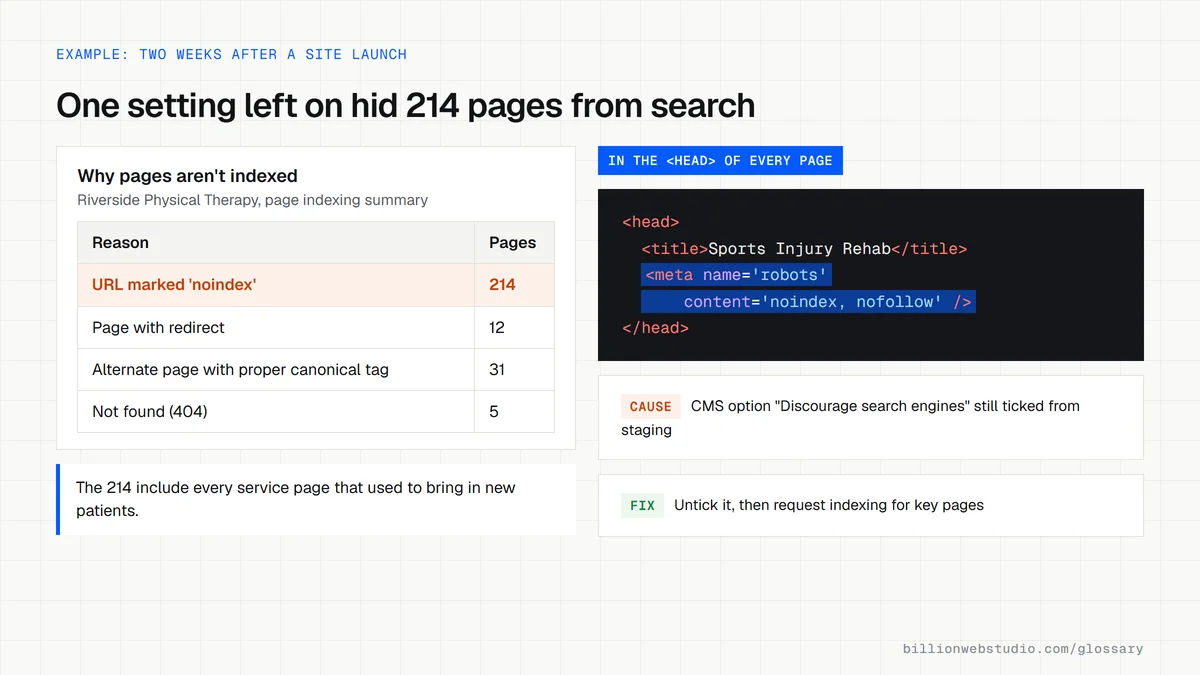
Some pages should never be a visitor's first impression from Google: thank you pages after a form, internal search results, login screens, staging copies and thin tag archives. Noindex keeps them out of results without deleting them. The danger runs the other way too. One setting left switched on after launch can quietly remove the pages that bring in leads, while nothing on the site itself looks broken.
A noindex tag example
A dental practice builds its new website on a staging server with the CMS option that discourages search engines turned on, which adds noindex to every page. The site goes live with that option still set. Two weeks later, the Page indexing report in Search Console shows hundreds of URLs under URL marked noindex, and new patient calls have slowed. Switching the setting off and requesting recrawls of key pages brings them back.
Common noindex tag mistakes
- Pairing noindex with a robots.txt block, which hides the rule from Google so the URL can still surface in results.
- Writing noindex inside robots.txt itself, a rule Google does not support.
- Leaving a staging site's sitewide noindex in place after the site goes live.
- Using noindex to choose between duplicate pages, when a canonical tag keeps their signals together instead.
- Listing noindexed URLs in the XML sitemap, which asks Google to index pages you have told it to skip.
Noindex, robots.txt, canonical or password: which one to use
| Situation | Use | Why |
|---|---|---|
| Thank you page after a form | Noindex meta tag | Page must work for visitors but never appear in search |
| Staging or test copy of the site | Password protection | Keeps out people and every crawler, not only those that obey rules |
| Same product reachable at several URLs | Canonical tag | Merges signals into one URL instead of dropping the copies |
| PDF price list you want out of search | X-Robots-Tag: noindex header | Files have no HTML head for a meta tag |
| Endless filter or internal search URLs | Robots.txt Disallow | Saves crawl time on pages with no value |
| Page removed for good | 404 or 410, or a 301 to the closest page | Tells Google the page is gone or has moved |
Copy this rule to noindex every PDF on an Apache server
# .htaccess in the site root (needs mod_headers enabled)
# Keeps all PDF files out of search results; visitors can still open them
<Files ~ "\.pdf$">
  Header set X-Robots-Tag "noindex"
</Files>
How to find every noindexed page on your site
- In Google Search Console, open Indexing, then Pages, and scroll to the Why pages aren't indexed table.
- Click the URL marked 'noindex' row and read the example URLs. Anything that should bring in visitors, such as a service page, is a problem to fix.
- For a PDF or other file, open it in Chrome, press F12, choose the Network tab, reload, click the file in the list and look for x-robots-tag under Response Headers.
- On WordPress, go to Settings, then Reading, and make sure Discourage search engines from indexing this site is not ticked on the live site.
- After fixing a page, paste it into URL Inspection and click Request indexing so Google rereads it sooner.
What good looks like: Only pages you chose to hide, such as thank you pages, internal search and login screens, appear under URL marked 'noindex', and every lead-generating page shows Indexing allowed: Yes in URL Inspection.
Free tool: Page indexing report help
Questions to ask your web developer
“How do you make sure the staging site's noindex never reaches the live site?”
A good answer: The noindex comes from an environment setting that is on for staging and off for production, the launch checklist includes checking it, and a crawl on launch day confirms no live page carries noindex.
“Which page types will you noindex, and how will we know?”
A good answer: A written list, typically thank you pages, internal search results, cart and account pages, with the method for each, and those URLs left out of the XML sitemap.
Noindex tag: common questions
What is the difference between noindex and robots.txt?
Robots.txt controls crawling: it asks bots not to request certain URLs. Noindex controls indexing: Google crawls the page, reads the rule and leaves the page out of results. The two do not combine well, because a URL blocked in robots.txt cannot be crawled, so its noindex tag is never seen.
What is the difference between noindex and nofollow?
Noindex tells search engines not to show the page itself in results. Nofollow, written as content="nofollow" or combined as content="noindex, nofollow", asks them not to follow the links on that page. Most pages you hide, such as thank you pages, only need noindex, so the links on them can still be discovered.
How do I check if a page has a noindex tag?
Open the page, view its source and search for noindex in the head section. For a fuller answer, paste the URL into the URL Inspection tool in Google Search Console, which reports whether indexing is allowed. The Page indexing report lists every URL Google found marked noindex across the site.
Sources
Want a website that gets this right?
Every Billion Web Studio build includes technical SEO, schema and speed work as standard, with a fixed quote within 1 business day.