SEO
What Is Internal Linking?
Internal linking is the practice of linking from one page on a website to another page on the same website. Internal links help visitors find related information and help search engines discover pages and understand which ones matter most.
What internal linking means in plain English
Every menu item, footer link, button and in-text link that points to another page on your own domain is an internal link. A link to another company's website is an external link. Together, your internal links form a map of the site: they show how pages relate and which pages sit at the center, such as your main services.
Search engines follow these links to find pages. Google's SEO Starter Guide notes that the vast majority of new pages Google finds every day are discovered through links, and its link guidance says every page you care about should have a link from at least one other page on your site.
Why internal linking matters for a business website
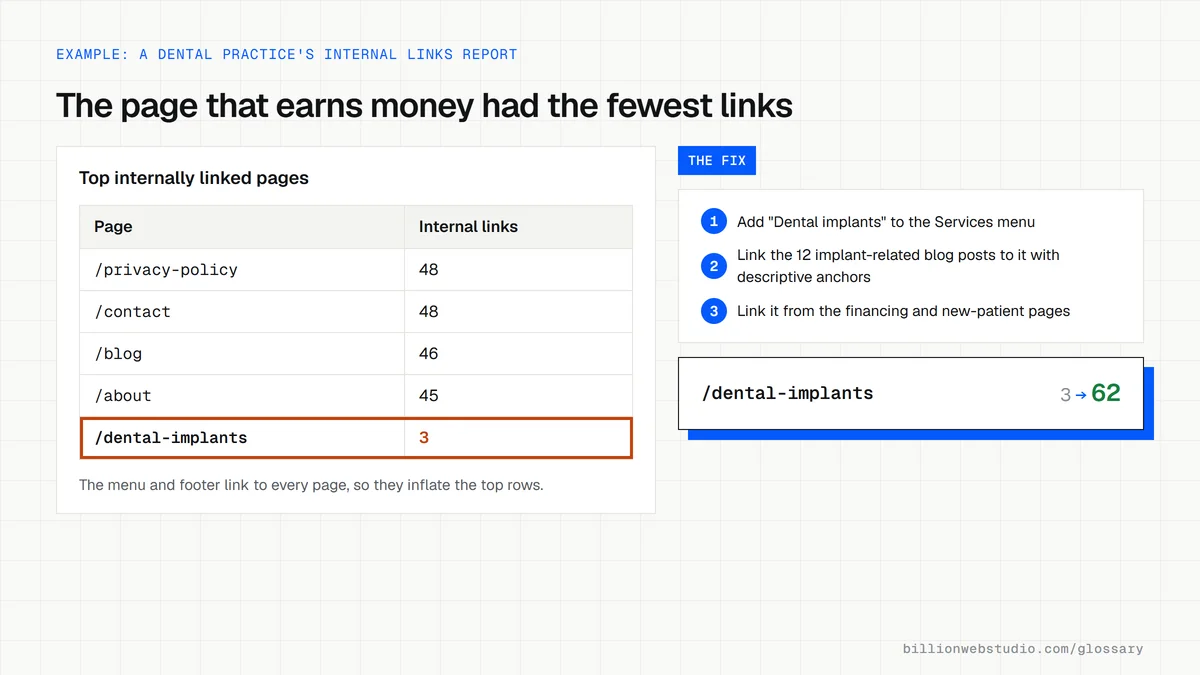
Internal links decide whether people reach the pages that make money. A blog post that answers a question and then links to the matching service page turns a reader into a lead. Pages with many relevant internal links also signal importance to Google, while pages buried deep in the site or not linked at all may be crawled rarely or never.
An internal linking example
A dental practice publishes a post titled "How much do dental implants cost". Without internal links, readers finish the article and leave. With them, the post links to the implants service page using the anchor "dental implant treatment", to the financing page and to the booking form. The implants page links back to the cost guide, so each page supports the other.
How to check internal linking on your site
- List your five most important pages and confirm each is linked from the main menu or homepage.
- Make sure every blog post links to at least one relevant service or product page.
- Use descriptive anchor text rather than generic words like "click here".
- Open the Links report in Google Search Console to see which pages receive the most internal links and which receive almost none.
- Update links that point to redirected or deleted URLs so visitors and crawlers reach the final page directly.
Which pages should link where on a service business site
| Page | Should link to | Example anchor |
|---|---|---|
| Homepage | Each main service page and the contact page | emergency plumbing repairs |
| Service page | Related services, pricing or financing, booking and its best supporting guides | water heater replacement costs |
| Blog post | The matching service page and one or two related posts | our drain cleaning service |
| Location page | Services offered in that area and local projects | bathroom remodels in Aurora |
| Case study | The service used and the quote or contact page | get a quote for a similar remodel |
How to check internal linking on your site in Search Console
- In Google Search Console, click Links in the left menu.
- Under Internal links, click More below Top linked pages to see your pages ranked by how many internal links each receives.
- Find your main service or product pages. If they sit far below pages linked from every menu and footer, they need more links from related content.
- Click a page to see which of your pages link to it, and check those links come from related posts and services, not only the footer.
- Compare the list with your XML sitemap. An important page missing from the report may have no internal links at all.
What good looks like: Every money page gets links from the menu or homepage plus several related posts or service pages with descriptive anchors, and no page you want ranked is missing from the internal links list.
Free tool: Google Search Console Links report
Questions to ask your web developer
“How will new blog posts link to our service pages?”
A good answer: Each post links to at least one relevant service or product page in the body text with a descriptive anchor, and the service page links back to its best supporting guides.
“How will you find pages that nothing links to?”
A good answer: A site crawl compared against the XML sitemap and analytics landing pages, listing every page with no internal links, each then linked or retired.
“What happens to internal links when URLs change?”
A good answer: Links are updated to the new URLs directly instead of relying on redirects, and a crawl after launch confirms no internal link hits a redirect or a 404.
Internal linking: common questions
What is the difference between internal and external links?
An internal link points to another page on the same website, such as a blog post linking to your pricing page. An external link points to a different domain, such as a supplier or a government source. Both help readers, but only internal links let you control how visitors move through your own site.
How many internal links should a page have?
There is no fixed number. Google's guidance gives no ideal count and suggests that if a page seems to have too many links, it probably does. Add a link wherever it genuinely helps the reader take the next step, and avoid long lists of links that nobody would click.
Do internal links help SEO?
Yes. Internal links help Google discover pages, understand what each one is about through the anchor text, and see which pages you treat as most important. They also guide visitors toward service pages and contact forms, which is where rankings turn into leads.
Sources
Want a website that gets this right?
Every Billion Web Studio build includes technical SEO, schema and speed work as standard, with a fixed quote within 1 business day.