Conversion and analytics
What Is Referral Traffic?
Referral traffic is visits that reach your website when someone clicks a link on another website, such as a directory, news article, partner site or supplier page, other than search engines and social networks, which analytics tools report separately.
What referral traffic means in plain English
When someone clicks a link to your site, the browser usually tells your site which page they came from. Google Analytics 4 reads that and sorts the visit into a channel. Clicks from known search engines go to organic search and clicks from known social sites go to organic social. Most other website links are labeled referral, with the linking domain shown as the source.
In the GA4 default channel group, a visit counts as Referral when its medium is referral, app or link. You can see each referring site in the Traffic acquisition report by switching the main dimension to session source, which lists domains such as a trade association, a review site or a local newspaper.
Why referral traffic matters for a business website
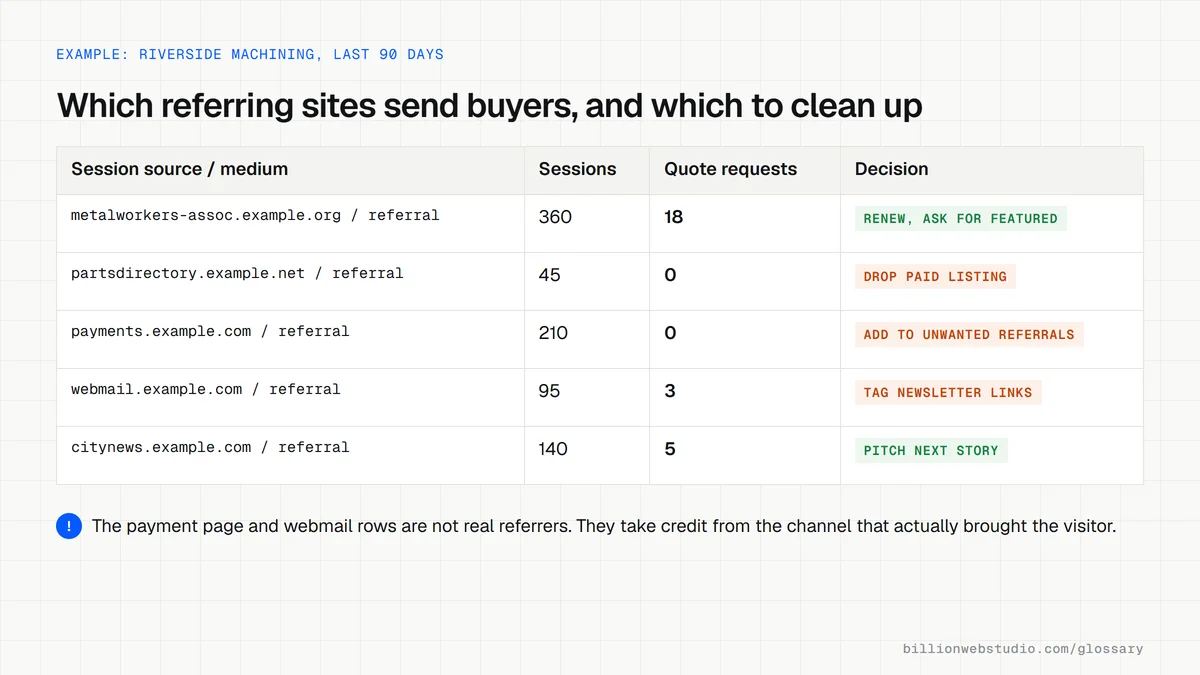
Referral visitors have often just read about you somewhere they trust, so they can arrive already warmed up. The report also shows which directories, partners and press mentions send real people rather than only a backlink. That helps you decide which paid listings to renew, which partners to thank and where to pitch your next story.
A referral traffic example
A manufacturing company finds that an industry supplier directory sends 120 visits a month, and 6 of those visits end in a quote request. A paid listing on a second directory sends 15 visits and no quotes. When the renewal invoices arrive, the company keeps the first listing, drops the second and asks the first directory about a featured profile.
Common referral traffic mistakes
- Letting a payment provider such as PayPal appear as a referrer, which takes credit for sales away from the channel that brought the buyer.
- Ignoring spam domains that send fake visits and inflate referral numbers.
- Assuming every backlink is a traffic source, when many links send no visitors at all.
- Leaving newsletter links untagged, so some clicks show up as referrals from webmail domains.
- Adding UTM tags to links between your own pages, which overwrites the visitor's real referrer.
Which referral sources to keep, fix or exclude
| Source in the report | What it usually is | What to do |
|---|---|---|
| Industry directory or association | Real people clicking your listing | Compare leads per listing with its yearly fee before renewing |
| News site or blog | Readers of an article that mentions you | Link the article from your press page and pitch the writer again |
| Payment provider domain | Buyers returning from paying, not a new source | Add it to List unwanted referrals in the data stream's tag settings |
| Your own other domain or booking tool | One visit split in two by a domain change | Set up cross-domain measurement so the session continues |
| Webmail domain | Newsletter readers clicking untagged links | Add utm_medium=email to every newsletter link |
| Unknown site with many sessions and no engagement | Spam or bot traffic | Do not visit it, and leave it out of budget decisions |
How to see which websites send you referral traffic
- In GA4, open Reports, then Acquisition, then Traffic acquisition.
- Click the dropdown above the first column and change it from Session default channel group to Session source / medium.
- Type referral in the search box above the table so only rows ending in / referral remain.
- Scroll to the Key events column, choose your lead event from its dropdown, and note which sources produce leads, not only sessions.
- Flag rows that are not real referrers, such as payment pages, your own other domains or webmail, and fix each one.
What good looks like: Healthy referral rows are sites a person chose to click from, such as directories, associations, partners and press. Payment providers, your own domains and obvious spam should not appear.
Free tool: GA4 Help: Traffic acquisition report
Questions to ask your web developer
“Will payment pages, booking tools and our own other domains be kept out of referral traffic?”
A good answer: Yes. They list every third-party domain in the checkout or booking flow, add payment domains to unwanted referrals and set up cross-domain measurement for any booking tool you link to.
“Can you show leads by referring site, not only visits?”
A good answer: They mark form submissions as a key event and share a Traffic acquisition view by session source / medium with that event selected, so every paid listing is judged on leads.
Referral traffic: common questions
What is the difference between referral traffic and backlinks?
A backlink is a link from another website to yours, which search engines weigh when judging authority. Referral traffic is the people who actually click such links. A backlink can help rankings without sending a single click, and a nofollow link that passes little ranking value can still send plenty of visitors.
How do I stop my payment provider showing as referral traffic?
In GA4, open Admin, choose your web data stream, select Configure tag settings, show all options and pick List unwanted referrals. Add the payment provider's domain there. Google allows up to 50 unwanted referral entries per data stream, and you need at least Editor access to change them.
Sources
Want a website that gets this right?
Every Billion Web Studio build includes technical SEO, schema and speed work as standard, with a fixed quote within 1 business day.