Conversion and analytics
What Is Call Tracking?
Call tracking is the practice of using unique phone numbers, or software that detects calls, to record which marketing source led a customer to call a business, along with details such as the time, duration and outcome of each call.
What call tracking means in plain English
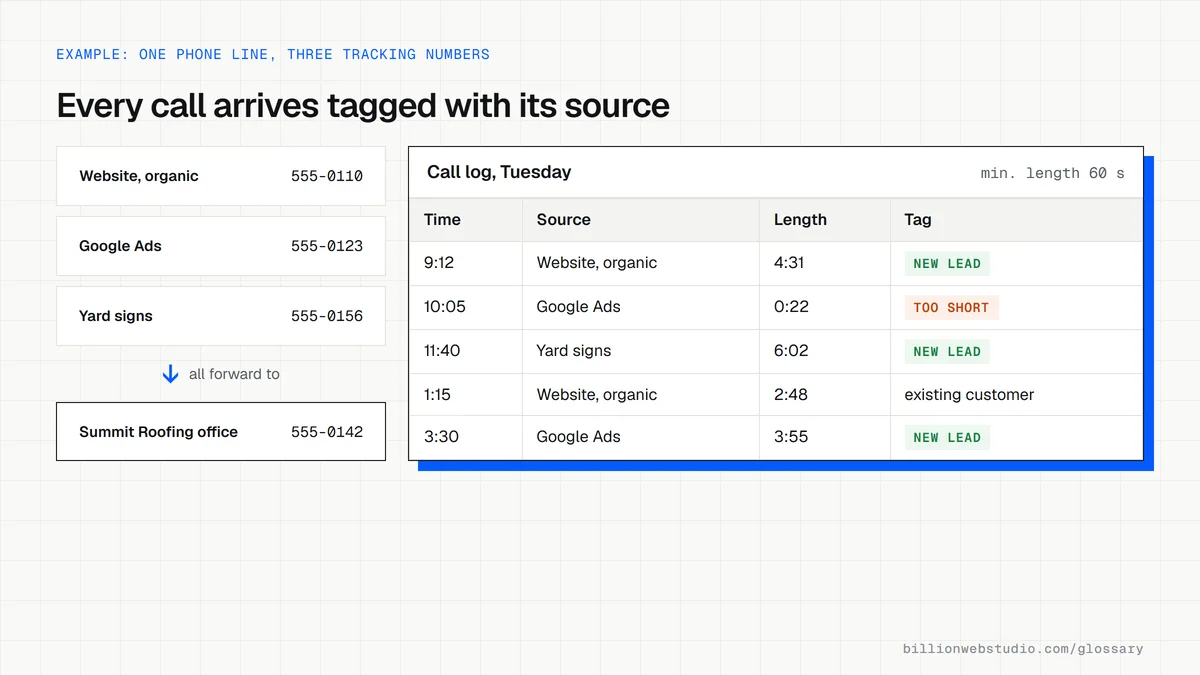
Each marketing channel gets its own number: one on the website, one on a print ad, one on a truck, one in a Google ad. Every number forwards to the same phone, so the team answers as usual. The tracking system logs which number rang, when and for how long, and many systems can record or transcribe calls and tag them as a new lead, an existing customer or spam.
Offline numbers are fixed, one per flyer or billboard. Online, call tracking usually relies on dynamic number insertion, where a script swaps the number on your site based on the visitor's source. Google Ads has built-in call tracking that uses Google forwarding numbers for calls from ads and from your website after an ad click, but it covers only Google Ads traffic.
Why call tracking matters for a business website
Phone calls are often a service business's most valuable leads, yet standard website analytics never hears the phone ring. Without call data, an owner may cut the channel that produces the most jobs simply because it shows few form fills. Call tracking puts calls next to forms in one report, and recordings show whether staff answer promptly and turn inquiries into bookings.
A call tracking example
A roofing contractor spends on Google Ads, a local radio spot and yard signs. It assigns a tracking number to each and installs number swapping on its website. After three months, the reports show the radio number drew few calls, while calls from organic search to its storm damage page were long and mostly from homeowners wanting quotes. The contractor drops the radio slot and expands the storm damage section of the site.
Common call tracking mistakes
- Counting every call as a lead, including existing customers, suppliers and sales pitches.
- Setting no minimum call length, so hang-ups and wrong numbers inflate the results.
- Recording calls without the notice or consent that local law requires.
- Tracking calls in one tool and forms in another, so nobody sees total leads by channel.
- Never listening to recordings, which is where missed calls and slow answers show up.
Which call tracking method fits which channel
| Method | Best for | What it tells you | Limit |
|---|---|---|---|
| One fixed number per offline ad | Flyers, radio, vehicles and signs | Calls and call length per campaign | Needs a separate number for every placement |
| Dynamic number insertion on the website | Organic search, social, email and paid visits | Source, campaign and landing page of each caller | Needs a pool of numbers and a script on every page |
| Google Ads call tracking | Google Ads campaigns | Calls from ads, and from your site after an ad click | Google Ads traffic only, in countries where forwarding numbers are offered |
| Tap-to-call event in GA4 | Mobile visitors who tap a tel: link | How many visitors tapped the number, and on which page | Cannot tell if the call connected or how long it lasted |
How to check your call tracking works end to end
- Open your site in a private window by clicking through from a Google search result, and confirm the header phone number changes to a tracking number.
- Open the site again by typing the address directly and confirm the number shown is the one set for direct visits.
- Call the number on screen from a mobile phone, let it ring through to your team and stay on the line past your minimum call length.
- Within the hour, check the call log in your tracking tool: it should show the right source, the time, the duration and, if switched on, a recording.
- The next day, check that the call appears as a conversion in Google Ads or a key event in GA4, if you have connected them.
What good looks like: Every test call shows up with the correct source and duration, callers hear a normal ring with no long delay, and direct visitors see the right default number.
Questions to ask your web developer
“How will call data reach the same report as our form leads?”
A good answer: Calls are sent to GA4 or our CRM with source, campaign and duration, using the same channel names as forms, so total leads by channel appear in one report.
“Do callers hear a recording notice, and who can listen to recordings?”
A good answer: A short notice plays before the call connects wherever the law requires one, recordings are kept for a set period, and only named staff can open them.
“What counts as a qualified call in the reports?”
A good answer: A minimum call length agreed with us, first-time callers separated from existing customers, and known spam numbers filtered out, so reports count real inquiries.
Call tracking: common questions
Does Google Analytics track phone calls?
Not the calls themselves. GA4 can record a tap on a tel: link as an event, and you can mark that event as a key event, but it cannot tell whether the call connected or how long it lasted. Call tracking software fills that gap and can send call data back to GA4 or Google Ads.
Is call recording legal for businesses?
In many places, yes, but the rules differ by country and, in the United States, by state. Some places require every party on the call to consent, while others need only one. A recorded greeting telling callers the call may be recorded is the usual safeguard. Check the rules that apply to you and your callers.
Sources
Want a website that gets this right?
Every Billion Web Studio build includes technical SEO, schema and speed work as standard, with a fixed quote within 1 business day.