Conversion and analytics
What Is Direct Traffic?
Direct traffic is website visits that analytics tools cannot link to any referring website, search engine or campaign. In Google Analytics 4 these visits show the source (direct) and medium (none), and they include typed addresses, bookmarks and untagged links.
What direct traffic means in plain English
Analytics tools work out where a visit came from by reading the referring address the browser passes along and any campaign tags in the link. When neither is present, the visit is filed as direct. Google describes the Direct channel as visitors who arrive through a saved link or by entering your URL.
In practice, direct is also where unknown visits land. Google lists several causes: links without UTM parameters, redirects that strip those tags, URL shorteners, links clicked inside PDFs or Word files, and ad blockers interfering with tracking. So a direct visit might be a loyal customer, or a newsletter reader whose real source was lost.
Why direct traffic matters for a business website
A large and growing direct share usually means your reports are missing information, not that your brand suddenly became famous. Leads from email, messaging apps or printed material end up credited to no channel, so the channels that earned them look weaker than they are. Budget decisions then rest on incomplete data.
A direct traffic example
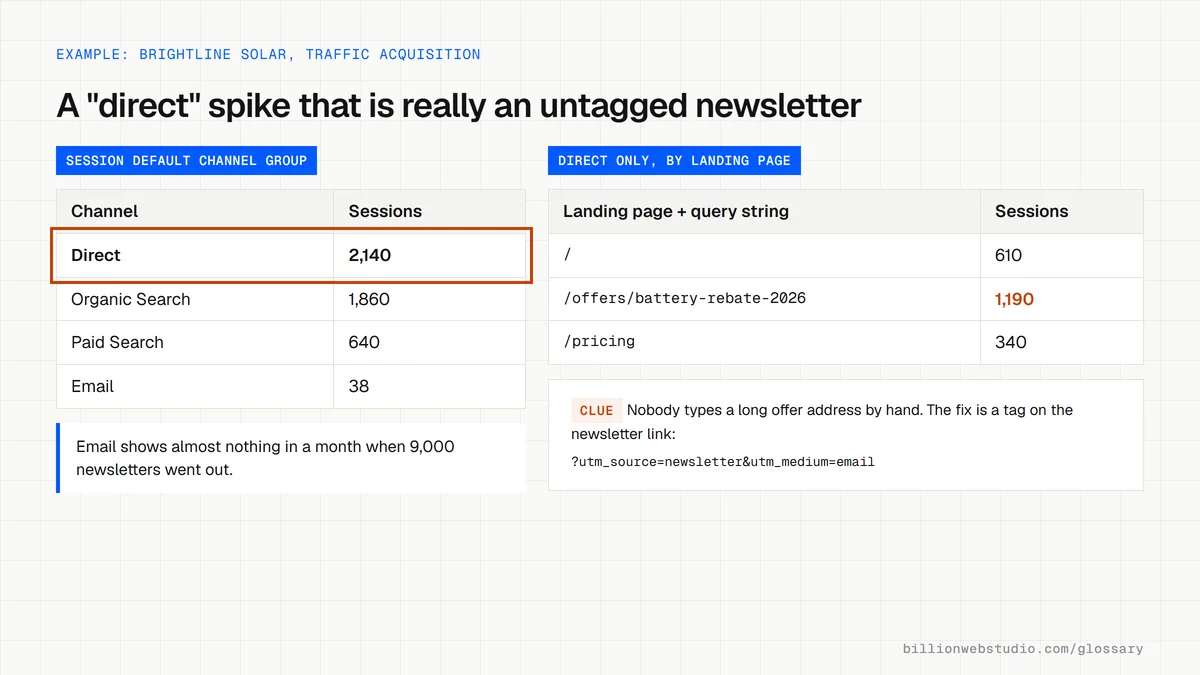
A solar installer sends a monthly email and sees direct sessions jump each time it goes out, while the email channel shows almost nothing. The newsletter links carried no UTM tags, and many subscribers read in a desktop mail app that sends no referrer. After the team tags every link, those sessions move to the email channel and the direct spike disappears.
How to reduce unexplained direct traffic
- Add UTM parameters to links in emails, PDFs, QR codes, social profiles and partner sites.
- Check that redirects, including old http addresses, keep the query string when they forward visitors.
- Avoid URL shorteners that drop campaign tags, or test that the one you use keeps them.
- Exclude your own office visits with an internal traffic filter so staff browsing does not inflate direct.
- Review which landing pages receive direct visits, since deep pages with long addresses are rarely typed by hand.
Copy these tagged link patterns
# Newsletter link: lands in the Email channel
https://www.example.com/offers/spring-tune-up?utm_source=newsletter&utm_medium=email&utm_campaign=2026-04-spring

# Social profile link: lands in Organic Social
https://www.example.com/?utm_source=instagram&utm_medium=social&utm_campaign=profile-bio

# Link inside a PDF price list: no longer Direct
https://www.example.com/pricing?utm_source=price-list-pdf&utm_medium=document&utm_campaign=2026-price-list

# QR code on a van or flyer: no longer Direct
https://www.example.com/?utm_source=van-wrap&utm_medium=qr&utm_campaign=fleet-2026

# GA4 reads utm_medium "email" as Email and "social" as Organic Social.
# Values such as "document" and "qr" show as Unassigned unless you add
# a custom channel group, but they stop inflating Direct.
How to find out what is hiding in your direct traffic
- In GA4, open Reports, then Acquisition, then Traffic acquisition. Rows are grouped by Session default channel group.
- Click Add filter, choose Session default channel group, select Direct and click Apply.
- Click the plus icon next to the first column header and add Landing page + query string as a secondary dimension.
- Sort by Sessions. The home page and short addresses are likely typed or bookmarked, while long offer, campaign or blog addresses usually mean a link lost its source.
- Line up spikes on the date chart with your email sends, mailers and PDF releases, then tag those links with UTM parameters.
What good looks like: Most direct sessions land on the home page or other short, memorable addresses. When one deep page with a long address takes a large share of direct sessions, treat it as a tracking gap rather than brand loyalty.
Free tool: GA4 Help: Traffic acquisition report
Questions to ask your web developer
“Will every link we control carry UTM tags, including emails, PDFs, QR codes and social profiles?”
A good answer: Yes, with a shared naming sheet that fixes lowercase values for source, medium and campaign, so values like Email and email never appear as separate rows.
“Do our redirects keep the query string?”
A good answer: They open old http and non-www addresses with a tagged test link and confirm the final URL still carries the same utm_ parameters after every redirect.
“Is our own team's browsing excluded?”
A good answer: An internal traffic rule is defined in the web data stream's tag settings, and the matching data filter under Admin is switched to Active, not left in Testing.
Direct traffic: common questions
Is direct traffic good or bad?
Neither on its own. Some direct visits come from people who know your name and type it in, which is a healthy sign of brand awareness. But direct also absorbs visits whose real source was lost, so a high share is worth investigating before you treat it as good news.
Why is my direct traffic so high?
The usual reasons are untagged links in emails, PDFs and messaging apps, redirects that drop campaign tags, URL shorteners and visits from your own team. Start by checking which landing pages get direct sessions. A spike on a deep product or campaign page almost always points to a link whose source was lost.
Sources
Want a website that gets this right?
Every Billion Web Studio build includes technical SEO, schema and speed work as standard, with a fixed quote within 1 business day.