Conversion and analytics
What Is a User Journey?
A user journey is the sequence of steps a person takes to complete a goal on a website or app, such as finding a service, comparing options and sending a quote request, including every page, click and decision along the way.
What a user journey means in plain English
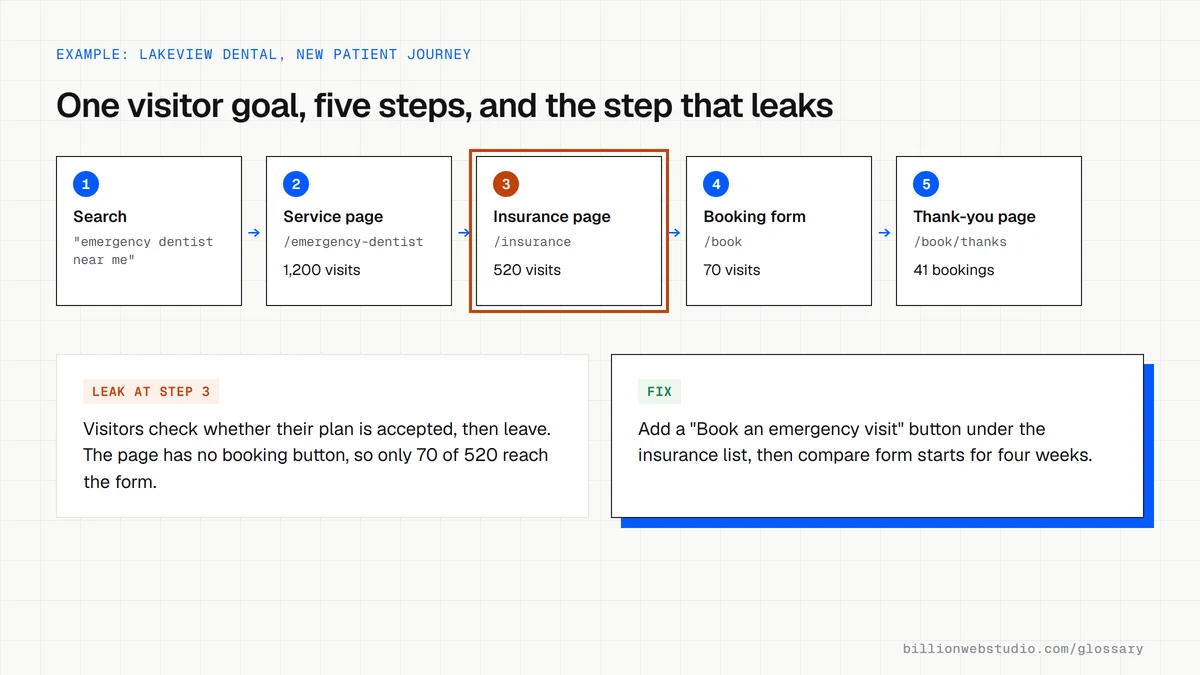
A user journey follows one type of visitor with one goal. A homeowner with a leaking roof might search Google, land on a repair page, read reviews, look for a price range and then call. Each of those moments is a step, and at each step the visitor either finds what they need or leaves.
Designers often draw this as a user journey map: a simple chart listing the steps in order, what the person is thinking and feeling at each one, and the questions they need answered. A journey map is narrower than a sales funnel, because it traces one person's real route rather than totals across all visitors.
Why the user journey matters for leads and sales
Most websites are planned page by page, but visitors experience them as a route. When one step breaks, such as a service page with no next action or a form that fails on mobile, every later step loses people too. Mapping the journey shows which page to fix first and stops money going into pages that nobody reaches.
A user journey example
An accounting firm maps the journey of a small business owner who needs bookkeeping. The owner searches a question, reads a blog answer, clicks through to the bookkeeping service page, looks for pricing, then books a call. The map reveals that the blog post has no link to the service page, so the firm adds one along with a short pricing note.
How to check user journeys on your own site
- Pick your two or three most valuable visitor goals and write down the steps each visitor should take.
- Use path exploration in GA4 to see which pages people actually visit before and after a key page.
- Complete each journey yourself on a phone, from a Google search all the way to the thank-you page.
- Look for pages with steady traffic but no obvious next step, such as blog posts with no link to a service.
- Watch session recordings or heatmaps on the step where the largest number of visitors leave.
What to measure at each stage of a lead journey
| Stage | What the visitor needs to know | Page that must answer it | GA4 signal to watch |
|---|---|---|---|
| Arrive | Am I in the right place? | Service or landing page | Engagement rate for that landing page |
| Read | Can you solve my exact problem? | Service page copy, photos and reviews | scroll event, sent when 90% of the page height has been seen |
| Compare | What will it cost, and can I trust you? | Pricing notes, reviews, case studies | Path exploration: the next page after the service page |
| Act | How do I get in touch right now? | Form, phone number or booking tool | form_start and form_submit events |
| Confirm | Did it work, and what happens next? | Thank-you page | Your lead key event, such as generate_lead |
How to trace a real user journey in GA4 path exploration
- In Google Analytics 4, click Explore in the left menu and choose the Path exploration template.
- Click Start over in the upper right, then click the Ending point box and pick your goal, for example the page title of your thank-you page or your lead event.
- Set the date range to the last 90 days and read the columns from right to left: each one shows the pages people saw just before the goal.
- Click a node to expand the step before it. Each step lists the top 5 pages by default, and + More shows up to 20.
- Note any service or blog page with steady traffic that never appears on a path to the goal. That is where the journey breaks.
What good looks like: Your main service pages appear one or two steps before the goal, and no high-traffic page sits outside every path. An exploration takes a starting point or an ending point, not both, so run one of each for a full picture.
Free tool: GA4 Help: Path exploration
Questions to ask your web developer
“Which visitor goals did you map before planning the page structure?”
A good answer: They name two or three specific goals, such as booking an emergency visit, list the pages each journey passes through, and show which link or button moves the visitor to the next step.
“How will we see where visitors drop out after launch?”
A good answer: They set up form_start, form_submit and a lead key event in GA4, confirm them in DebugView, and book a path exploration review about a month after launch.
“Have you walked each journey on a phone from a real search?”
A good answer: Yes. They test every journey on a mid-range phone over mobile data and fix any step that needs zooming, sideways scrolling or a hunt for the next action.
User journey: common questions
What is the difference between a user journey and a customer journey?
A user journey usually covers the steps someone takes within one website or product to finish a task. A customer journey is broader and spans every contact with the business, including ads, phone calls, sales meetings, delivery and support. The website user journey is one part of that wider customer journey.
How many steps should a user journey have?
No single number fits every site. A good journey has only the steps a visitor needs to reach their goal and decide with confidence. If a step exists only because of how the site was built, such as an extra page before the form, it is a strong candidate for removal.
Sources
Want a website that gets this right?
Every Billion Web Studio build includes technical SEO, schema and speed work as standard, with a fixed quote within 1 business day.