Conversion and analytics
What Is Bounce Rate?
Bounce rate is the percentage of website sessions in which a visitor did not engage with the site. In Google Analytics 4, bounce rate is the inverse of engagement rate: the share of sessions that were not engaged sessions.
What bounce rate means in GA4
GA4 counts a session as engaged if it lasts longer than 10 seconds, includes a key event, or has two or more page or screen views. Any session that does none of those counts toward bounce rate, which is not engaged sessions divided by total sessions. So a 40% engagement rate means a 60% bounce rate.
Universal Analytics worked differently: it counted any single-page session as a bounce, however long the visitor stayed. Universal Analytics stopped processing data on July 1, 2023, so older articles quoting bounce rate benchmarks describe a different metric. A reader who spends five minutes on one article and leaves is no longer a bounce in GA4.
Why bounce rate matters for a business website
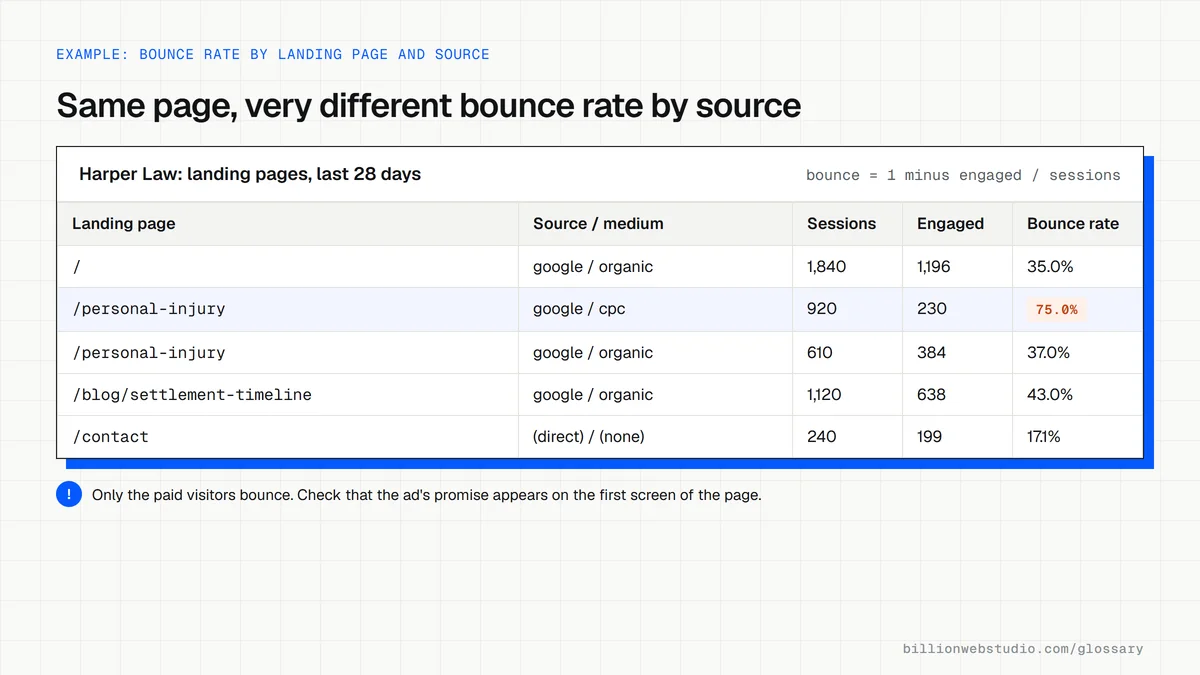
A high bounce rate on a page meant to generate leads suggests the page is not matching what visitors expected, loading too slowly, or giving them no obvious next step. Treat it as a symptom, not a diagnosis. Read it page by page and by traffic source, since a contact page and a blog post naturally behave differently.
A bounce rate example
A law firm notices its personal injury page has a much higher bounce rate from paid ads than from organic search. The ad promises a free case review, but the page opens with a long firm history. Moving the case review offer and form to the top makes the page match the ad, and the team watches engaged sessions from that campaign.
How to lower bounce rate
- Match each page's headline to the search query or ad that sends people there.
- Speed up the first screen, especially on mobile, so visitors are not left waiting.
- Give every page a clear next step, such as a related page, a quote button or a phone number.
- Remove pop-ups that cover the content as soon as the page loads.
- Check that your analytics tag fires once per page, since missing or duplicate tags distort the numbers.
Work out your Bounce rate
Bounce rate calculator (GA4)
How to check bounce rate by landing page in GA4
- In GA4, open Reports, then Engagement, then Landing page.
- Click the pencil icon at the top right (Customize report), choose Metrics, add Bounce rate and Engagement rate, then click Apply and save the change to the current report.
- Click the plus icon next to the Landing page column heading and add Session source / medium as a secondary dimension.
- Sort by Sessions and review the 10 busiest rows first, ignoring rows with only a handful of sessions.
- Use the date picker's Compare option to set this month against last month and look for rows that jumped.
What good looks like: There is no official target. A page is healthy when its bounce rate is steady or falling compared with similar pages, and its key events hold up; a sudden jump from one source usually means a broken link, tag or a mismatched ad.
Free tool: Analytics Help: Landing page report
Questions to ask your web developer
“Which events count as key events on our site?”
A good answer: A short list, such as form submissions, calls and purchases, each tested to fire once per action, because any key event makes a session engaged and so changes bounce rate.
“If bounce rate jumps after launch, what will you check first?”
A good answer: That the GA4 tag fires on every template, that page views are not missing or duplicated, that redirects keep UTM tags, and which pages and sources the change started on.
Bounce rate: common questions
What is a good bounce rate?
There is no universal good bounce rate, because it depends on page type, traffic source and device. Compare similar pages on your own site over time instead of chasing one target. In GA4, also check key events, since the aim is useful visits, not simply a lower number.
How do I see bounce rate in GA4?
Most GA4 reports do not show bounce rate or engagement rate by default. Open a detail report, choose Customize report, add both metrics under Metrics and apply the change. Overview reports cannot be customized this way, so use a detail report such as Pages and screens.
Is a high bounce rate bad for SEO?
Bounce rate is a figure inside your own analytics account, not a score Google Search publishes or asks you to hit. A high rate is still worth investigating, because the same problems that make visitors leave, such as slow pages or content that misses the search intent, also make a page less useful.
Sources
Want a website that gets this right?
Every Billion Web Studio build includes technical SEO, schema and speed work as standard, with a fixed quote within 1 business day.