Conversion and analytics
What Is Server-Side Tracking?
Server-side tracking is a way of collecting website analytics and ad conversion data in which the browser sends events to a server you control, and that server forwards the data to tools such as Google Analytics 4 or Meta.
What server-side tracking means in plain English
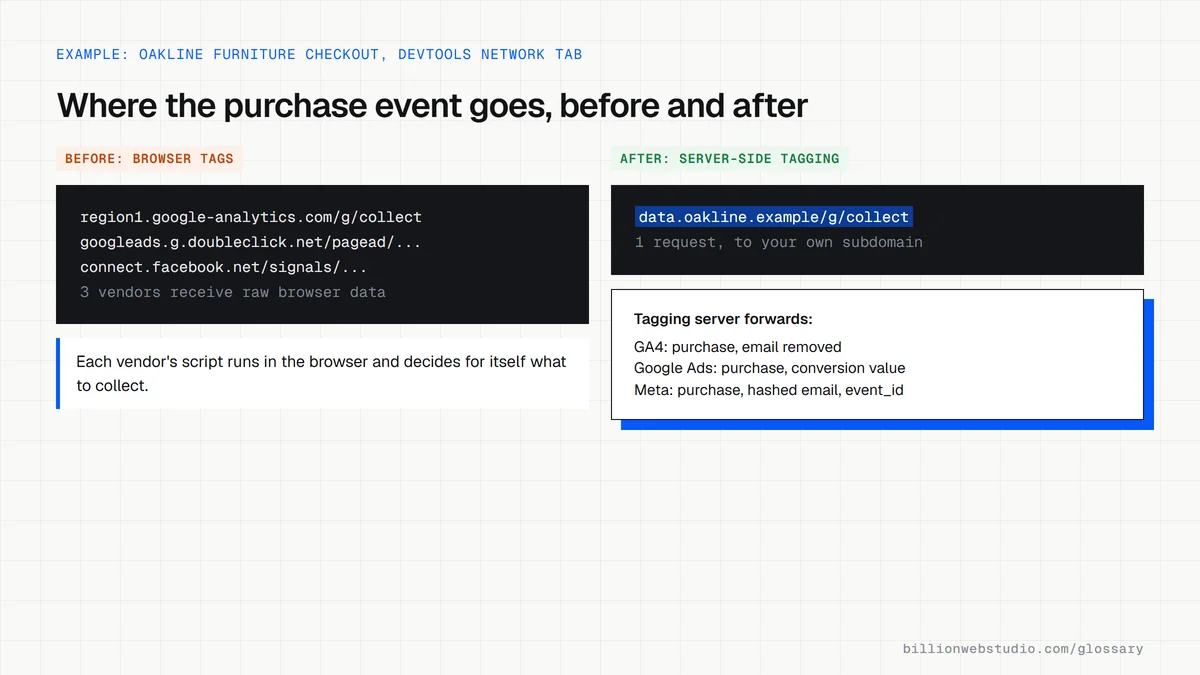
In standard tracking, every tag runs in the visitor's browser and each one sends data straight to its own vendor. With server-side tracking, the page sends one stream of events to your own tagging server, often on a subdomain such as data.yoursite.com. That server decides what to keep, remove or reshape before passing anything to each analytics or advertising platform.
Google Tag Manager offers this as server-side tagging. The container runs in your own Google Cloud project or another environment you choose, and Google notes that only you can access the data on that server until you send it elsewhere. Meta's equivalent is the Conversions API, which sends events from your server to Meta.
Why server-side tracking matters for a business website
Moving tags to a server can mean fewer scripts loading in the browser, and filtering on your server makes it easier to strip personal details before they reach a vendor. Ad platforms also get a steadier feed of leads and sales to optimize against. Consent still applies: if a visitor declines tracking, the server has to respect that choice as well.
Server-side tracking costs and an example
As of October 2026, Google's Cloud Run setup guide estimates about $45 a month per server and recommends at least two servers in production to reduce the risk of data loss, so a basic setup starts near $90 a month. A furniture retailer, for example, might route GA4 and Meta purchase events through one tagging server, removing email addresses from the GA4 stream while sending hashed customer details only to Meta.
Common server-side tracking mistakes
- Running the tagging server on its default cloud address instead of a subdomain of your own site.
- Sending the same purchase from both the browser and the server without deduplication, so it is counted twice.
- Assuming server-side tracking makes cookie consent optional, which it does not.
- Running a single server in production, so one outage loses data.
- Launching it with nobody responsible for the cloud bill and for keeping the container up to date.
Copy this Google tag pointed at a tagging server
<!-- Google tag that sends GA4 events to your own tagging server -->
<!-- Replace G-XXXXXXXXXX and data.example.com with your own values -->
<script async src="https://www.googletagmanager.com/gtag/js?id=G-XXXXXXXXXX"></script>
<script>
  window.dataLayer = window.dataLayer || [];
  function gtag(){dataLayer.push(arguments);}
  gtag('js', new Date());
  gtag('config', 'G-XXXXXXXXXX', {
    'server_container_url': 'https://data.example.com'
  });
</script>
How to check whether your site uses server-side tagging
- Open your site in Chrome, right-click anywhere, choose Inspect and select the Network tab.
- Type collect in the filter box, reload the page, then click around or add a product to the cart.
- Read the domain of each request. Requests to region1.google-analytics.com or www.google-analytics.com mean GA4 data goes straight from the browser to Google.
- Requests to a subdomain of your own site, such as data.example.com/g/collect, mean events go to a tagging server first.
- Clear the filter and look for ad pixel requests. Any vendor still called directly from the page is still a browser tag.
What good looks like: Analytics events go to a subdomain of your own site, the ad tags you moved no longer call their vendors from the browser, and conversions in GA4 and each ad platform still match your real order count.
Free tool: Google Tag Manager: Send data to server-side Tag Manager
Questions to ask your web developer
“Who owns the cloud account and the bill for the tagging server?”
A good answer: The business owns the cloud project and billing, the developer has a user role on it, and the monthly cost estimate is agreed in writing before launch.
“How will you stop purchases being counted twice?”
A good answer: Events sent from both the browser and the server share the same event name and event ID. For Meta, the Pixel eventID matches the Conversions API event_id, and duplicates arriving within 48 hours are dropped.
“What personal data leaves our server, and to which vendor?”
A good answer: They give a written list per vendor, for example GA4 receives no email or phone number, while ad platforms receive only hashed customer details from visitors who gave consent.
Server-side tracking: common questions
Is server-side tracking better than client-side tracking?
It gives you more control, not automatically better results. Server-side tracking provides a place to filter data and send cleaner conversions to ad platforms, but it adds hosting costs and technical upkeep. Small sites with modest ad budgets often get enough from a well-configured GA4 and Google Tag Manager setup in the browser.
Does server-side tracking get around cookie consent rules?
No. Privacy laws such as the GDPR apply to the personal data itself, not to the route it travels, so visitors who refuse consent must not be tracked through your server either. Server-side tagging is a way to control data, not a way to avoid asking for permission. Treat this as general information rather than legal advice.
Sources
Want a website that gets this right?
Every Billion Web Studio build includes technical SEO, schema and speed work as standard, with a fixed quote within 1 business day.