Conversion and analytics
What Is a Call to Action (CTA)?
Call to action (CTA) stands for Call to Action.
A call to action (CTA) is a prompt on a web page, ad or email that tells the reader what to do next, such as Call now, Book a quote or Add to cart, usually shown as a button or link.
What a call to action means
Every page should have a job, and the call to action is how the visitor completes that job. It combines a short instruction, a clickable element and a reason to act. A primary CTA is the main action you want, such as requesting a quote. A secondary CTA offers a softer step, such as viewing pricing, for visitors who are not ready yet.
Why a call to action matters for leads and sales
Visitors rarely work out the next step for themselves. If a page explains a service well but ends without a clear button or phone number, interested buyers leave and search again. A visible, specific CTA turns attention into an inquiry you can track, which is how a website starts paying for itself.
Call to action examples
- A roofing company's service page has a Get a free inspection button at the top, repeated after the photo gallery.
- An online store places an Add to cart button beside the price, with the delivery estimate directly underneath.
- A B2B software firm uses Book a demo as its main CTA and Download the spec sheet as a secondary option.
- A local clinic shows a tap-to-call button fixed to the bottom of the screen on mobile.
Common call to action mistakes
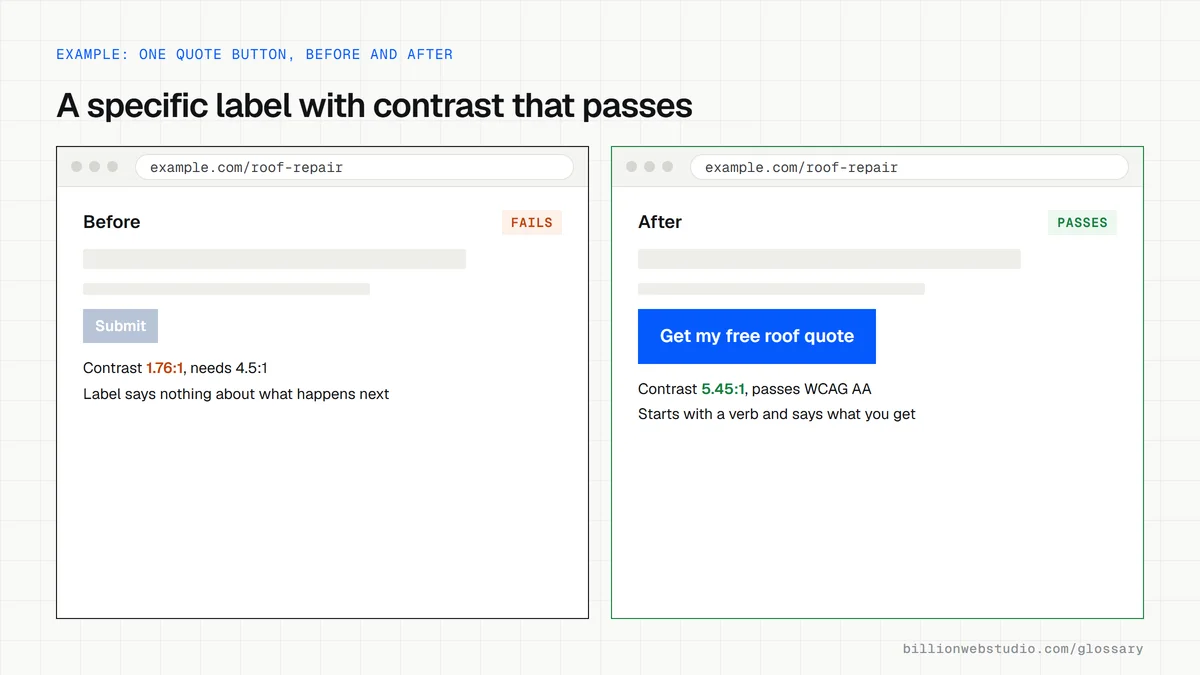
- Using vague labels like Submit or Learn more where a specific action, such as Get my quote, would work better.
- Giving equal weight to five different buttons, so no single next step stands out.
- Placing the only CTA at the very bottom of a long page.
- Linking a button to a form that asks for far more detail than the offer justifies.
- Choosing button colors with weak contrast against the background, which makes the CTA hard to see.
Vague vs specific call to action labels by page type
| Page type | Vague label | Specific label |
|---|---|---|
| Service page | Submit | Get my free quote |
| Emergency service | Contact us | Call now: (217) 555-0142 |
| Online store product | Learn more | Add to cart |
| B2B software | Get started | Book a 20-minute demo |
| Clinic | Click here | Book an appointment |
| Newsletter | Sign up | Send me the monthly price list |
How to check the calls to action on your key pages
- Open your five busiest pages on your phone and note whether one main button or tap-to-call link is visible without scrolling.
- Read each button label aloud: it should start with a verb and say what happens next, such as Get my quote, not Submit.
- In Chrome, right-click the button, choose Inspect, copy color and background-color from the Styles panel and paste both into the WebAIM Contrast Checker.
- Tap every button and phone link on a real phone and check it opens the right form, dialer or checkout.
- In GA4, check that each completed form or call click is recorded as a key event, so you can see which CTA produces inquiries.
What good looks like: Button text meets WCAG 2.2 AA contrast of at least 4.5:1, or 3:1 for large text (18 point, or 14 point bold), targets are at least 24 by 24 CSS pixels, and every CTA leads to a working next step.
Free tool: WebAIM Contrast Checker
Questions to ask your web developer
“What is the main action on each page template, and what is the secondary one?”
A good answer: A list per template, for example service pages: Get a quote as the main action and See pricing as the secondary, with the main button repeated after key sections and kept in reach on mobile.
“How will you check our buttons for contrast and tap size?”
A good answer: Colors are checked against WCAG 2.2 AA contrast, every button meets the 24 by 24 CSS pixel target minimum, and the pages are tested on real phones before launch.
“How will we know which button brings in leads?”
A good answer: Each CTA click and completed form or call is tracked as a GA4 event, with the button label or position stored as a parameter, so reports show which one led to the inquiry.
Call to action (CTA): common questions
What is a good call to action?
A good call to action is specific, short and tied to what the visitor wants at that moment. It starts with a verb, says what happens next, and stands out visually. Get your fixed quote tells a buyer far more than Submit, and sets the expectation for the next step.
How many CTAs should a page have?
One primary action per page is the usual rule, repeated where it makes sense, such as near the top and after key sections. A secondary, lower-commitment option suits visitors who are not ready. Many unrelated buttons competing for attention tend to dilute the main goal.
Sources
Want a website that gets this right?
Every Billion Web Studio build includes technical SEO, schema and speed work as standard, with a fixed quote within 1 business day.