Conversion and analytics
What Is Above the Fold?
Above the fold is the part of a web page that visitors can see on their screen before they scroll. The term comes from newspapers, where the top half of the front page showed on a folded copy at the newsstand.
What above the fold means on a website
On a website, the fold is the bottom edge of the browser window when the page first loads. Everything above it is seen by almost every visitor; everything below needs a scroll. Because screens range from small phones to wide monitors, the fold is not one fixed line, which is why designers check layouts at several sizes.
Scroll heatmaps often show an average fold, the point most visitors can see before they start scrolling, measured on their real devices. That figure is more useful than any rule of thumb, because it reflects your own audience's phones and screens rather than a generic template.
Why above the fold matters for leads and speed
The first screen decides whether a visitor stays. It should say what you do, who it is for and what to do next. It also matters for performance: Largest Contentful Paint, a Core Web Vital, measures when the largest image, text block or video in the viewport finishes rendering, and a good score is 2.5 seconds or less.
An above the fold example
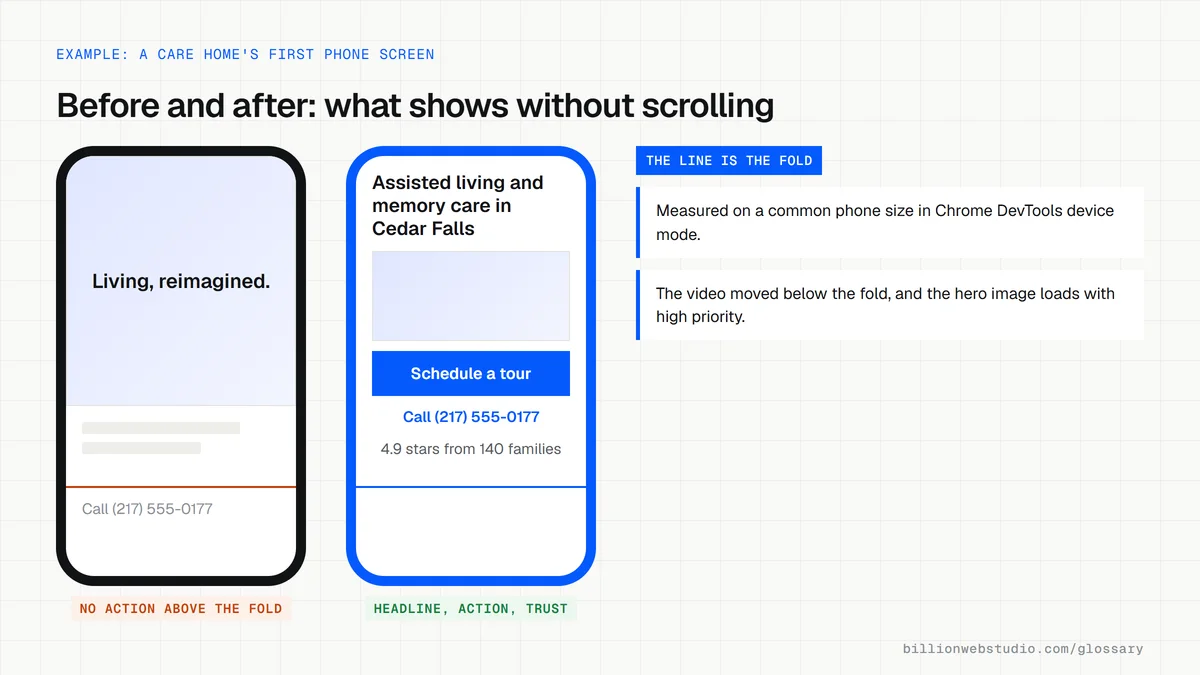
A senior living community's homepage opens with a full-screen video and a slogan, and the phone number appears only after scrolling. A redesign keeps one photo, adds a headline naming the care types and location, and places Schedule a tour and the phone number on the first screen of a phone. The video moves further down the page.
Common above the fold mistakes
- Cramming every message into the first screen, so nothing stands out.
- Using a large image slider that loads slowly and pushes the headline down.
- Lazy-loading the main hero image, which web.dev warns against because it can delay Largest Contentful Paint.
- Designing the first screen on a desktop monitor and never checking it on a phone.
- Assuming visitors will not scroll, then leaving the rest of the page thin or unfinished.
Copy this hero image markup
<!-- Hero image on the first screen: load it early, never lazily -->
<img
  src="/images/lakeview-dental-hero-800.webp"
  srcset="/images/lakeview-dental-hero-800.webp 800w,
          /images/lakeview-dental-hero-1600.webp 1600w"
  sizes="100vw"
  width="1600" height="900"
  alt="Dentist explaining an x-ray to a patient at Lakeview Dental"
  fetchpriority="high">

<!-- Images further down the page can use loading="lazy" -->
How to check what visitors see above the fold on a phone
- Open your page in Chrome, press F12 and click Toggle device toolbar (the phone and tablet icon) at the top of DevTools.
- Pick a common phone, such as iPhone 12 Pro, from the Dimensions list and reload the page.
- Without scrolling, check you can see what you do, where you do it and one clear action, such as a call or quote button.
- Run the page in PageSpeed Insights, open the Mobile report and find the LCP breakdown insight, which names the element counted as Largest Contentful Paint.
- If that element is your hero image, check in View page source that its img tag does not carry loading="lazy".
What good looks like: On a phone-sized screen the headline, the main action and a trust signal show without scrolling, and field data shows LCP of 2.5 seconds or less for at least 75 percent of visits.
Free tool: PageSpeed Insights
Questions to ask your web developer
“Which screen sizes will you design and test the first screen for?”
A good answer: Named phone, tablet and laptop sizes taken from our own analytics, with a mockup of the first screen at each size approved before the build starts.
“How will the hero image load so it does not slow down the first screen?”
A good answer: Served at the right size for each screen with srcset, in a modern format such as WebP or AVIF, never lazy-loaded, and marked fetchpriority="high" when it is the LCP element.
Above the fold: common questions
Do people scroll below the fold?
Yes. Visitors scroll when the first screen gives them a reason to keep going. The fold matters because it shapes that first impression, not because content below it is ignored. A scroll map shows how far your own visitors actually go on each page.
What should go above the fold on a homepage?
A clear headline saying what you do and for whom, a short supporting line, one primary call to action, and a trust signal such as reviews or a recognized credential. On mobile, a tap-to-call or quote button should be visible without scrolling.
Sources
Want a website that gets this right?
Every Billion Web Studio build includes technical SEO, schema and speed work as standard, with a fixed quote within 1 business day.