SEO
What Is a 302 Redirect?
A 302 redirect is an HTTP status code, 302 Found, that tells browsers and search engines a page has moved temporarily to another URL, so visitors are sent to the new address while Google usually keeps the original URL in its results.
What a 302 redirect means in plain English
When a browser requests the original address, the server replies with status 302 and a Location header naming the temporary address, and the browser follows it automatically. The message to search engines is: this is a short detour, keep the old address on file. Status 307 means the same thing but guarantees that a form submission is sent on unchanged, whereas browsers may turn a submitted form into a plain page request after a 302.
How Google treats a 302 redirect
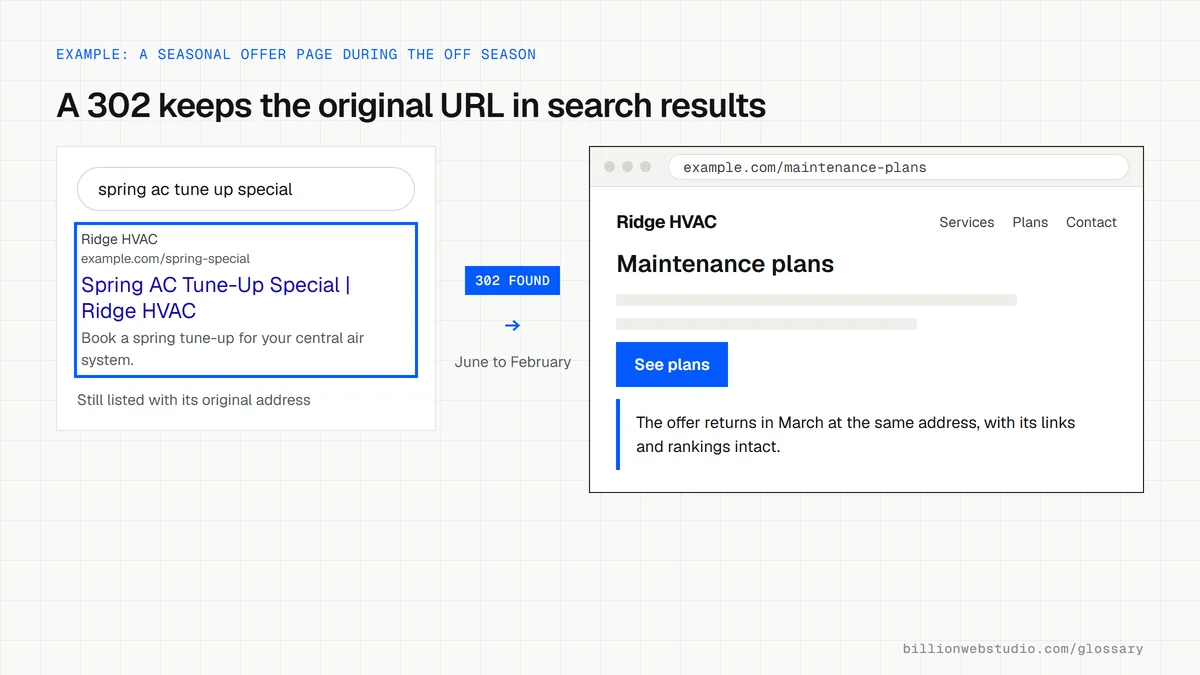
Google's redirect documentation says Googlebot follows a 302, but its indexing systems treat the redirect as only a weak signal that the target should become the canonical URL. In practice the original page usually stays in search results. If other signals strongly point to the target, Google may still index the target instead, which is why a temporary redirect should not be left in place indefinitely.
When to use a 302 redirect
- Sending visitors to a holding page while a product or service is briefly unavailable.
- Pointing a seasonal offer URL at a general page during the months the offer is not running.
- Running an A/B test that splits visitors between two URLs, which Google's testing guidance says should use a 302 rather than a 301.
- Showing a short-term campaign page in place of a normal page for a fixed period.
An example of a 302 redirect
An HVAC company runs a spring tune-up offer at /spring-special. Over the summer, the team adds a 302 from that URL to its general maintenance plans page, because the offer returns every March. The /spring-special address keeps its place in Google and the links pointing to it. In February the redirect comes off and the updated offer goes live at the same address.
Common 302 redirect mistakes
- Using a 302 for a permanent move, such as a redesign, a switch to HTTPS or a new domain, where Google recommends permanent 301 or 308 redirects.
- Leaving a temporary redirect in place for years after everyone has forgotten why it was added.
- Chaining a 302 into further redirects, which slows visitors and makes crawling less efficient.
- Never checking which status code a plugin or host actually sends, since some redirect tools default to 302.
301, 302, 307 or 308: which redirect to use
| Status code | Permanent or temporary | Can a form POST become a GET? | How Google treats it | Use it for |
|---|---|---|---|---|
| 301 Moved Permanently | Permanent | Yes, browsers may change it | Strong signal: the target becomes the indexed URL | Redesigns, merged pages, new domains |
| 308 Permanent Redirect | Permanent | No, the method is kept | Same as 301 | Permanent moves of URLs that receive form posts or API calls |
| 302 Found | Temporary | Yes, browsers may change it | Weak signal: the original URL usually stays in results | Seasonal offers, short outages, A/B tests |
| 307 Temporary Redirect | Temporary | No, the method is kept | Same as 302 | Temporary moves where a form submission must arrive unchanged |
How to find every 302 redirect on your site
- Download the free Screaming Frog SEO Spider, which crawls up to 500 URLs without a license, type your homepage into the box at the top and click Start.
- When the crawl finishes, open the Response Codes tab and choose the Redirection (3xx) filter.
- Sort by the Status Code column and list every 302 and 307 along with where it points.
- For each one, ask whether the original page is really coming back. If not, change it to a 301 in your redirect plugin or server settings.
- Open your redirect plugin or hosting panel and check the default redirect type, so new redirects are not created as 302 by mistake.
What good looks like: Every 302 or 307 on the list has a reason and an end date, such as a seasonal offer, and every permanent move uses a 301 or 308.
Free tool: Screaming Frog SEO Spider (free up to 500 URLs)
Questions to ask your web developer
“Which redirect type does our CMS or redirect plugin create by default?”
A good answer: The developer knows the default, has set it to 301 for normal page moves, and creates a 302 only on purpose for a known temporary detour.
“How will we know when a temporary redirect should come off?”
A good answer: Each temporary redirect is logged with its reason and an end date, and the list is reviewed at least every quarter.
302 redirect: common questions
Does a 302 redirect pass link equity?
Google treats a 302 as a weak canonical signal, so the original URL normally keeps its place in search along with the signals attached to it. That is the purpose of a temporary redirect. If you want a new URL to take over for good, use a 301 or 308 redirect instead.
How do I check if a redirect is a 301 or a 302?
Open Chrome DevTools, select the Network panel, load the old URL and read the status column for the first request. The URL Inspection tool in Google Search Console and online HTTP header checkers also show the exact status code the server sends back.
When should I change a 302 to a 301?
As soon as you know the move is permanent. If the original page is never coming back, a 302 leaves Google unsure which URL to show. Switching to a 301 makes the new address the clear replacement, which matters most during redesigns, page merges and domain changes.
Sources
- MDN: 302 Found
- IETF RFC 9110: HTTP Semantics, section 15.4.3 (302 Found)
- Google Search Central: Redirects and Google Search
- Google Search Central: Site moves with URL changes
- Google Search Central: Minimize A/B testing impact in Google Search
- IETF RFC 9110: HTTP Semantics, section 15.4.8 (307 Temporary Redirect)
- IETF RFC 9110: HTTP Semantics, section 15.4.9 (308 Permanent Redirect)
- Google Search Central: How HTTP status codes and network errors affect Google Search
- Screaming Frog: Redirect checker tutorial
Want a website that gets this right?
Every Billion Web Studio build includes technical SEO, schema and speed work as standard, with a fixed quote within 1 business day.