Building and hosting
What Is a Website Migration?
A website migration is any major change to a site's domain, platform, URL structure or hosting that can affect how search engines find and rank it, such as moving from Wix to WordPress, switching domains or changing hosts.
What a website migration means in plain English
Google separates migrations into two kinds. In a move without URL changes, only the hosting or CDN behind the site changes, and visitors see the same addresses. In a move with URL changes, the addresses themselves change: a new domain, a new folder structure, a switch from HTTP to HTTPS, or a new platform that writes URLs differently.
Redesigns often turn into migrations without anyone calling them that. A new CMS, merged service pages or a cleaner URL pattern all change where content lives. Any of these needs the same planning as a domain move, because search engines have to learn every new address and connect it to the old one.
Why a website migration matters for rankings and leads
Your existing URLs carry years of rankings, backlinks and bookmarks. Google's site move guidance tells owners to expect temporary ranking fluctuation, and says a medium-sized site can take a few weeks or more before the new URLs start to show. A careless move turns that short wobble into a lasting loss of traffic and inquiries.
Google also notes that Googlebot has to visit every old and new URL at least once before a move is fully processed. For a move between domains, the Change of Address tool in Search Console helps, but it is not needed for an HTTPS switch or a www change on the same domain.
A website migration example
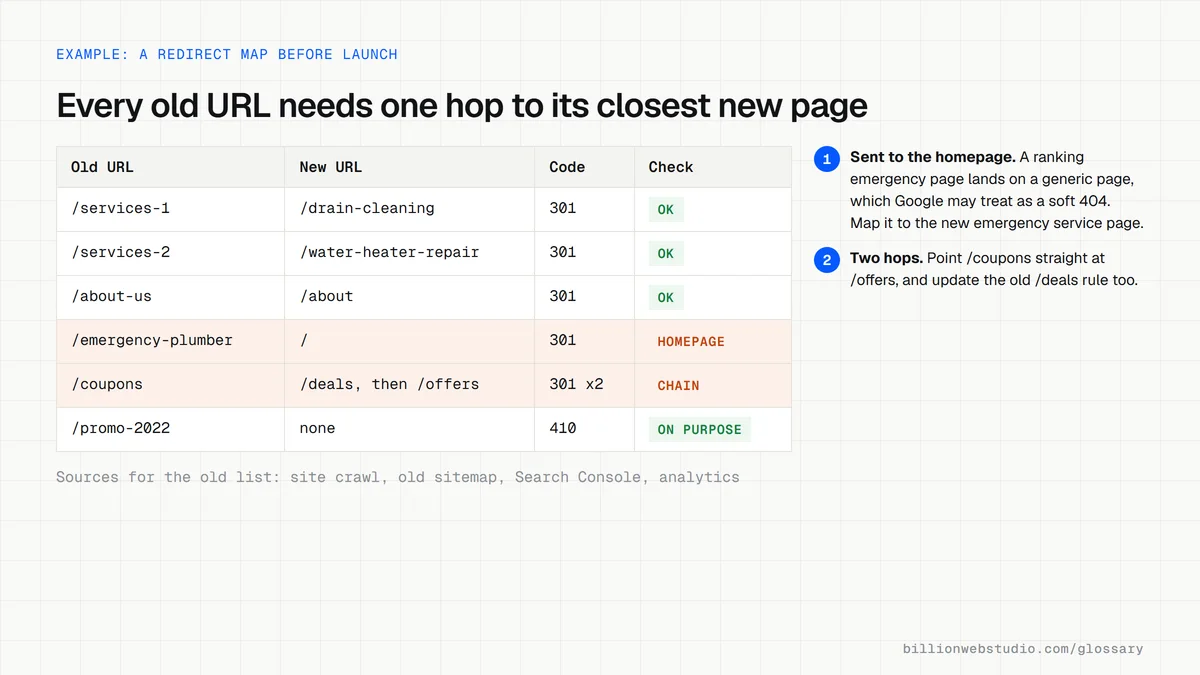
A plumbing company moves from a hosted builder to WordPress, and the platform's URLs change from /services-1 style addresses to /drain-cleaning. The team exports every old URL from the sitemap, analytics and Search Console, maps each one to its new match, and sets up 301 redirects. After launch they submit the new sitemap and watch crawl errors daily for a month.
Website migration checklist
- Crawl and export every current URL, including images and PDFs, before anything changes.
- Build a one-to-one redirect map from each old URL to its closest new page.
- Keep page titles, headings and body content close to the originals where they already rank.
- Remove any staging noindex tags and robots.txt blocks before the new site goes live.
- Update internal links, canonical tags and the XML sitemap to the new addresses.
- Benchmark rankings, traffic and leads beforehand so you can spot and fix drops quickly.
Which kind of website move needs which steps
| Type of move | Do URLs change? | Redirects needed | Change of Address tool |
|---|---|---|---|
| New hosting or CDN only | No | None | Not used |
| HTTP to HTTPS | Yes, the protocol | 301 from every http URL | Not used, Google handles it |
| www to non-www, or the reverse | Yes | 301 from every old version | Not supported |
| New platform with new URL patterns | Yes, the paths | 301 from every old path | Not used on the same domain |
| New domain name | Yes, the whole address | 301 from every old URL | Yes, on the old property; Google processes the move for 180 days |
Copy this redirect map template
old_url,new_url,status,notes
/services-1,/drain-cleaning,301,
/services-2,/water-heater-repair,301,
/about-us,/about,301,
/blog/2023/frozen-pipes,/guides/frozen-pipes,301,merged into one guide
/blog/2024/burst-pipe,/guides/frozen-pipes,301,merged into one guide
/coupons,/offers,301,
/promo-2022,,410,offer ended and no close match

# One row per old URL, including images and PDFs that earn links.
# Test every row on staging: one hop, ending in a 200 page.
How to check a website migration in the first week after launch
- Paste your ten busiest old URLs into Chrome one at a time. Each should land on its matching new page, not the homepage or an error page.
- Open Chrome DevTools (F12), go to the Network panel, tick Preserve log and load an old URL again. You should see one 301 followed by a 200, with no extra hops.
- In Google Search Console for the new site, open Indexing > Sitemaps, submit the new XML sitemap and confirm its status reads Success.
- Still in Search Console, open Indexing > Pages and watch the Not found (404) count every few days. A jump usually means missing redirects.
- For a move to a new domain, open the old property's Settings, choose Change of address and follow the steps. Skip this for HTTPS or www changes.
What good looks like: Every old URL answers with a single 301 to its closest new page, the new sitemap shows Success, 404 errors stay flat, and inquiries in GA4 return to their usual level within a few weeks.
Free tool: Google Search Console Change of Address tool
Questions to ask your web developer
“Can I see the full redirect map before launch, and where did the list of old URLs come from?”
A good answer: A spreadsheet of every old URL, gathered from a crawl, the old sitemap, Search Console and analytics, with its new match and status code, tested on the staging site before go-live.
“What will you check in the first 30 days after launch, and how often?”
A good answer: Daily checks of 404 errors, redirects and indexing for the first two weeks, then weekly, with a short report comparing traffic and leads against the pre-launch benchmark.
“Which old URLs will not be redirected, and why?”
A good answer: Only pages with no close match and no traffic or links, which return 404 or 410 on purpose. Nothing is sent to the homepage just to avoid an error.
Website migration: common questions
How long does it take to recover from a website migration?
Google says medium-sized sites can take a few weeks or more for new URLs to appear, and rankings may fluctuate while every old and new URL is crawled. A well-planned move usually settles within that time. A move with missing redirects or blocked pages can take much longer to recover.
Will I lose my Google rankings if I migrate my website?
Some short-term movement is normal, but lasting losses usually come from avoidable errors: missing or wrong redirects, removed content, a leftover noindex tag or broken internal links. Billion Web Studio keeps rankings through redesigns by redirecting every old URL, which is the core protection for any migration.
What is the difference between a website migration and a redesign?
A redesign changes how a site looks and reads. A migration changes where or how it is served, such as the domain, platform, URLs or hosting. Many redesigns include a migration, which is why URL mapping and redirects belong in the redesign plan from the start, not the final week.
Sources
Want a website that gets this right?
Every Billion Web Studio build includes technical SEO, schema and speed work as standard, with a fixed quote within 1 business day.