SEO
What Is Crawl Budget?
Crawl budget is the set of URLs on a website that Google can and wants to crawl. It depends on how much crawling your server handles without slowing down and how much demand Google sees for your pages.
What crawl budget means in plain English
Google defines crawl budget with two parts. The crawl capacity limit is how hard Googlebot can crawl without overloading your server; it rises when the site responds quickly and falls when it slows down or returns server errors. Crawl demand is how much Google wants to crawl, based on how popular your pages are and how often they change.
Together, they decide how many pages Google fetches and how quickly it notices new or updated ones. If a site has far more URLs than its crawl budget covers, some pages wait a long time to be crawled, and Search Console may list them as "Discovered, currently not indexed".
When crawl budget matters for a business website
For most business sites, it does not. Google's guide is written for large sites with more than about a million unique pages that change weekly, or sites with more than about 10,000 pages that change daily, and Google calls these rough estimates. A 50-page service website is crawled comfortably. Crawl budget matters for big catalogs, listings sites and publishers.
A crawl budget example
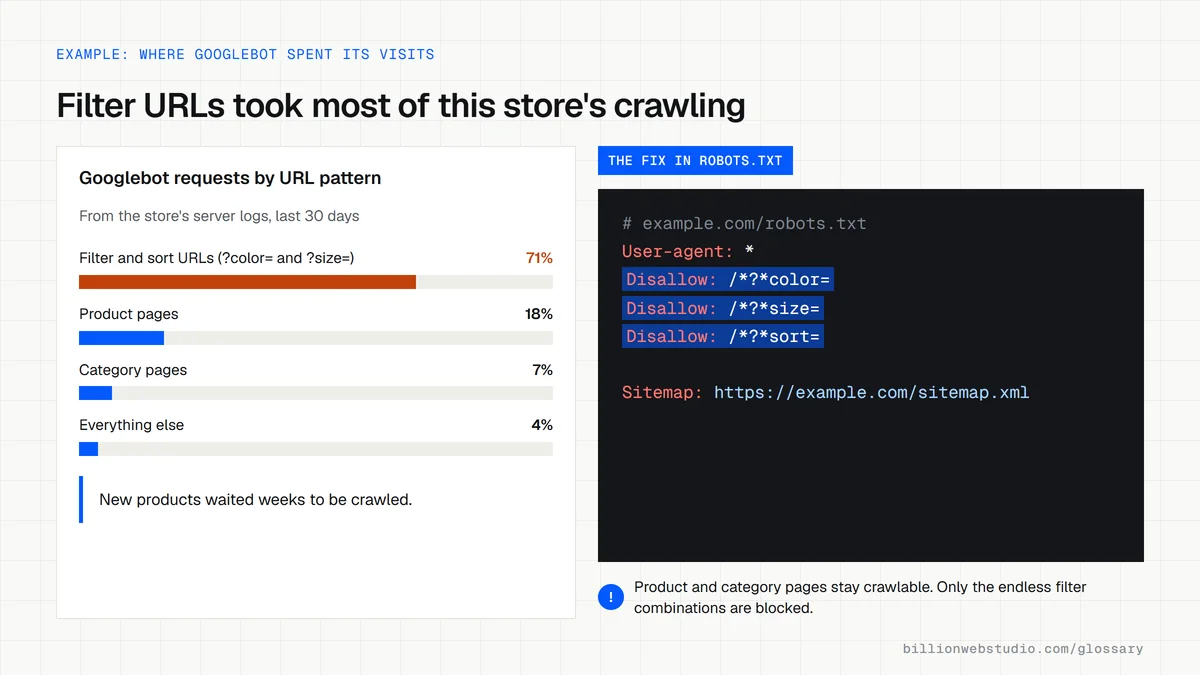
An online store sells 2,000 products, but its filter menu creates a new URL for every combination of color, size, brand and sort order. Googlebot finds hundreds of thousands of near-duplicate URLs and spends its visits there, so new products take weeks to appear in search. Blocking the filter URLs in robots.txt lets Google spend its crawling on real product pages.
How to avoid wasting crawl budget
- Block crawling of endless filter, sort and internal search URLs with robots.txt.
- Return a 404 or 410 status for pages you have removed for good, and fix soft 404 errors.
- Keep your XML sitemap current and include only the pages you want indexed.
- Shorten redirect chains so every old URL points straight to its final destination.
- Speed up server response times so Google can crawl more pages without strain.
- Do not use noindex to save crawl budget, because Google still has to fetch those pages to see the tag.
Does crawl budget matter for your site?
| Site | Size and change rate | Should you worry? |
|---|---|---|
| Local service business | Under 100 pages, updated monthly | No. Google crawls sites this size comfortably |
| Store with filter menus | 2,000 products, filters creating thousands of URL variations | Yes, for the filter URLs. Block them so products get crawled |
| Listings or classifieds site | 10,000+ unique pages changing daily | Yes. One of the two cases Google's guide is written for |
| Large publisher or catalog | 1 million+ unique pages changing weekly | Yes. Google's other named case |
| Any size | New pages crawled the same day they go live | No. Google says you do not need its crawl budget guide |
Copy this robots.txt for filter URLs
# Let Google crawl products and categories, not endless filter combinations
User-agent: *
Disallow: /*?*color=
Disallow: /*?*size=
Disallow: /*?*sort=
Disallow: /search

Sitemap: https://example.com/sitemap.xml
How to check whether Google crawls your site enough
- In Google Search Console, click Settings in the left menu, then Open report next to Crawl stats.
- Read Total crawl requests and Average response time, and check that Host status shows no significant availability issues.
- Under the By response and By file type breakdowns, click a row to see sample URLs Google fetched, and look for filter, sort or internal search addresses.
- Open Indexing, then Pages, and note how many URLs are listed as Discovered - currently not indexed.
- Publish or update a page and check its Last crawl date in URL Inspection a day later.
What good looks like: Host status is clear, the vast majority of crawl responses are 200, and new pages are crawled within a day or two. Google says a site whose pages are crawled the same day they are published does not need to manage crawl budget.
Free tool: Search Console Crawl Stats report
Questions to ask your web developer
“How many crawlable URLs does the site create compared with the pages we want in Google?”
A good answer: They show a crawl count next to the XML sitemap count. Filter, sort and internal search URLs are blocked in robots.txt or never linked, so the two numbers are close.
“What happens to the URLs of products or pages we delete?”
A good answer: They return a 404 or 410, or a single 301 to a close replacement, and they leave the XML sitemap the same day.
“How quickly does our server answer Googlebot, and how will it stay fast as the catalog grows?”
A good answer: They quote the average response time from the Crawl stats report and name the caching or hosting changes that keep it steady as pages are added.
Crawl budget: common questions
Does crawl budget affect rankings?
Not directly. Google has said that crawling is necessary for being in the results but is not a ranking signal, so a higher crawl rate does not lift positions. Crawl budget matters only when Google cannot reach or refresh important pages in time, which mostly affects very large or fast-changing sites.
How do I check my crawl budget?
Open the Crawl stats report in Google Search Console, found under Settings. It shows how many requests Googlebot made, response times and any availability problems Google hit. The Page indexing report also helps: many pages marked "Discovered, currently not indexed" can be a sign Google is not reaching them.
How can I increase my crawl budget?
Make the server faster and more reliable so Google can crawl more without slowing it down, and remove low-value URLs so demand focuses on pages that matter. Google also points to improving the quality and value of your content. Google does not accept payment to crawl a site more often.
Sources
- Google Search Central: Large site owner's guide to managing your crawl budget
- Google Search Central Blog: What crawl budget means for Googlebot
- Search Console Help: Crawl Stats report
- Google Search Central: In-depth guide to how Google Search works
- Google Search Central: Managing crawling of faceted navigation URLs
Want a website that gets this right?
Every Billion Web Studio build includes technical SEO, schema and speed work as standard, with a fixed quote within 1 business day.