SEO
What Is a 301 Redirect?
A 301 redirect is an HTTP status code that tells browsers and search engines a page has moved permanently to a new URL, sending visitors there automatically and signaling Google to show the new address in search results.
What a 301 redirect means in plain English
HTTP status code 301, Moved Permanently, is defined in RFC 9110. When a browser asks for an old address, the server answers 301 and names the new address in a Location header, and the browser loads it instantly. Codes 302, 303 and 307 mean the move is temporary. Code 308 is also permanent, with one technical difference: it keeps the original request method, such as a form submission.
Why 301 redirects matter for a business website
Every page that ranks or earns links has built up value at its address. When that address changes during a redesign, a move to HTTPS, a domain change or a merge of two pages, a 301 tells Google the new URL should take over as the canonical version. Without it, visitors and bookmarks hit a 404 error page and the old page's search standing is left behind.
An example of a 301 redirect
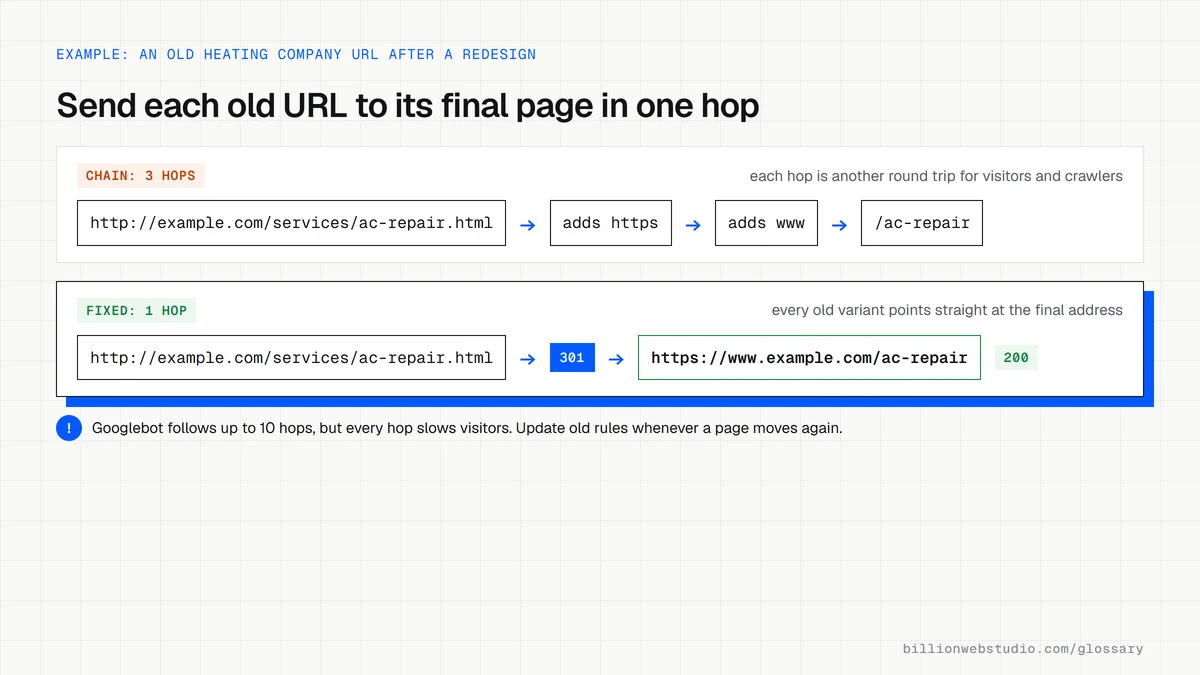
A heating company rebuilds its website, and /services/ac-repair.html becomes /ac-repair. Before launch, the team lists every old URL in a spreadsheet next to its closest new match, then sets up a 301 for each one on the server. Two old blog posts about thermostats are merged into one guide, so both old addresses redirect to that single new page.
Common 301 redirect mistakes
- Redirecting every old URL to the homepage, which Google may treat as a soft 404.
- Using a 302 temporary redirect for a move that is meant to be permanent.
- Building chains where one redirect leads to another and then another.
- Removing redirects a few months after a move, when Google advises keeping them generally at least one year.
- Leaving menus and internal links pointing at old URLs instead of updating them to the new ones.
Copy these 301 redirect rules for Apache
# .htaccess in the site root (Apache with mod_alias)
# One line per moved page: old path, then the full new address
Redirect 301 /services/ac-repair.html https://www.example.com/ac-repair
Redirect 301 /blog/thermostat-tips https://www.example.com/guides/thermostats
Redirect 301 /blog/smart-thermostats https://www.example.com/guides/thermostats

# A whole old folder: /news/anything goes to /blog/anything
RedirectMatch 301 ^/news/(.*)$ https://www.example.com/blog/$1

# On Nginx the same move is: location = /services/ac-repair.html
#   { return 301 https://www.example.com/ac-repair; }
How to check a 301 redirect and spot redirect chains
- Open Chrome DevTools with F12, go to the Network panel and tick Preserve log so the first request is not wiped when the page changes.
- Type the old URL into the address bar and press Enter.
- Read the Status column from the top: you want one 301 row followed by a 200 row for the new page. Two or more 3xx rows mean a chain.
- Try the http and non-www versions of the old URL too, since each of those can add its own hop.
- In Google Search Console, inspect the old URL with URL Inspection. Over time it should be reported as a page with redirect, and the new URL as indexed.
What good looks like: Every old address returns a single 301 or 308 to its closest new page, which returns 200, with no chains and no old URL pointing at the homepage.
Free tool: Google Search Central: Redirects and Google Search
Questions to ask your web developer
“Where are the redirects set up: on the server, in the CMS or with a plugin?”
A good answer: In one documented place, ideally the server or CDN, with the full list exported to a spreadsheet you keep, so a plugin change or host move cannot silently delete them.
“How do you avoid redirect chains when URLs change again later?”
A good answer: When a page moves a second time, the old redirects are updated to point straight at the newest URL, and a crawl after each change confirms every redirect is one hop.
301 redirect: common questions
What is the difference between a 301 and a 302 redirect?
A 301 says a page has moved permanently, so Google treats the new URL as the one to show in search. A 302 says the move is temporary, so Google usually keeps the original URL in results. Use 302 only for short-term situations, such as a seasonal promotion page that will return.
How long should 301 redirects stay in place?
Google's site move guidance says to keep redirects for as long as possible, generally at least one year. In practice many businesses keep them indefinitely, because old links on other websites, printed materials and bookmarks keep sending visitors to the old addresses long after search engines have updated.
Will a 301 redirect hurt my SEO?
A redirect to the closest matching new page is the standard way to protect rankings when URLs change. Problems come from redirecting to irrelevant pages, long redirect chains, or forgetting pages altogether. After launch, check Search Console for 404 errors and confirm old URLs return a single 301 to the right destination.
Sources
- IETF RFC 9110: HTTP Semantics, section 15.4.2 (301 Moved Permanently)
- MDN: 301 Moved Permanently
- Google Search Central: Redirects and Google Search
- Google Search Central: Site moves with URL changes
- Google Search Central: How HTTP status codes and network errors affect Google Search
- Apache HTTP Server: mod_alias Redirect and RedirectMatch
Want a website that gets this right?
Every Billion Web Studio build includes technical SEO, schema and speed work as standard, with a fixed quote within 1 business day.