SEO
What Is a Soft 404?
A soft 404 is a web page that tells visitors the content is missing or empty but sends a 200 OK success code instead of a 404 Not Found code, so Google flags it as an error and leaves it out of search.
What a soft 404 means in plain English
Every page response carries a status code: 200 means the page is fine, 404 means it does not exist. A soft 404 is a mismatch. The server reports success, but the page says nothing is here, or shows almost no content. Google spots the contradiction and lists the URL as Soft 404 in the Page indexing report in Search Console, among pages it has not indexed.
The second kind is a page that is technically real but looks empty to Google, such as a category with no products, an internal search page with zero matches, or a page whose content depends on JavaScript that failed to run.
Why soft 404s matter for a business website
Google's crawl budget guidance says soft 404 pages keep getting crawled and waste your budget, so crawlers spend time on dead ends instead of new pages. If a real page is mistaken for a soft 404, it drops out of search entirely. Soft 404s also point to deeper problems, such as a store leaving empty pages live or a template that renders no content.
An example of a soft 404
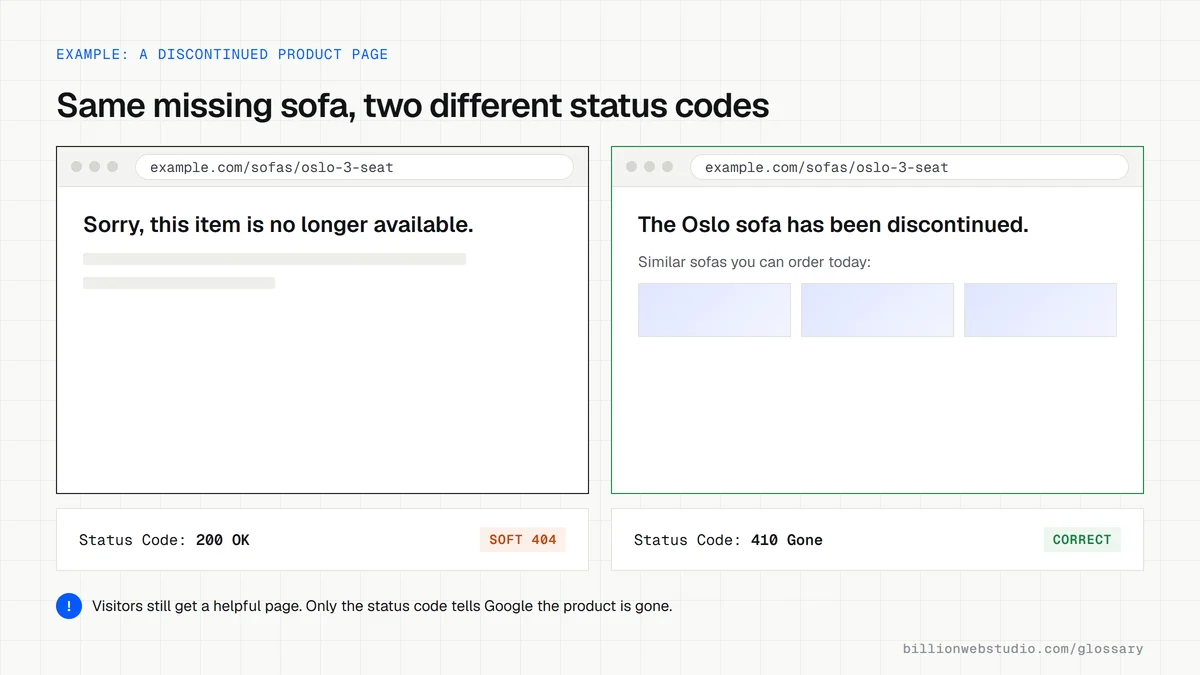
An online furniture store discontinues a sofa, and its product page now shows only This item is no longer available, while still returning 200 OK. Search Console lists it as a soft 404. The store redirects the URL to the closest replacement sofa where one exists, and lets the remaining discontinued product pages return a proper 404 or 410 status.
How to fix a soft 404
- Return a real 404 or 410 status code for pages that are truly gone, while still showing a helpful custom error page.
- Redirect a removed page with a 301 only when a close replacement exists.
- Add genuine content to thin pages that should rank, such as empty categories or placeholder service pages.
- On JavaScript-heavy sites, send missing content to a URL that returns 404 or add a noindex tag to error views, as Google's JavaScript SEO guidance suggests.
- Use URL Inspection to confirm Google now sees the right status, then validate the fix in the Page indexing report.
Which status code to send for each kind of missing page
| Situation | Send | Why |
|---|---|---|
| Page removed, close replacement exists | 301 redirect to the replacement | Google treats a 301 as a strong signal to process the new URL |
| Page removed, nothing similar | 404 or 410 with a helpful error page | Google drops 4xx URLs from the index and ignores their content |
| Product out of stock for now | 200 with a clear stock notice | The page still exists and will sell again |
| Category with no products yet | Add products or content, or noindex it until it has some | An empty page is likely to be reported as a soft 404 |
| Internal search with no results | noindex on the results page | Empty result pages are thin and waste crawling |
| Moved for a short time, such as a seasonal page | 302 redirect | Google treats a 302 as a weak signal, so the original URL tends to stay in search |
How to check a page's status code for a soft 404
- In Search Console, open Indexing, then Pages, and click Soft 404 in the Why pages aren't indexed table to see example URLs.
- Open one example in Chrome, press F12 (Cmd+Option+I on a Mac) and click the Network tab.
- Reload the page, click the first row (the page itself) and read Status Code under Headers: 200 on a missing or empty page is the problem.
- Decide per URL: add real content, redirect to a close replacement, or let a page that is gone return 404 or 410.
- After the fix, run Test live URL in URL Inspection on one example, then click Validate Fix in the Page indexing report.
What good looks like: Missing pages answer 404 or 410 while still showing a helpful error page, live pages answer 200 with real content, and the Soft 404 count in Page indexing falls toward zero after validation.
Free tool: Search Console Help: Page indexing report
Questions to ask your web developer
“What status code does the site send for a deleted product or an empty search result?”
A good answer: 404 or 410 for deleted pages, shown with a custom error page that links to related items, and noindex on internal search results with no matches. They can prove it live in the browser's Network tab.
“What happens to a product page when the item sells out for good?”
A good answer: A 301 redirect to the closest replacement when one exists, otherwise a 404 or 410. Items that are only out of stock for now stay live with a 200 and a clear stock message.
Soft 404: common questions
What is the difference between a 404 and a soft 404?
A 404 is the correct response for a missing page: the server says Not Found, and Google removes an already indexed URL from its index. A soft 404 is a missing or empty page that wrongly returns 200 OK, leaving Google to guess. A real 404 is an honest, healthy answer.
Do soft 404 errors hurt SEO?
Soft 404s are an indexing problem rather than a penalty. They waste crawling on pages that should not exist, and they can keep a genuine page out of the index if Google mistakes it for an error. Fixing them keeps Google focused on the pages that bring in customers.
Should I redirect all 404 pages to my homepage?
No. Sending unrelated missing pages to the homepage confuses visitors who expected specific content, and Google may treat those redirects as soft 404s anyway. Redirect only to a page that genuinely replaces the old one, and let everything else return a proper 404 with links to help visitors continue.
Sources
Want a website that gets this right?
Every Billion Web Studio build includes technical SEO, schema and speed work as standard, with a fixed quote within 1 business day.