SEO
What Is Breadcrumb Navigation?
Breadcrumb navigation is a row of links, usually near the top of a page, that shows where the page sits in a website's structure, such as Home > Services > Roof Repair, so visitors can jump back to any higher level in one click.
What breadcrumb navigation means in plain English
The name comes from the fairy tale trail of breadcrumbs. Each step in the trail links to a parent page, and the last item is the page you are reading. W3C's accessibility patterns describe the trail as links to the current page's parents, listed in order of the site hierarchy.
Most sites use hierarchy breadcrumbs, which follow the site structure. Online stores sometimes use attribute breadcrumbs that reflect filters such as size or color. History breadcrumbs that copy the visitor's click path are rarer, because the browser's back button already does that job.
Why breadcrumb navigation matters for a business website
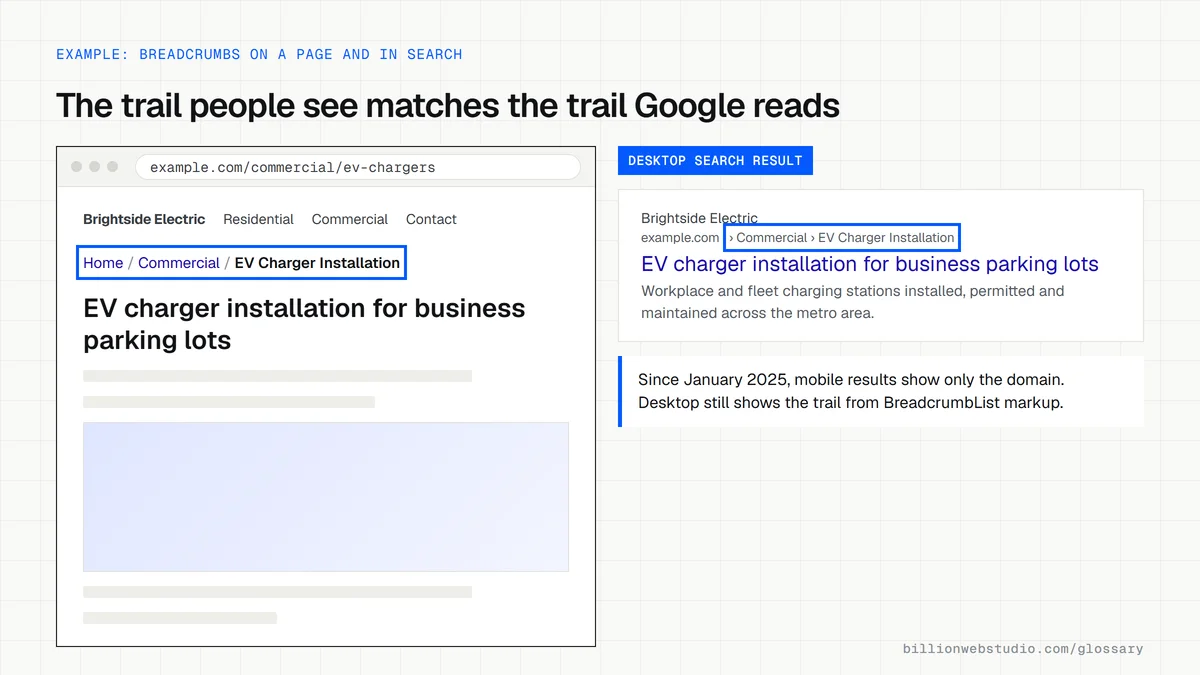
Many visitors land deep in a site from search, on a single product or service page rather than the homepage. Breadcrumbs show them at once what else you offer and give a one-click route to the wider category, which keeps them browsing instead of leaving. They also add internal links to parent pages, and with BreadcrumbList structured data Google can show the trail in desktop search results.
An example of breadcrumb navigation
A landscaping company's page on paver patio installation shows Home > Hardscaping > Paver Patios just above the heading. A visitor arriving from Google sees straight away that the company also builds retaining walls and outdoor kitchens under Hardscaping. The developer adds matching BreadcrumbList markup, so the trail Google reads is the same trail people see on the page.
Breadcrumb navigation in Google search results
- Google reads BreadcrumbList structured data containing at least two ListItem entries to understand where a page sits in the site.
- Since January 23, 2025, Google's mobile results show only the domain in the visible URL, without the breadcrumb trail.
- Desktop results still show breadcrumbs, and Google continues to support the markup for them.
- The Rich Results Test and the breadcrumb report in Search Console still check the markup for errors.
Common breadcrumb navigation mistakes
- Showing a trail that does not match the menu or URL structure, which confuses people about where they are.
- Adding breadcrumb markup that differs from the breadcrumbs visible on the page.
- Making the last item an ordinary link back to the same page instead of marking it as the current page.
- Leaving out a labelled nav landmark, so screen reader users cannot easily find or skip the trail.
- Adding breadcrumbs to a flat five-page site, where they only add clutter.
Copy this BreadcrumbList markup
<script type="application/ld+json">
{
  "@context": "https://schema.org",
  "@type": "BreadcrumbList",
  "itemListElement": [
    {
      "@type": "ListItem",
      "position": 1,
      "name": "Commercial",
      "item": "https://example.com/commercial/"
    },
    {
      "@type": "ListItem",
      "position": 2,
      "name": "EV Charger Installation"
    }
  ]
}
</script>
How to check the breadcrumbs on your site
- Open a deep page, such as a single service or product page, and confirm a trail like Home / Category / Page appears above the heading.
- Click each item in the trail and check it opens the right parent page. The last item should be the current page, shown as plain text.
- Paste the page address into Google's Rich Results Test and click Test URL. Look for Breadcrumbs among the detected items, with no errors.
- In Google Search Console, open the Breadcrumbs report in the left menu (it appears once Google finds breadcrumb markup) to see invalid items across the whole site.
- Compare the names in the markup with the visible trail. They should match word for word.
What good looks like: Every page below the homepage shows a trail that matches the menu structure, the Rich Results Test detects a valid BreadcrumbList with at least two items, and Search Console reports no invalid breadcrumb items.
Free tool: Google Rich Results Test
Questions to ask your web developer
“Are the breadcrumbs generated from the site structure, or typed by hand on each page?”
A good answer: Generated by the page template from the site hierarchy, so new pages get a correct trail automatically and the visible links and the JSON-LD come from the same data.
“How is the trail marked up for screen reader users?”
A good answer: A nav element labelled Breadcrumb containing an ordered list, with aria-current="page" on the last item, following the W3C breadcrumb pattern.
“Will the breadcrumb markup pass Google's tests at launch?”
A good answer: Yes. Each page template is checked in the Rich Results Test before launch, and the Search Console breadcrumbs report is reviewed once Google has recrawled the site.
Breadcrumb navigation: common questions
Do breadcrumbs help SEO?
They help in two ways. Breadcrumbs add internal links from deep pages up to category pages, which makes the site structure clearer to Google, and BreadcrumbList markup lets Google show the trail in desktop results. They are not a ranking shortcut on their own, but they support a well-organized site.
Where should breadcrumbs go on a page?
Place them near the top of the main content, below the main menu and above the page heading, where people expect to find them. Keep them small and plain so they do not compete with the headline, and show them consistently on every page below the homepage.
Does a small website need breadcrumbs?
Not always. A site with a handful of pages, all one click from the menu, gains little from breadcrumbs. They earn their place once you have two or more levels, such as service categories with individual service pages, blog categories or product collections.
Sources
Want a website that gets this right?
Every Billion Web Studio build includes technical SEO, schema and speed work as standard, with a fixed quote within 1 business day.