SEO
What Is Anchor Text?
Anchor text is the visible, clickable text of a hyperlink. It tells visitors and search engines what the linked page is about, so a descriptive phrase like "roof repair pricing" works far better as anchor text than "click here".
What anchor text means in plain English
In a page's HTML, a link looks like <a href="/pricing">see our pricing</a>. The words between the tags, here "see our pricing", are the anchor text. Google's SEO Starter Guide calls it link text and says it tells users and Google something about the page you are linking to. For an image link, Google uses the image's alt text as the anchor.
Anchor text is often grouped into types: exact match (the target keyword itself), partial match (the keyword plus other words), branded (your company name), naked URLs (the web address shown as text) and generic phrases like "read more". A natural website uses a mix, because people describe links in many different ways.
Why anchor text matters for your website
Good anchor text helps a visitor decide whether to click, which keeps people moving toward a service page or contact form. It also gives Google context about the destination page. Google's guidance asks for link text that is descriptive, reasonably concise and relevant to both pages, and warns that cramming keywords into links counts as keyword stuffing.
An anchor text example
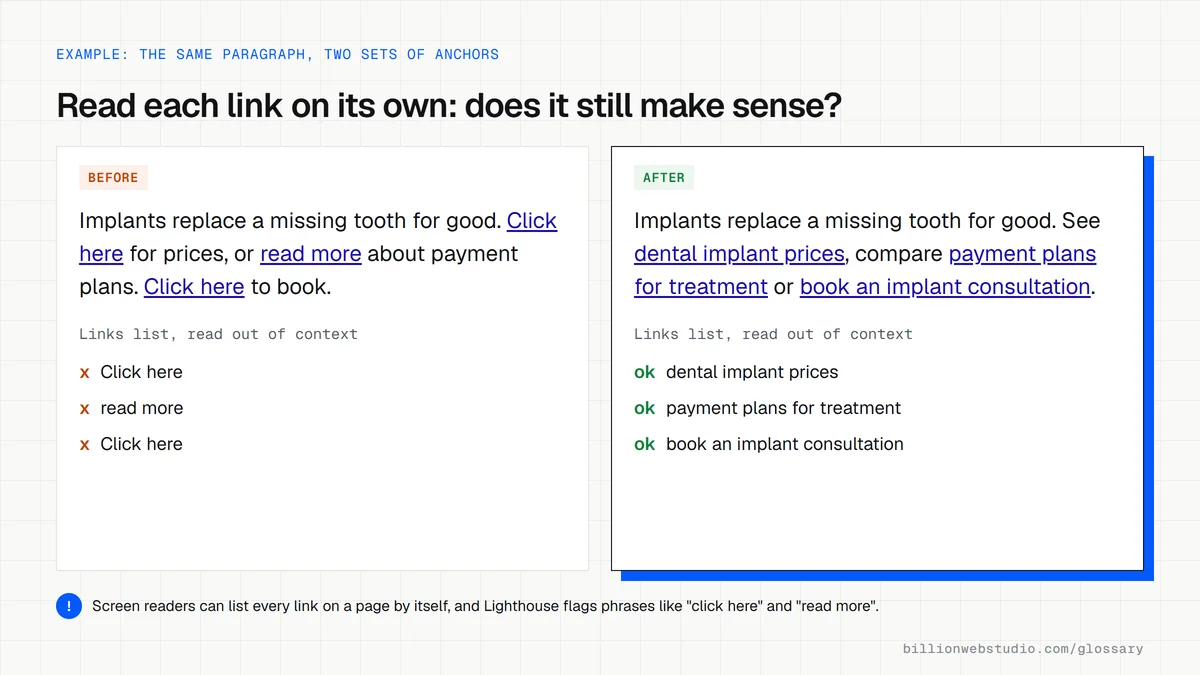
A roofing company's blog post ends with "To find out more, click here." A reader skimming the page has no idea where that link goes. Rewritten, it says "See what a full roof replacement costs in Denver." The link now explains the destination, invites the right reader and tells Google the target page covers roof replacement pricing in Denver.
Common anchor text mistakes
- Using "click here", "read more" or "learn more" for every link, so nobody knows where it leads.
- Repeating the same exact-match keyword in every link to a page, which looks manipulated.
- Turning a whole sentence into link text instead of a short, descriptive phrase.
- Placing several links side by side with no surrounding words to tell them apart.
- Building links with JavaScript click handlers instead of a standard <a href> element that Google can follow.
Generic anchor text and better rewrites
| Link goes to | Weak anchor | Better anchor |
|---|---|---|
| Pricing page | Click here | see our maintenance plan prices |
| Service page | Learn more | emergency boiler repair |
| Case study | Read more | how we rebuilt a bakery's online ordering |
| Booking form | Here | book a free roof inspection |
| PDF download | Download | the 2026 price list (PDF, 1 MB) |
| Homepage, from a logo image | Logo with empty alt text | Logo with alt="Northside Plumbing home" |
How to check the anchor text on any page of your site
- Open the page in Chrome, press F12 (Cmd+Option+I on a Mac) to open DevTools, and select the Lighthouse panel.
- Tick only the SEO category, choose Mobile or Desktop, and click Analyze page load.
- In the report, look for the audit named "Links do not have descriptive text". It lists every link that uses phrases such as "click here", "here", "more" or "learn more".
- For links from other websites, open Google Search Console, click Links and read the Top linking text table under External links.
- Read each in-content anchor on its own and ask whether a stranger would know where it leads.
What good looks like: Lighthouse passes the descriptive link text audit, and every in-content link names its destination in a few words. Anchors from other sites are mostly your brand name, service names or natural phrases, not one exact keyword repeated.
Free tool: Lighthouse: Links do not have descriptive text
Questions to ask your web developer
“How do you choose the anchor text for links you add between our pages?”
A good answer: Each anchor names the destination page's topic in a few words, matching how a customer would describe it, and the wording varies naturally instead of repeating one exact keyword on every link.
“Can you show me that no link on the site uses generic text like "click here" or is built without a real <a href> element?”
A good answer: Yes: a Lighthouse SEO report or crawl export with no descriptive link text failures, and every button that navigates uses a standard link, so both people and Google can follow it.
“If you earn links from other sites for us, what anchor text will they use?”
A good answer: Mostly the business name or the page's natural title, chosen by the linking site. No paid placements with keyword-rich anchors, which Google's spam policies treat as link schemes.
Anchor text: common questions
What is an example of anchor text?
In the sentence "Compare our website redesign packages before you decide", if the words "website redesign packages" are the clickable part, they are the anchor text. They describe exactly what the visitor will find on the next page, which is what good anchor text should do.
Does anchor text affect SEO?
Yes. Google says link text tells users and Google something about the page being linked to, so it helps search engines understand the target page. Descriptive, concise anchors help most. Stuffing keyword-heavy anchors into links can count as keyword stuffing under Google's spam policies.
What is the best anchor text for internal links?
Use a short phrase that matches what the destination page actually covers, such as "emergency plumbing in Austin" for that service page. Vary the wording naturally across the site, and read the anchor on its own: if it still makes sense without the rest of the sentence, it is doing its job.
Sources
Want a website that gets this right?
Every Billion Web Studio build includes technical SEO, schema and speed work as standard, with a fixed quote within 1 business day.