SEO
What Is Google Indexing?
Google indexing is the process in which Google analyzes a crawled web page and stores it in the Google index, its database of pages that can appear in search results. A page that is not indexed cannot show up in Google Search.
What Google indexing means in plain English
Google Search works in three stages. In crawling, automated programs download pages they find through links and sitemaps. In indexing, Google analyzes each page's text, images and key tags, works out what it is about, groups duplicates, chooses a canonical version and stores it. In serving, Google returns relevant results from that index when someone searches.
Indexing is not guaranteed. Google states that not every page it processes will be indexed, even when the page follows its guidelines, and it does not accept payment to crawl or rank a site. Being indexed does not mean ranking well either; it only means the page is eligible to appear.
Why Google indexing matters for a business website
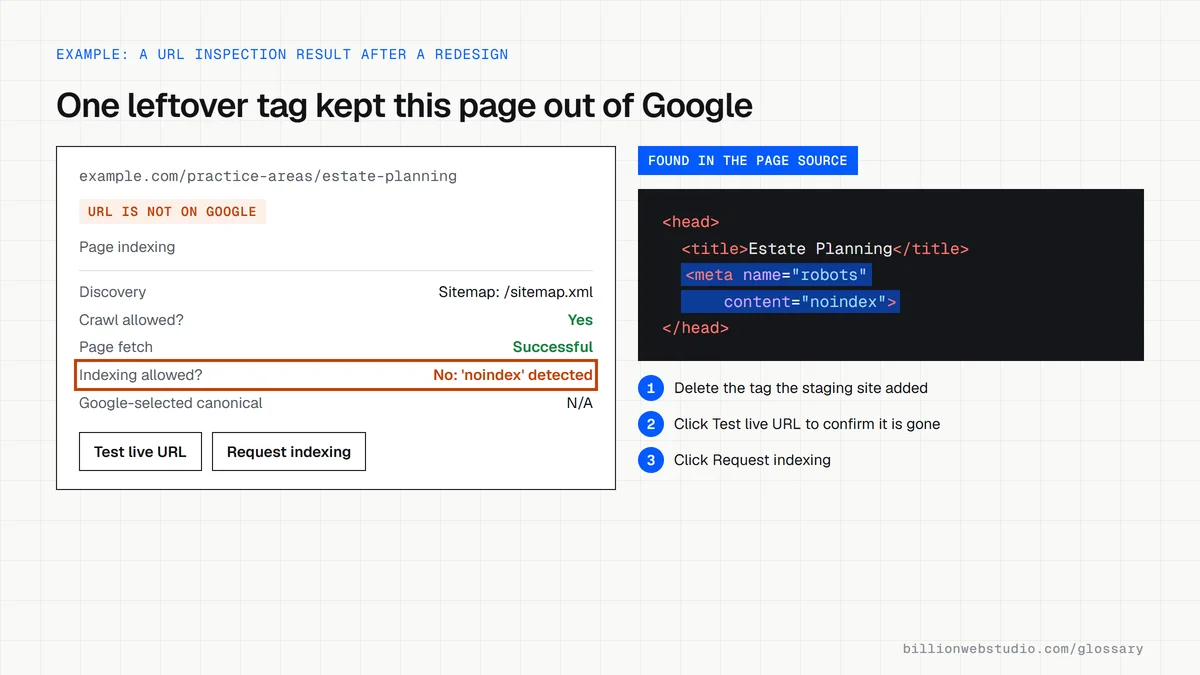
If your service, location or product pages are not indexed, they cannot bring a single visitor from Google, however well designed they are. Indexing problems often go unnoticed for months because the site looks fine in a browser. A stray noindex tag left over from a staging site, for example, can quietly remove a whole website from search.
A Google indexing example
A law firm launches a redesigned website, and calls from search dry up. URL Inspection in Search Console reports the new practice area pages as "Excluded by 'noindex' tag", because the developer left the staging setting switched on. Removing the tag, resubmitting the sitemap and requesting indexing for the key pages brings them back once Google recrawls them.
How to check and fix Google indexing
- Use URL Inspection in Google Search Console for the exact index status of any single page.
- Review the Page indexing report to see every excluded page and the reason Google gives.
- Remove stray noindex tags and robots.txt rules that block pages you want in search.
- Submit an XML sitemap and link every important page from other pages on your site.
- Request indexing for new or fixed pages, knowing that a request does not guarantee inclusion.
Common Page indexing reasons and what to do about each
| Reason in Search Console | What it means | What to do |
|---|---|---|
| URL marked 'noindex' (also shown as Excluded by 'noindex' tag) | A robots meta tag or header tells Google not to index the page | Remove it if the page should be found, then click Request indexing |
| URL blocked by robots.txt | Google is not allowed to crawl the page | Delete the rule if the page should rank |
| Crawled - currently not indexed | Google read the page and chose not to store it for now | Make the page more useful and distinct, and link to it from related pages |
| Discovered - currently not indexed | Google knows the URL but has not crawled it yet | Link to it internally and keep it in the sitemap |
| Duplicate without user-selected canonical | Google treats it as a copy and picked another URL | Add a canonical tag or merge the pages |
| Page with redirect | The URL redirects, so its target is indexed instead | Nothing if intended; point links and the sitemap at the final URL |
| Soft 404 | The page looks empty or missing but returns a success code | Return a real 404 or 410, or add real content |
How to check whether Google has indexed a page
- Sign in to Google Search Console, paste the full page address into the inspection bar at the top and press Enter.
- Read the headline result: URL is on Google means the page is indexed, while URL is not on Google means it cannot appear in results.
- Open the Page indexing section and read Indexing allowed? and Google-selected canonical to see why a page is out, or which other URL Google indexed instead.
- Click Test live URL to check the current version, then Request indexing once any problem is fixed.
- For the whole site, open Indexing, then Pages, and read the reasons listed under Why pages aren't indexed.
What good looks like: Every page you want found shows URL is on Google, Indexing allowed? says Yes, and the Google-selected canonical is the page itself. Excluded pages are only ones you meant to exclude, such as redirects, filters and thank-you pages.
Free tool: Search Console URL Inspection tool
Questions to ask your web developer
“How will you stop the staging site's noindex setting from reaching the live site?”
A good answer: Noindex is controlled by an environment setting rather than by hand, and the launch checklist includes checking robots meta tags, robots.txt and URL Inspection on key pages on launch day.
“Which pages should stay out of Google, and how will they be excluded?”
A good answer: A written list, such as thank-you, cart, account and internal search pages, each excluded with noindex, while every other page is listed in the XML sitemap.
“How will you confirm the new site is indexed after launch?”
A good answer: They submit the sitemap, inspect the main page templates in the first days, and review the Page indexing report weekly until the counts settle.
Google indexing: common questions
How long does it take Google to index a page?
Google says crawling can take anywhere from a few days to a few weeks, and indexing follows only if Google decides the page is worth keeping. Internal links, an updated sitemap and a URL Inspection request help Google find the page sooner, but asking repeatedly for the same URL does not speed it up.
Can I pay Google to index my website faster?
No. Google states that it does not accept payment to crawl a site more often or rank it higher. Its Indexing API is limited to job posting and livestream video pages, so for most businesses the tools are a clean sitemap, solid internal linking and the Request indexing button in Search Console.
Why is my page not indexed by Google?
Common reasons are a noindex tag, a robots.txt rule blocking the page, a canonical tag pointing elsewhere, duplicate or thin content, or no links pointing to the page. URL Inspection in Google Search Console shows the status and reason for any URL, and the Page indexing report lists every excluded page.
Sources
Want a website that gets this right?
Every Billion Web Studio build includes technical SEO, schema and speed work as standard, with a fixed quote within 1 business day.