SEO
What Is On-Page SEO?
On-page SEO is the work done on a web page itself to help it rank for the searches it targets, including the main content, title tag, headings, meta description, images, internal links and URL.
What on-page SEO means in plain English
On-page SEO is about making one page the clearest answer to one kind of search. That starts with knowing what the searcher wants, then writing content that covers it, and then making sure the signals Google reads, such as the page title, headings and image descriptions, describe that content accurately. Everything involved sits on the page and is under your direct control.
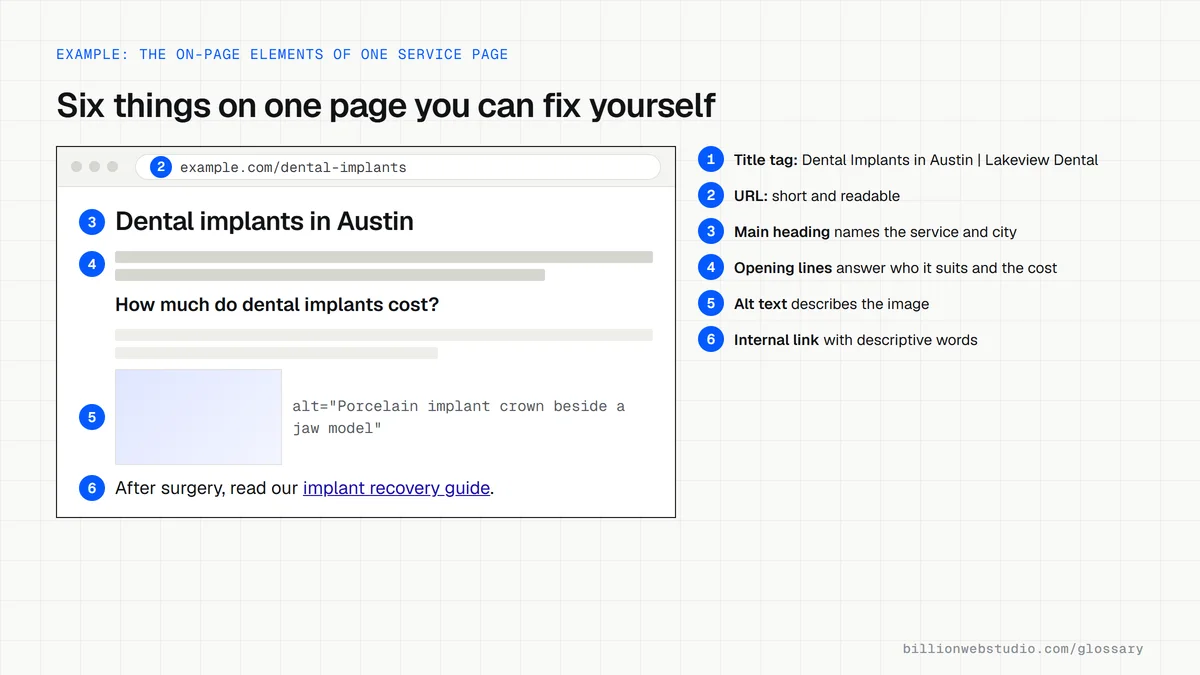
The main elements of on-page SEO
- Content that fully answers the search, written for people rather than repeated keywords.
- A title element that is unique to the page, clear and accurate, since Google uses it for the title link in results.
- A meta description that summarizes the page, which Google sometimes uses as the snippet.
- Headings that break the page into scannable sections.
- Descriptive URLs, image alt text and internal links with meaningful anchor text.
Why on-page SEO matters for a business website
On-page work is the cheapest SEO lever because it needs no outside help, only edits to pages you already own. A page with a precise title and content that matches what buyers ask can climb for searches it was missing, and the same clarity helps visitors decide to call. Google's guide also notes that it does not use the keywords meta tag, so effort belongs on visible content.
An example of on-page SEO
A law firm's page about car accidents is titled Home, Services, Smith Law and opens with the firm's history. After optimization the title reads Car Accident Lawyer in Tampa, Smith Law, the first paragraph explains how claims work in Florida, and new sections cover costs, timelines and what to bring to a first meeting. Internal links point to related injury pages.
Copy this on-page template for a service page
<head>
  <title>Dental Implants in Austin | Lakeview Dental</title>
  <meta name="description" content="Single and full-arch dental implants in Austin, with 3D scans, a written quote before treatment and evening appointments.">
  <link rel="canonical" href="https://www.example.com/dental-implants">
</head>
<body>
  <h1>Dental implants in Austin</h1>
  <p>Who implants suit, what they cost and how to book a consultation.</p>

  <h2>How much do dental implants cost?</h2>
  <img src="/images/implant-crown.jpg" width="800" height="533"
       alt="Porcelain implant crown beside a model of the lower jaw">

  <h2>What happens at each appointment</h2>
  <p>After surgery, follow our <a href="/dental-implants/recovery">implant recovery guide</a>.</p>
</body>
How to check the on-page SEO of one page in ten minutes
- Open the page in Chrome, press Ctrl+U (Cmd+Option+U on a Mac) to view the source, then press Ctrl+F and search for <title and name="description" to read the title and meta description.
- Search the same source for <h1 and <h2 and read the headings in order: together they should outline the page like a table of contents.
- Right-click an important image, choose Inspect and read its alt attribute in the panel that opens. It should describe the image, not repeat a keyword list.
- In Google Search Console, open Performance, click + Add filter, choose Page, paste the page URL and click Apply, then open the Queries tab.
- Compare those queries with the page: questions people search for that the page never answers are the next sections to write.
What good looks like: The title and main heading name the same service or topic, headings follow a logical order, images have descriptive alt text, and the top queries in Search Console match what the page is about.
Free tool: Google Search Console
Questions to ask your web developer
“Which search does each page target, and where is that written down?”
A good answer: A keyword map lists every URL with one main search phrase and its intent, so no two pages chase the same phrase and every new page has a clear job before it is written.
“When you change an existing page, how will we know whether it worked?”
A good answer: Each change is logged with its date, and Search Console clicks, impressions and position for that page are compared over equal periods before and after, usually four weeks or more.
On-page SEO: common questions
What is the difference between on-page and off-page SEO?
On-page SEO covers changes you make to your own pages, such as content, titles, headings and internal links. Off-page SEO covers signals from elsewhere on the web, mainly links from other sites, reviews and business listings. On-page work makes a page worth ranking, and off-page signals show others trust it.
Do meta descriptions still matter for SEO?
They matter for clicks more than for rankings. Google says it usually builds the snippet from page content and only sometimes uses the meta description, so a good one is short, unique to the page and covers its key points. When Google does show it, a clear summary can persuade searchers to choose your result.
Does putting keywords in the URL help rankings?
Barely. Google's starter guide says keywords in the domain name or URL path alone have hardly any effect beyond appearing in breadcrumbs. Readable URLs are still worth having because they help people understand a result before clicking, but rewriting existing URLs purely for keywords is rarely worth the redirect risk.
Sources
Want a website that gets this right?
Every Billion Web Studio build includes technical SEO, schema and speed work as standard, with a fixed quote within 1 business day.