SEO
What Is an Orphan Page?
An orphan page is a web page that no other page on the same website links to. Visitors cannot reach an orphan page by clicking through the site, and search engines may never find it or may treat it as unimportant.
What an orphan page means in plain English
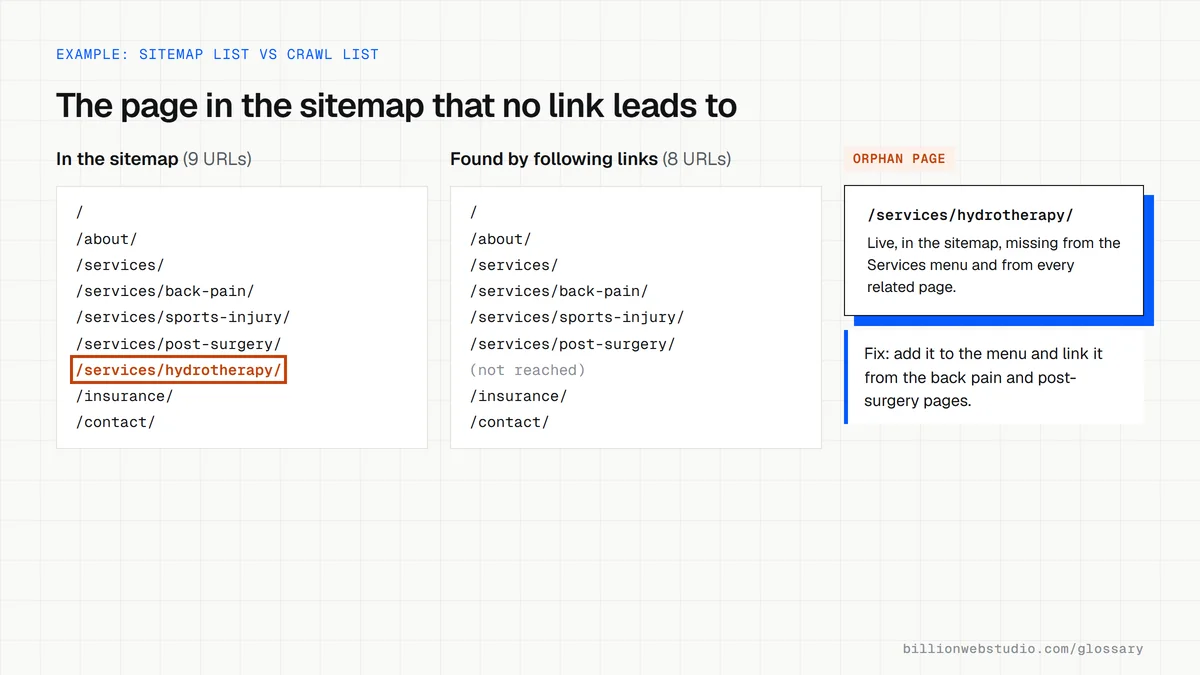
A page can be live, published and listed in your sitemap but still be an orphan if nothing in your menus, footer, blog posts or other pages points to it. The only ways in are typing the address, an outside link, an ad or the sitemap. Orphans usually appear by accident during redesigns, CMS migrations or campaign launches.
Google finds most new pages by following links, and its guidance says every page you want indexed should have a link from at least one other page on your site. A sitemap helps Google discover a URL, but Google says a sitemap does not guarantee that every page in it will be crawled and indexed.
Why orphan pages matter for a business website
An orphan page wastes the work that went into it. A service page nobody can navigate to earns no leads from site visitors, and without internal links Google gets little signal that the page matters, so it may rank poorly or never be indexed. Orphaned landing pages from old ad campaigns can also keep showing outdated prices or offers.
An orphan page example
A physical therapy clinic adds a page for dry needling but forgets to add it to the services menu. The page is in the sitemap, so Google eventually finds it, yet weeks later Search Console shows almost no impressions for it. Adding the page to the menu and linking to it from three related treatment pages makes it a proper part of the site.
How to find and fix orphan pages
- Export every URL from your sitemap and CMS, then compare it with the URLs a site crawler finds by following links.
- Treat any URL that appears in the sitemap but not in the crawl as an orphan.
- Link each page worth keeping from its parent category or a related page, using descriptive anchor text.
- Redirect or remove orphans that are outdated, duplicated or no longer offered.
- Recheck after every redesign or migration, because that is when menus and links most often change.
What to do with each orphan page you find
| Orphan page | Action | Why |
|---|---|---|
| Current service or product page | Link it from its menu or category and two related pages | It should bring leads and needs links to rank |
| Paid campaign landing page | Leave it unlinked; add noindex if it copies other pages | It is built for ad traffic, not search |
| Old offer or discontinued service | 301 redirect to the closest current page | Stops visitors seeing outdated prices or offers |
| Duplicate of another page | 301 redirect, or a canonical tag if it must stay live | Keeps signals on one URL |
| Thank you or confirmation page | Leave it unlinked and noindexed | Visitors should only reach it after a form |
How to find orphan pages with free tools
- Open your XML sitemap, usually at yoursite.com/sitemap.xml or listed in Search Console under Indexing, then Sitemaps, and copy every page URL into column A of a spreadsheet.
- Crawl the site from the homepage with a link crawler such as Screaming Frog SEO Spider, which is free for up to 500 URLs, and paste the HTML pages it found into column B.
- In cell C2 type =COUNTIF(B:B, A2) and fill it down. Any row showing 0 is a sitemap URL that no internal link leads to. Check both lists use the same https and trailing slash format first.
- For each 0, open Links in Search Console, click More under Internal links and look for the URL. A missing entry or a very low count confirms Google sees few or no links to it either.
- Decide what to do with each orphan using the table on this page, and repeat the check after every redesign.
What good looks like: The only rows showing 0 are pages you meant to keep out of the navigation, such as thank you pages or paid campaign landing pages.
Free tool: Search Console Links report help
Questions to ask your web developer
“After the redesign, how will you confirm no page lost all its internal links?”
A good answer: They crawl the old site before launch and the new site after it, compare both crawls with the sitemap and the landing pages in analytics, and fix or redirect every URL that dropped out.
“When we publish a new page, what makes sure it gets linked?”
A good answer: The publishing checklist requires a link from the page's parent menu or category and from at least two related pages before the page goes live.
Orphan page: common questions
Are orphan pages bad for SEO?
Usually, yes. Without internal links, Google may struggle to discover an orphan page and gets no signal that you consider it important, so it may rank poorly or stay out of the index. Deliberate orphans, such as a thank-you page or a paid campaign landing page, are fine if you do not need them in search.
How do I find orphan pages on my website?
Compare two lists. The first is every URL you have published, taken from your sitemap, CMS or analytics. The second is every URL a crawler finds by following links from your homepage. Pages on the first list that are missing from the second are orphans.
How do I fix an orphan page?
First decide whether the page is worth keeping. If it is, link to it from its natural parent, such as a services menu or category page, and from two or three related pages with descriptive anchor text. If it is outdated or duplicated, redirect it to the closest relevant page or remove it.
Sources
Want a website that gets this right?
Every Billion Web Studio build includes technical SEO, schema and speed work as standard, with a fixed quote within 1 business day.