Building and hosting
What Is a Favicon?
A favicon is the small icon that represents a website in browser tabs, bookmarks, phone home screens and Google search results. It is usually a simplified version of the brand's logo, added with a link tag in the HTML head of the homepage.
What a favicon means in plain English
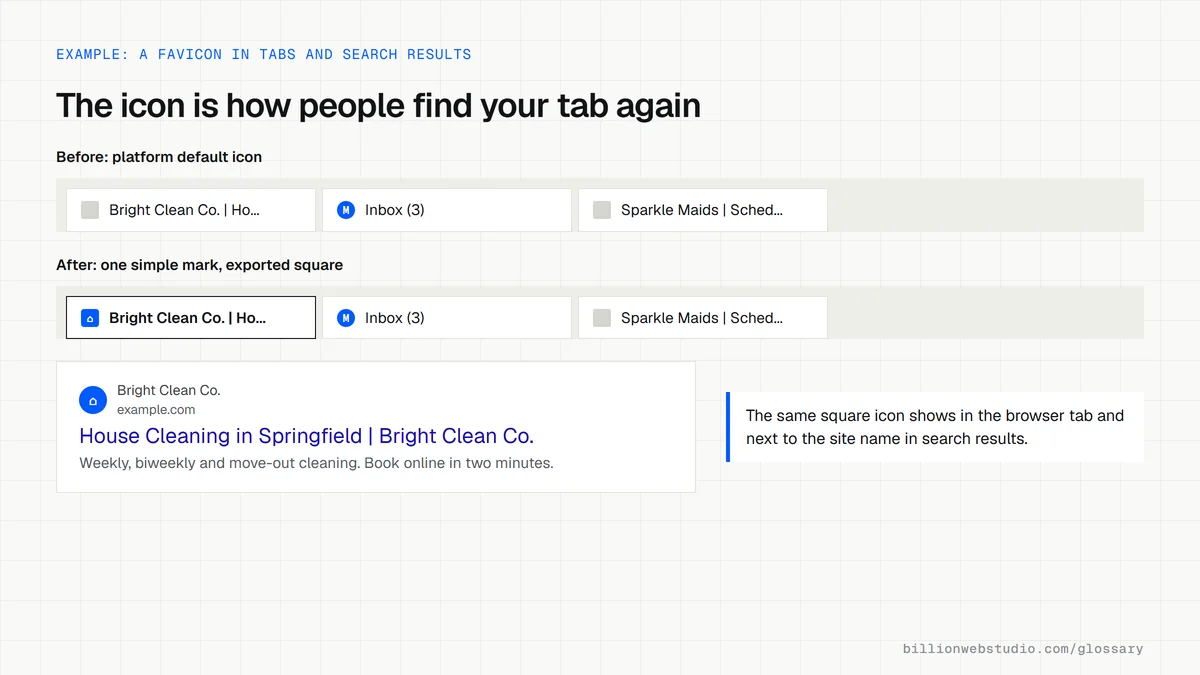
The word is short for favorites icon, because browsers first showed it next to saved favorites. Today it appears in the browser tab, the bookmarks bar, history lists, on a phone's home screen when someone saves your site, and beside your site name in Google results. It is tiny, so a simple mark works far better than a full logo with words.
Technically, a favicon is an image file referenced in your homepage's HTML with a link tag, usually rel="icon". Sites often supply more than one size, for example a small icon for browser tabs and a larger image for Apple devices through rel="apple-touch-icon", so the icon looks sharp wherever it appears.
Why a favicon matters for your business
A favicon is a small trust signal. In a row of open tabs, your icon is how a returning customer finds your site again. In Google results, a blank or blurry icon next to your name looks unfinished beside businesses with crisp ones, and a hosting platform's default icon suggests the site was never properly launched.
Google's favicon rules
- The favicon must be square, with a 1:1 aspect ratio, and at least 8x8 pixels, though Google recommends going larger than 48x48 pixels.
- Common image formats such as ICO, PNG and JPEG are supported.
- Googlebot must be able to crawl the homepage and Googlebot-Image must be able to crawl the icon file.
- Google supports one favicon per hostname, so each subdomain needs its own.
- Keep the favicon URL stable, because after a change Google can take several days to several weeks to show the new icon.
A favicon example
A cleaning company's logo is a blue house outline with the company name beside it. At browser tab size the name becomes unreadable, so the designer exports only the house shape, in white on a blue square. Several sizes are saved, from a small tab icon to a larger home screen icon, and linked in the homepage head.
Copy these favicon tags
<!-- In the <head> of the homepage, and ideally every page -->
<link rel="icon" href="/favicon.ico" sizes="32x32">
<link rel="icon" href="/favicon-96x96.png" type="image/png" sizes="96x96">
<link rel="apple-touch-icon" href="/apple-touch-icon.png">
<!-- favicon.ico: 32x32 for tabs -->
<!-- favicon-96x96.png: square and larger than 48x48 for Google results -->
<!-- apple-touch-icon.png: 180x180 for iPhone and iPad home screens -->
How to check your favicon in browsers and Google
- Open your homepage in Chrome, right-click, choose View page source and search for rel="icon".
- Click the file named in the href value. It should open a square image, not an error page or a redirect to the homepage.
- Open example.com/robots.txt (with your domain) and make sure neither the icon file nor its folder is disallowed.
- Add the site to a phone's home screen and check the icon is sharp, not a letter or a page screenshot.
- If you changed the icon, run the homepage through URL Inspection in Search Console and click Request indexing.
What good looks like: The icon link opens a square file that loads with a 200 status, robots.txt allows it, and the same mark appears in the tab, on a phone home screen and beside your name in search results.
Free tool: Google Search Console URL Inspection
Questions to ask your web developer
“Which favicon files will you deliver, and at what sizes?”
A good answer: A square ICO or PNG for browser tabs, a PNG larger than 48x48 pixels for Google results and a 180x180 Apple touch icon, all drawn from a simplified mark rather than the full logo.
“Will the icon keep the same URL after launch?”
A good answer: Yes. The file stays at one stable address. If the design changes later, they replace the file at that address and ask Google to recrawl the homepage.
Favicon: common questions
What size should a favicon be?
Google requires a square favicon of at least 8x8 pixels and recommends going larger than 48x48 pixels so it looks sharp everywhere. In practice, sites provide several sizes, such as a small icon for browser tabs and larger versions for phone home screens and search results.
Why is my favicon not showing in Google?
Common causes are an icon blocked by robots.txt, an image that is not square, a link tag missing from the homepage, or simply time. Google has to recrawl the homepage first, which can take days or weeks. You can request indexing with the URL Inspection tool in Search Console.
Sources
Want a website that gets this right?
Every Billion Web Studio build includes technical SEO, schema and speed work as standard, with a fixed quote within 1 business day.