SEO
What Is Robots.txt?
Robots.txt is a plain text file at the root of a website that tells search engine crawlers which URLs they may and may not request, mainly to manage crawling rather than to hide pages from search results.
What robots.txt means in plain English
The file always lives at the top level of a domain, such as example.com/robots.txt, and crawlers do not look for it in subfolders. It contains groups of rules: a User-agent line naming the crawler, then Disallow or Allow lines listing paths. The format follows the Robots Exclusion Protocol, published as RFC 9309. Google reads only the first 500 KiB of the file.
Why robots.txt matters for a business website
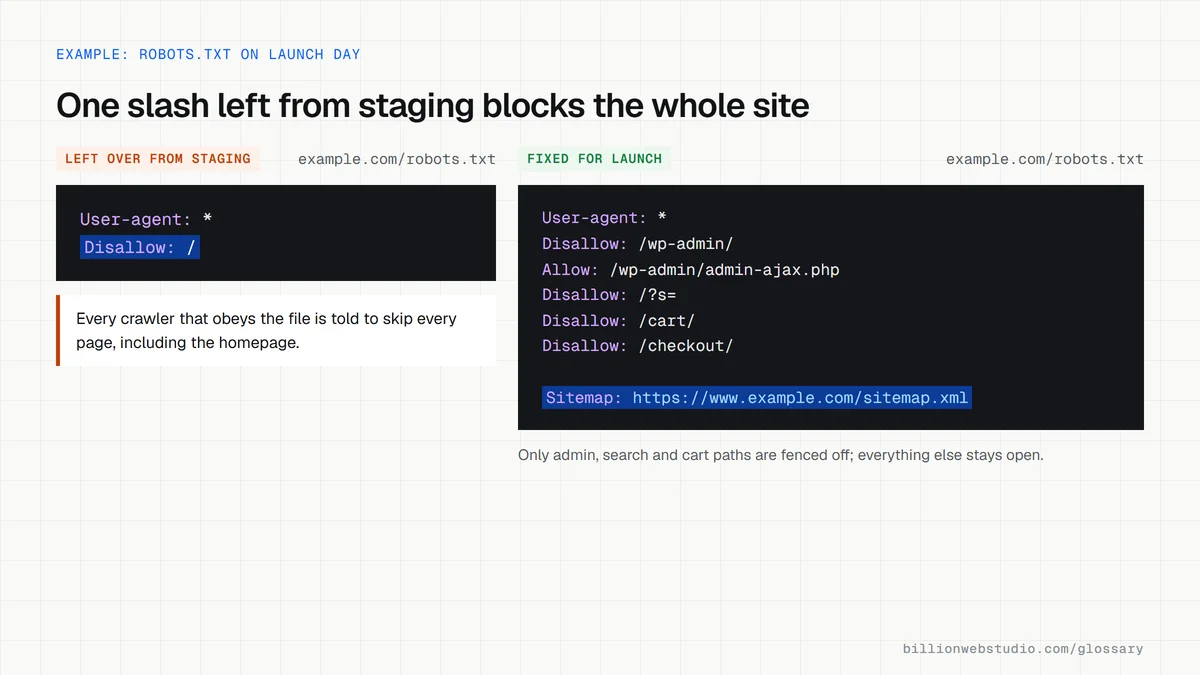
Robots.txt keeps crawlers away from areas that waste their time, such as cart pages, internal search results or endless filter combinations, so they spend effort on pages that earn leads. It can also point crawlers to your XML sitemap. One wrong line can stop Google crawling the whole site, which is why this small file deserves a check after every launch.
An example robots.txt file
A small online store might use four lines. User-agent: * applies the rules to every crawler. Disallow: /cart/ and Disallow: /search/ keep bots out of the basket and internal search pages. Sitemap: https://www.example.com/sitemap.xml tells crawlers where the full list of product and category pages lives. Everything not disallowed stays open to crawling.
Common robots.txt mistakes
- Leaving Disallow: / in place after moving a site from staging to live, which blocks the whole site.
- Using robots.txt to hide a page, when Google may still index a blocked URL that other sites link to.
- Blocking a page that carries a noindex tag, so Google never crawls it and never sees the noindex.
- Blocking CSS or JavaScript files that Google needs to render and understand the page.
- Listing private folders in the file, which anyone can read by visiting /robots.txt.
Copy this robots.txt for a WordPress store
# robots.txt for https://www.example.com
User-agent: *
Disallow: /wp-admin/
Allow: /wp-admin/admin-ajax.php
Disallow: /?s=
Disallow: /search/
Disallow: /cart/
Disallow: /checkout/
Disallow: /my-account/

Sitemap: https://www.example.com/sitemap.xml
How to check your robots.txt file in five minutes
- Type your domain followed by /robots.txt into the browser, for example https://www.example.com/robots.txt. A plain text file should load; a 404 page means you have none.
- Read the group that starts User-agent: *. A line reading Disallow: / with nothing after the slash blocks the whole site.
- In Google Search Console, open Settings, find robots.txt and click Open Report. It works for Domain properties and URL-prefix properties without a path.
- Check the status says Fetched and the issues count is zero. After any edit, open the three-dot menu next to the file and choose to request a recrawl.
- Paste your most important page into URL Inspection and read Crawl allowed? under Page indexing. It should say Yes.
What good looks like: The report shows Fetched with no errors, nothing blocks the whole site or your CSS and JavaScript files, and a Sitemap line gives the full https address of your sitemap.
Free tool: Search Console robots.txt report help
Questions to ask your web developer
“What will robots.txt contain on launch day, and who checks it?”
A good answer: A short file that blocks only low-value areas such as admin, cart and internal search, lists the sitemap, and is checked in the Search Console robots.txt report on launch day.
“Will any CSS, JavaScript or image folders be blocked?”
A good answer: No. Files Google needs to render the page stay crawlable, and the URL Inspection live test is used to confirm the page renders fully.
Robots.txt: common questions
Does robots.txt stop a page from appearing in Google?
Not reliably. Google says a URL blocked by robots.txt can still be indexed if other pages link to it, usually showing without a description. To keep a page out of search results, allow crawling and add a noindex rule, or put the page behind a password.
Can robots.txt block AI crawlers?
Yes, for crawlers that obey it. You can add rules for specific AI user agents by name. Google's Google-Extended token controls whether content may be used to train Gemini models, and Google says it does not affect inclusion or ranking in Google Search. Compliance is voluntary, so badly behaved bots may ignore the file.
What happens if a website has no robots.txt file?
If the file returns a 404 or another 4xx error, Google treats the site as having no crawl restrictions and crawls everything it can find. That is fine for most small sites. Server errors are different: Google pauses crawling for up to 12 hours while it retries the file.
Sources
- Google Search Central: Introduction to robots.txt
- Google Search Central: How Google interprets the robots.txt specification
- IETF RFC 9309: Robots Exclusion Protocol
- Google Search Central: Google's common crawlers (Google-Extended)
- Search Console Help: robots.txt report
- Search Console Help: URL Inspection tool
Want a website that gets this right?
Every Billion Web Studio build includes technical SEO, schema and speed work as standard, with a fixed quote within 1 business day.