Building and hosting
What Is Information Architecture (IA) in Web Design?
Information architecture (IA) stands for Information Architecture.
Information architecture (IA) is the way a website's content is organized, grouped, labeled and connected so visitors and search engines can find what they need. It covers the page hierarchy, menus, category names and URL structure.
What information architecture means in plain English
Information architecture answers three questions before anyone designs a screen: which pages should exist, where each one sits, and what it should be called. The usual output is a site map diagram showing the hierarchy, a list of menu labels, and rules for how pages link to each other and how their URLs are formed.
IA is different from visual design. A site can look polished and still bury its most profitable service three clicks deep under a vague label such as Solutions. Good IA follows the words and mental groupings your customers already use, not the way your departments or price lists happen to be organized internally.
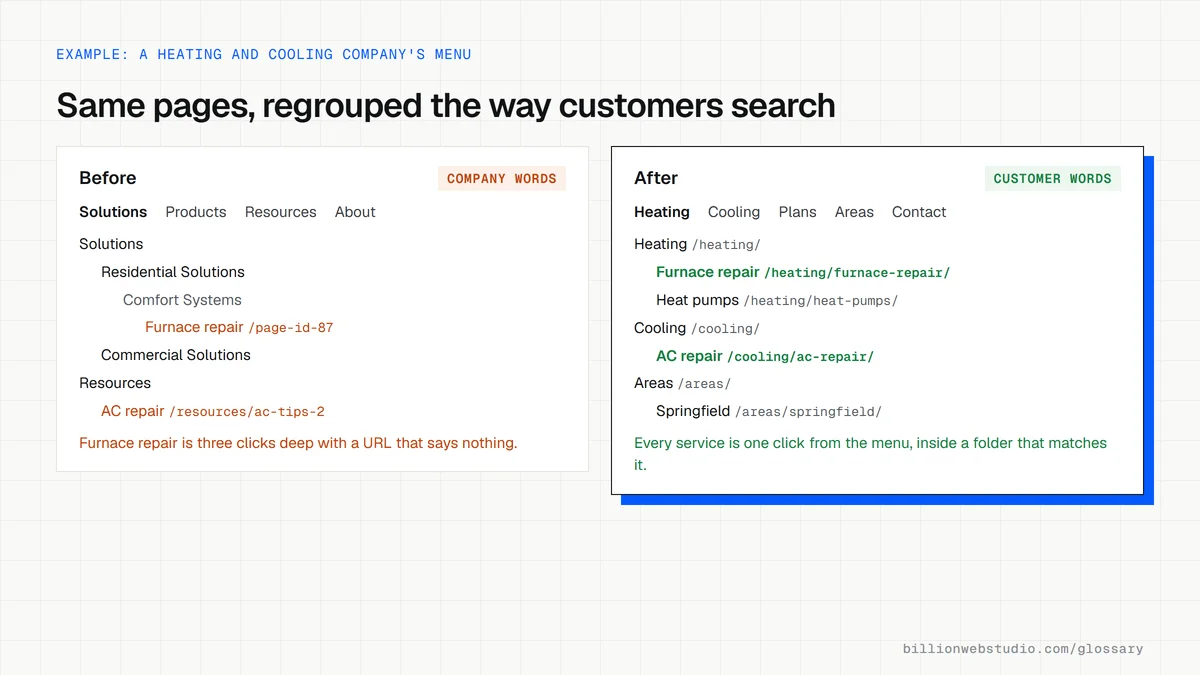
Why information architecture matters for leads and SEO
Visitors who cannot find the page that matches their need rarely search your site for it. They leave and try a competitor. Clear grouping shortens the path from landing to inquiry, and it gives every service a page of its own that can rank for the exact phrases buyers type.
Google's SEO Starter Guide says organizing a site logically helps search engines and users understand how pages relate to the rest of the site, and suggests using directories to group similar topics on large sites. A clear hierarchy also produces natural internal links and breadcrumbs, which pass context between related pages.
An information architecture example
A law firm listed 14 practice areas in one long Services menu using legal terms. A card sort with recent clients showed people grouped needs as family matters, business matters and injuries. The new structure uses those three hubs, each with its own URL folder such as /family-law/divorce, and the busiest practice areas now sit one click from the homepage.
How to test your website's information architecture
- Run an open card sort, where customers group your page topics and name the groups themselves.
- Run a closed card sort to check whether people can place topics into the categories you have chosen.
- Run a tree test, asking people where they would click in a text-only menu to complete a task.
- Review site search terms and Search Console queries for words your menus do not use yet.
- Count the clicks from the homepage to each page that brings in leads, and shorten the longest paths.
Copy this site structure outline
SITE STRUCTURE: Northside Heating and Cooling (example.com)
/                               Home
/heating/                       Heating (hub)
  /heating/furnace-repair/
  /heating/furnace-installation/
  /heating/heat-pumps/
/cooling/                       Cooling (hub)
  /cooling/ac-repair/
  /cooling/ac-installation/
/plans/                         Maintenance plans
/areas/                         Service areas (hub)
  /areas/springfield/
  /areas/riverton/
/reviews/  /about/  /contact/
/blog/                          Guides: each post links to its service page

Main menu: Heating | Cooling | Plans | Areas | Reviews | Contact
How to check your site structure from its sitemap
- Open your XML sitemap, usually at example.com/sitemap.xml or example.com/sitemap_index.xml, and copy the page URLs into a Google Sheet.
- Select the column and use Data > Split text to columns with a custom separator of / to see each URL's folders.
- Sort by the first folder. Each main menu group should have its own folder, and every service page should sit inside one.
- In Search Console, open Performance > Search results, click the Pages tab and note the ten pages with the most clicks.
- Check each of those pages is linked from the main menu or a hub page, not only from the footer or a blog post.
What good looks like: URL folders mirror the menu groups, no money page sits loose at the root or in an unrelated folder, and every high-click page can be reached from the menu or a hub.
Free tool: Google Search Console
Questions to ask your web developer
“Will you test the menu labels with real customers before design starts?”
A good answer: Yes, with a short card sort or tree test, even with a small group of recent customers, and they show you the results and the labels that changed.
“How will the URLs follow the menu, and what happens to old URLs?”
A good answer: Each menu group gets a folder, its pages sit inside it, and every old URL that moves gets a 301 redirect listed in a spreadsheet you approve.
“Where will new pages go as we add services or areas?”
A good answer: There is a written rule: new services go under their hub folder and are linked from the hub, so the structure does not drift over time.
Information architecture (IA): common questions
What is the difference between information architecture and navigation?
Information architecture is the underlying structure: what content exists, how it is grouped and what each group is called. Navigation is the visible interface built on top of it, such as the main menu, footer links and breadcrumbs. Navigation can be redesigned without changing the IA, but weak IA makes any menu confusing.
Is information architecture the same as a sitemap?
Not quite. A visual sitemap diagram is one output of IA work, showing pages and their hierarchy. An XML sitemap is a file listing URLs for search engines. Information architecture is the thinking behind both, including labels, grouping rules and how pages connect to one another.
Who is responsible for a website's information architecture?
On larger projects a UX designer or content strategist leads it, with input from sales, support and SEO. On smaller sites the web designer usually drafts it during discovery. Either way, the business owner should approve the structure before wireframes begin, because changing it later means reworking designs and content.
Sources
Want a website that gets this right?
Every Billion Web Studio build includes technical SEO, schema and speed work as standard, with a fixed quote within 1 business day.