Building and hosting
What Is Headless WordPress?
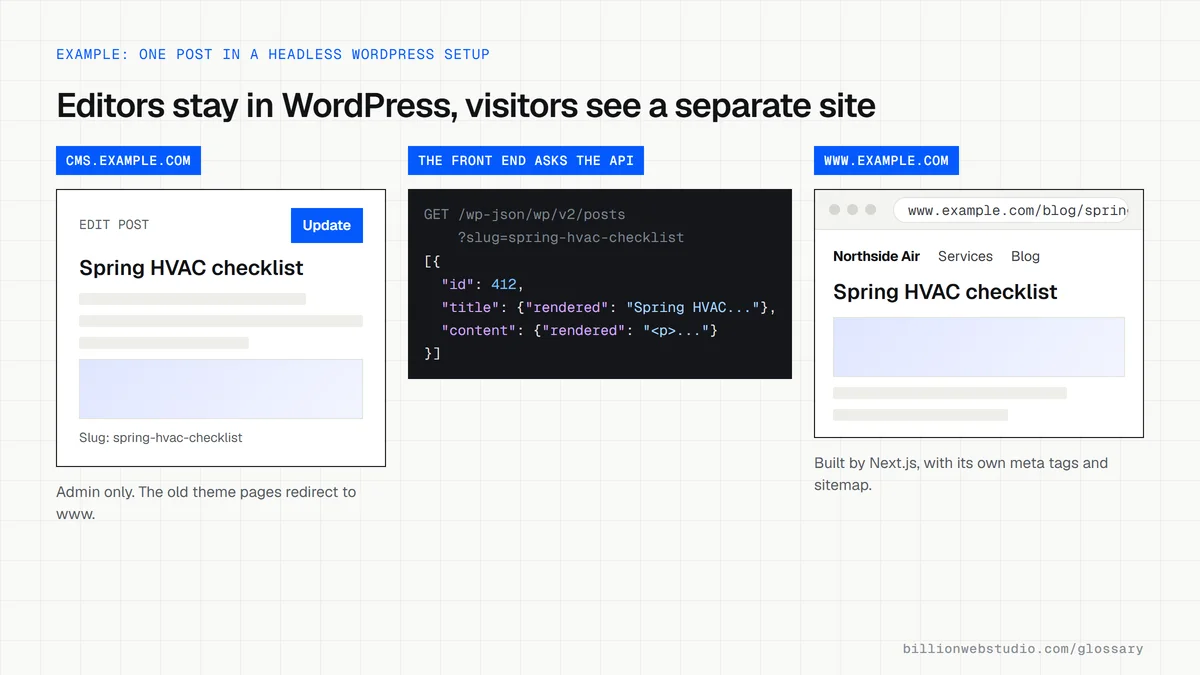
Headless WordPress is a setup in which WordPress is used only for writing and storing content, while a separate front end, often built with a framework such as Next.js, fetches that content through an API and shows it to visitors.
What headless WordPress means in plain English
In a normal WordPress site, the theme turns posts and pages into the HTML visitors see. In a headless setup, the theme stops serving the public site. Editors keep using the WordPress dashboard and block editor, but a different application, hosted separately, requests the content and builds the pages, often ahead of time or on the server.
WordPress ships with a REST API that returns posts, pages and other content as JSON. Many headless builds use WPGraphQL instead, a free plugin that lets the front end ask for exactly the fields it needs. WordPress.org announced in October 2024 that WPGraphQL was becoming a canonical plugin, an officially endorsed plugin with close ties to the core project.
Why headless WordPress matters for a business
The appeal is keeping an editor your team already knows while gaining a fast, fully custom front end. Pre-built pages can be served from a CDN, and the WordPress admin no longer sits on the public domain. It also lets one WordPress install feed a website and an app at the same time.
The catch is that much of WordPress's plugin ecosystem works through the theme. Page builders, many form plugins, SEO plugin output, live preview and some caching tools stop working out of the box, so developers rebuild them. You maintain two codebases and two hosting setups, which raises both build and running costs.
A headless WordPress example
A B2B software company has 400 blog posts in WordPress and a marketing team that writes in the block editor every day. It wants a faster site that matches its product design. Developers rebuild the front end in Next.js and pull posts through WPGraphQL. Before launch they recreate the meta tags, XML sitemap, redirects and demo request form that plugins used to supply.
Common headless WordPress mistakes
- Going headless only for speed when a lean theme and good hosting would reach the same scores.
- Assuming SEO plugin settings will appear on the new front end without extra development work.
- Forgetting to rebuild post previews, so editors cannot see a draft before publishing.
- Leaving the old theme front end publicly reachable, which creates duplicate copies of every page.
- Not planning how new posts trigger a rebuild or cache refresh on the front end.
What a theme gives you that a headless front end must rebuild
| Feature | Regular WordPress theme | Headless front end |
|---|---|---|
| SEO title, description and canonical | Printed by the SEO plugin | Front end must fetch the fields and print them in each page head |
| XML sitemap | Generated by WordPress core or the SEO plugin | Built by the front end with public URLs |
| Redirects | Managed by a plugin or the server | Read from WordPress or set in the front end hosting |
| Draft preview | Preview button works out of the box | Needs a preview route and a secure token on the front end |
| Forms | The form plugin shows and submits the form | Front end builds the form and posts to the plugin's API or another service |
| Block editor layouts | The theme styles every block | Front end must style or map each block type it supports |
Copy these WordPress REST API requests
# Latest 3 posts, only the fields the front end needs
GET https://cms.example.com/wp-json/wp/v2/posts?per_page=3&_fields=id,slug,title,excerpt,date,link

# One post by its slug
GET https://cms.example.com/wp-json/wp/v2/posts?slug=spring-hvac-checklist&_fields=id,title,content,date

# Pages work the same way
GET https://cms.example.com/wp-json/wp/v2/pages?slug=about&_fields=id,title,content
How to check a headless WordPress setup for gaps
- Open your WordPress address followed by /wp-json/wp/v2/posts in a browser. A list of posts as JSON means the API the front end uses is working.
- Now open the WordPress address on its own. It should redirect to the main site or show nothing public, not a full copy of your pages in the old theme.
- On the live site, view the source of a post and search for the meta description and rel="canonical" to confirm the SEO fields carried over.
- Open the sitemap your developer points you to and check every URL uses the public domain, not the WordPress address.
- Publish a test post and time how long it takes to appear on the live site.
What good looks like: The API answers, the WordPress address shows no duplicate public pages, every page carries a meta description and a canonical on the public domain, and new posts appear within the agreed time.
Questions to ask your web developer
“Where will the WordPress admin live, and what happens if someone visits that address?”
A good answer: On a separate address such as cms.example.com, with old theme pages redirected to the main site and the admin behind a login, while the API stays reachable for the front end.
“How will new posts, edits and deletions reach the live site?”
A good answer: A webhook or scheduled rebuild refreshes the changed pages, deleted posts return a 404 or redirect, and the team knows how long a change takes to show.
“Which of our current plugins will stop working, and what replaces each one?”
A good answer: A plugin by plugin list marked keep, replace or rebuild, with the cost of each rebuild shown in the quote.
Headless WordPress: common questions
Is headless WordPress faster than regular WordPress?
Often, but not automatically. Pre-rendered pages served from a CDN can load very quickly. A headless front end weighed down with heavy JavaScript can still be slow, and a well-optimized traditional theme can score just as well. Measure Core Web Vitals on both options before committing.
Do WordPress plugins work with headless WordPress?
Plugins that manage data in the admin, such as custom fields, user roles or editorial workflows, usually still work. Plugins that change what visitors see through the theme, such as page builders, sliders, many form tools and SEO tag output, generally need extra development to work with a separate front end.
Is headless WordPress good for SEO?
It can be, provided the front end renders full HTML on the server or at build time, and the team rebuilds titles, meta descriptions, canonical tags, structured data, sitemaps and redirects. Missing any of these during the switch is a common cause of lost rankings after a headless launch.
Sources
Want a website that gets this right?
Every Billion Web Studio build includes technical SEO, schema and speed work as standard, with a fixed quote within 1 business day.