Building and hosting
What Is Figma?
Figma is a collaborative design tool, used in a web browser or a desktop app, where teams design, prototype, review and hand off the screens of websites and apps, with everyone working in the same live file.
What Figma means in plain English
Figma is where most modern website designs are drawn before anyone writes code. Designers lay out each page, build reusable parts such as buttons and cards, and link screens into a clickable prototype you can tap through on a phone. Because the file lives online, you can open the same design, leave comments on any element and see changes as they happen, without exporting or emailing files.
Figma has grown into a set of products. Figma Design is the main design tool, FigJam is an online whiteboard for workshops and sitemaps, and Dev Mode gives developers measurements, styles, code snippets and downloadable assets. Newer products include Figma Make, an AI prompt-to-app tool, and Figma Sites, still in beta, which publishes responsive websites from designs.
Why Figma matters for your website project
Changing a design in Figma costs minutes. Changing the same thing after it is built costs developer hours. A good Figma stage lets you approve layout, content order, mobile views and calls to action while changes are still cheap, and gives the developer an exact reference instead of a description. The Figma file is also a business asset: it holds your brand components and is the starting point for every future page or redesign.
A Figma example
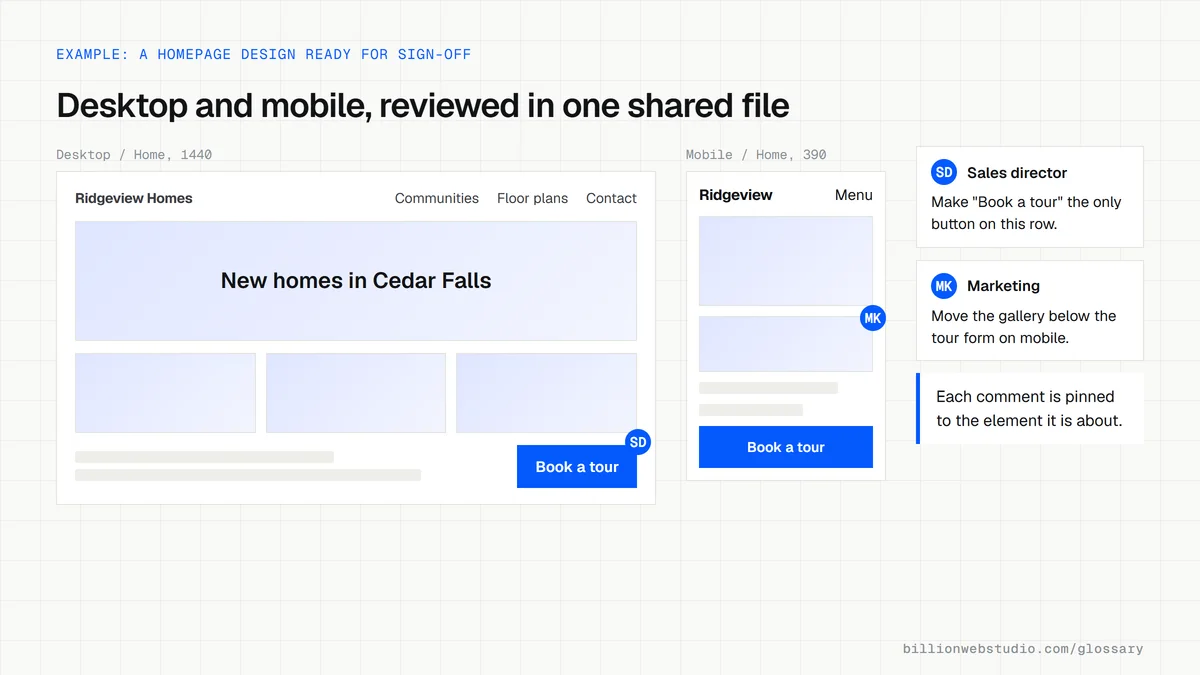
A home builder is redesigning its website. The designer shares a Figma link with the homepage, a community page and a floor plan page, each in desktop and mobile versions. The sales director leaves comments directly on the inquiry form and the photo gallery, and the team taps through the prototype on their phones. Once approved, the developer opens the same file in Dev Mode to read spacing, colors and fonts and export icons as SVG.
Common Figma mistakes
- Approving only desktop designs and leaving the mobile layout to be improvised during the build.
- Signing off designs filled with placeholder text that real content will not fit.
- Leaving the only copy of the design file in a freelancer's or agency's personal account.
- Treating a polished clickable prototype as proof that the finished site will be fast and accessible.
- Giving feedback by email screenshots instead of comments pinned to the exact element in the file.
Which Figma seat each person on a website project needs
| Person | Seat | What that seat allows |
|---|---|---|
| Designer | Full | Edits Figma Design files, with full access to Dev Mode, FigJam and Figma Slides |
| Developer building the site | Dev | Full Dev Mode for inspecting and exporting, plus view and comment access in design files |
| Marketing lead running workshops | Collab | Creates in FigJam and Figma Slides, and views and comments on design files |
| Owner or approver | View (free) | Views and comments on files shared with them, with basic inspection, at no cost |
How to check a Figma file before you approve the design
- Open the share link and look at the left sidebar: every page you are paying for should have both a desktop frame and a mobile frame.
- Select Present in the toolbar (Ctrl+Alt+Enter on Windows, Cmd+Option+Return on a Mac) and click through the main path, from homepage to service page to inquiry form.
- Read the text on every frame. Real headlines, service names and prices should be in place, not Lorem ipsum or placeholder copy.
- Press C to open the comment tool, click the exact element you want changed and type your note, so the feedback stays attached to the design.
- Check where the file lives in the file browser. If it sits in the designer's own team, ask them to right-click the file, choose Move and place it in a team your business owns.
What good looks like: Desktop and mobile frames for every page, real content in place, a prototype that reaches the inquiry form, all comments resolved, and the file stored in a team where your business is an owner. Moving a file between teams needs can edit permission in both teams.
Free tool: Figma Help: View prototypes in the prototype viewer
Questions to ask your web developer
“Will the design file sit in a Figma team our business owns?”
A good answer: Yes. The file is created in, or moved before handoff into, a team where your business holds an owner role, and the designer keeps edit access only for the length of the project.
“Which screen widths will you design, and how should layouts behave in between?”
A good answer: Named widths such as desktop, tablet and mobile for every template, plus notes on how each layout adapts between them, so nothing is improvised during the build.
“Are colors, text styles and buttons set up as reusable styles and components?”
A good answer: Yes. Colors and text are saved as styles or variables and repeated parts are components, so the developer reads exact values in Dev Mode and future pages reuse them.
Figma: common questions
Is Figma a website builder?
Mainly, no. Figma is a design and prototyping tool, and most websites designed in Figma are then built in a CMS such as WordPress or Webflow, or in custom code. Figma Sites, which was still in beta as of October 2026, can publish simple responsive websites directly from designs.
What is Dev Mode in Figma?
Dev Mode is a developer workspace inside Figma Design for inspecting designs, viewing properties and generated code, downloading assets and tracking changes. Figma's help center says it is available on Professional, Education, Organization, Government and Enterprise plans and requires a Full or Dev seat.
Should I own the Figma file for my website?
Yes. Ask for the design file to be transferred to a Figma team your business controls, or at least shared with edit access, before the project ends. Without it, future pages and redesigns have to start from screenshots or from the live site.
Sources
Want a website that gets this right?
Every Billion Web Studio build includes technical SEO, schema and speed work as standard, with a fixed quote within 1 business day.