Building and hosting
What Is a Headless CMS?
Headless CMS stands for Headless Content Management System.
A headless CMS is a content management system that stores and organizes content but has no built-in website front end, delivering that content through an API to any website, app or screen a developer builds.
What a headless CMS means in plain English
The head is the part of a website visitors see: the templates, layout and styling. A traditional CMS bundles the head with the content store, so editing and display live in one system. A headless CMS removes the head. Editors still log in and fill in fields, but the system only hands out content as data, usually JSON over a REST or GraphQL API.
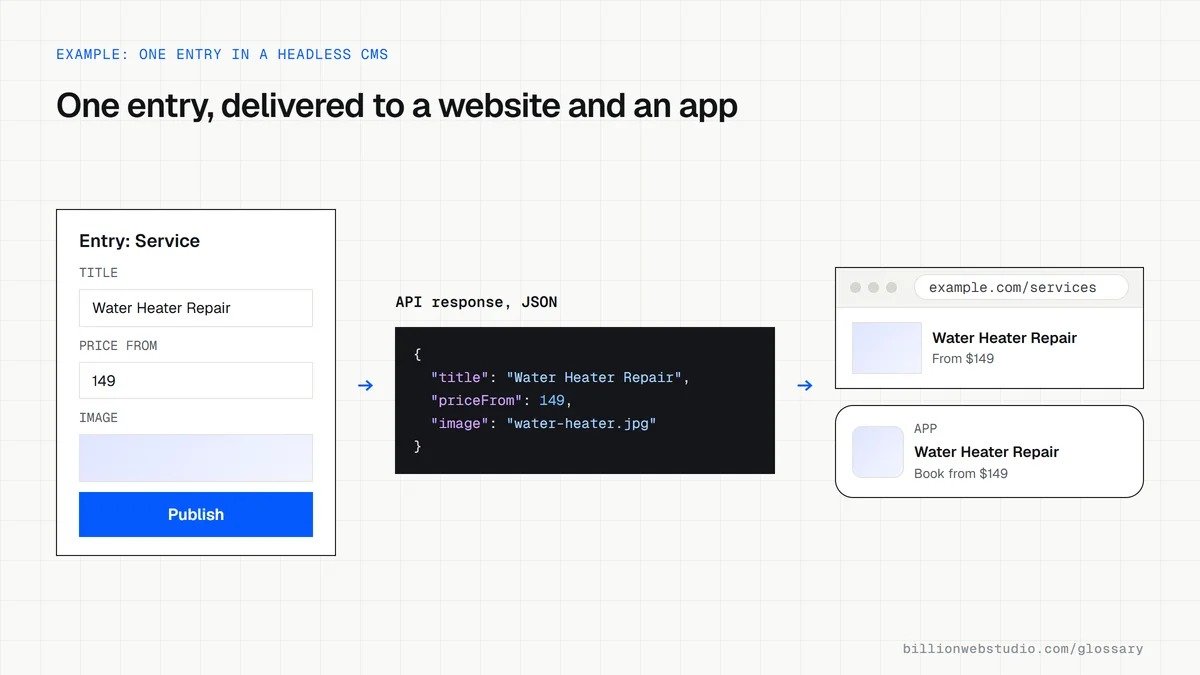
Content is modeled as structured fields rather than free pages. A service entry might have a name, a summary, a price range, an image and a list of FAQs. Developers then decide how those fields appear on the website, in a mobile app or on an in-store display. Contentful, Sanity and Strapi are well-known examples, and WordPress can also run this way.
Why a headless CMS matters for a business
The benefits are freedom and reuse. Developers can build the front end in any framework, pre-render pages for speed, and publish the same product data to the website, an app and partner portals from one source. The editing system is not exposed on the public site, which shrinks what attackers can reach.
The costs land on day-to-day editing and budget. Marketers often lose drag-and-drop page building and true live previews unless developers build them. Features that a traditional CMS gets from plugins, such as forms, SEO fields, redirects and sitemaps, must be built into the front end. You also run and pay for two systems.
A headless CMS example
An industrial equipment maker publishes the same specification sheets on its website, in a distributor portal and on touchscreens at trade shows. Updating three copies by hand caused errors. With a headless CMS, engineers edit each product once, and all three front ends fetch the latest figures through the API, so a corrected load rating appears everywhere at the same time.
How to decide if you need a headless CMS
- You publish the same content to more than one channel, such as a website and an app.
- Your front end needs a custom framework or performance level that themes cannot reach.
- You have developers available after launch, because layout changes will usually need them.
- Your marketing team can work with structured fields rather than a visual page builder.
- You have priced the extra hosting, preview setup and maintenance of running two systems.
Copy this example of headless CMS content as JSON
{
  "type": "service",
  "slug": "water-heater-repair",
  "title": "Water Heater Repair",
  "summary": "Same-week repair for gas and electric water heaters.",
  "priceFrom": 149,
  "currency": "USD",
  "serviceAreas": ["Springfield", "Riverton"],
  "image": {
    "url": "https://cdn.example.com/water-heater.jpg",
    "alt": "Technician checking the valve on a gas water heater"
  },
  "seo": {
    "metaTitle": "Water Heater Repair in Springfield | Northside Plumbing",
    "metaDescription": "Book same-week water heater repair from licensed plumbers."
  },
  "updatedAt": "2026-10-20T09:30:00Z"
}
How to check a headless CMS site before launch
- Edit a draft entry in the CMS and click preview. You should see the change in the real page design before publishing.
- Publish a small change and time how long it takes to appear on the live site.
- Open a live page, right-click, choose View page source and search for a sentence from the body text.
- Run the same URL through URL Inspection in Search Console, click Test live URL, then View tested page, and check the HTML tab contains the text.
- Confirm the SEO title, meta description and redirects can be edited in the CMS without a developer.
What good looks like: Previews show drafts in the real design, published edits go live within the time the developer promised, and the page source already contains the text, so Google does not need to run JavaScript to see it.
Free tool: Google Search Console URL Inspection
Questions to ask your web developer
“How will editors preview a draft before it goes live?”
A good answer: A preview mode connected to the front end that shows unpublished content in the real design, tested with the editors before launch.
“What happens on the website when we click publish?”
A good answer: A webhook triggers a rebuild or cache refresh for the affected pages, with a stated time to go live and an alert if the rebuild fails.
“Which SEO fields and redirects can we manage ourselves?”
A good answer: Meta title, description, canonical URL, social image and a redirect list are fields in the CMS, and the front end reads them on every page.
Headless CMS: common questions
Is WordPress a headless CMS?
Not by default. WordPress is a traditional CMS that renders pages through its theme. It can be used headless, because its built-in REST API exposes posts, pages and other content as JSON for a separate front end to fetch. That arrangement is usually called headless WordPress.
Is a headless CMS good for SEO?
It can be excellent or poor depending on the front end. If pages are rendered on the server or pre-built, search engines get complete HTML quickly. If content only loads through browser JavaScript, indexing becomes less reliable. Titles, meta tags, sitemaps and redirects also have to be built deliberately.
What is the difference between a headless CMS and a traditional CMS?
A traditional CMS stores content and also produces the web pages through built-in themes. A headless CMS only stores and serves content through an API, leaving the presentation to separately built front ends. Traditional systems are quicker to launch, while headless systems trade simplicity for flexibility across channels.
Sources
Want a website that gets this right?
Every Billion Web Studio build includes technical SEO, schema and speed work as standard, with a fixed quote within 1 business day.