Building and hosting
What Is a Hero Section?
A hero section is the large opening block at the top of a web page, usually a headline, a short supporting line, an image or video, and a main call-to-action button, that tells visitors what the page offers before they scroll.
What a hero section means in plain English
The hero is a design component, the first full-width band of the page. Above the fold describes whatever happens to be visible on a given screen, while the hero is the deliberate block designers build to fill that space. On a phone the hero may be all a visitor sees at first, so every element in it has to earn its place.
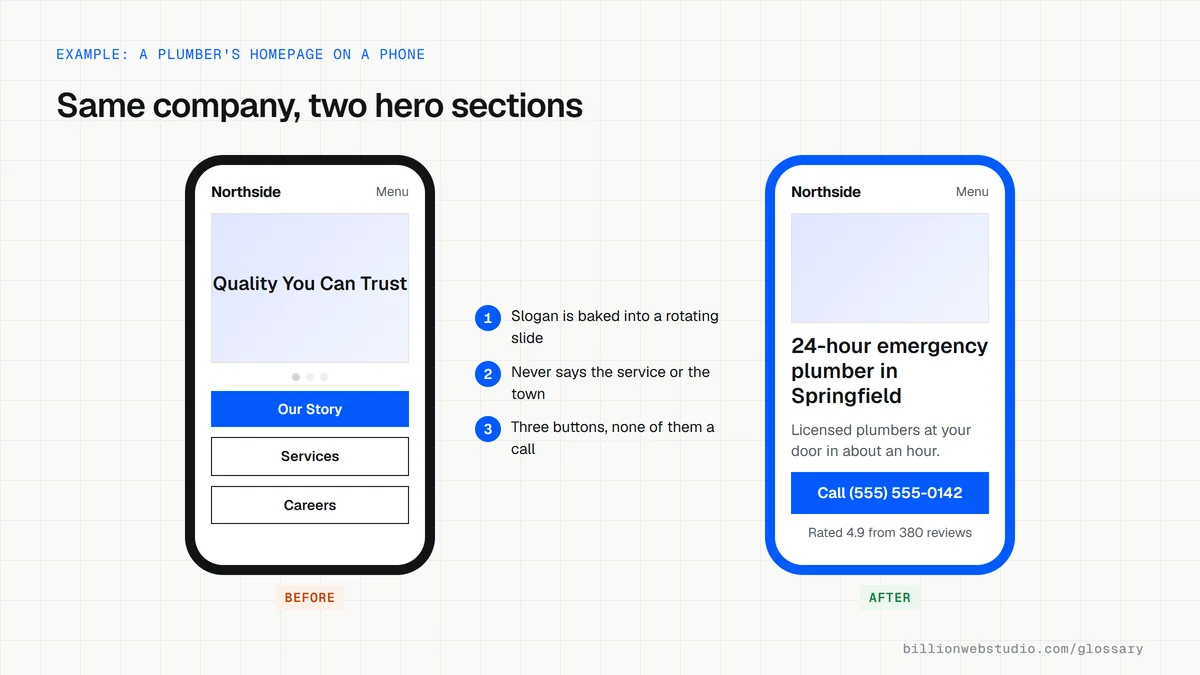
A typical hero holds four things: a headline that names the offer, a sentence explaining who it is for, one primary button, and a supporting visual. Many also carry a small trust marker, such as a review rating or a license number, close to the button.
Why the hero section matters for leads and speed
The hero carries the page's first promise, so a vague headline or a missing button costs inquiries before the rest of the page gets a chance. Each page should have its own hero written for the search that brought people there, not a copy of the homepage banner.
The hero image is very often the Largest Contentful Paint element, the item web.dev uses to judge loading speed. web.dev recommends giving that image fetchpriority="high" and reports a test on Google Flights where doing so improved LCP from 2.6 seconds to 1.9 seconds.
A hero section example
A solar installer's old hero was a three-slide carousel of panel photos with the slogan Powering Tomorrow. The new hero has a single photo of a finished rooftop, the headline Home solar installation in Austin, a line on financing and typical payback, and one Get a free quote button. The photo is compressed, sized for phones and never lazy loaded.
Common hero section mistakes
- Baking the headline into the image, where screen readers, translation tools and search engines cannot read it.
- Rotating several slides so the visitor only ever sees part of the message.
- Offering three or four equal buttons instead of one clear next step.
- Using an autoplay background video that burns mobile data and holds back the rest of the page.
- Writing a clever slogan instead of saying plainly what you do and where.
Copy this hero section markup
<section class="hero">
  <img src="/images/plumber-van-1200.webp"
       srcset="/images/plumber-van-640.webp 640w, /images/plumber-van-1200.webp 1200w"
       sizes="100vw" width="1200" height="675"
       alt="Northside Plumbing technician unloading tools from a service van"
       fetchpriority="high">
  <h1>24-hour emergency plumber in Springfield</h1>
  <p>Licensed plumbers at your door in about an hour, day or night.</p>
  <a class="button" href="tel:+15555550142">Call (555) 555-0142</a>
  <p class="trust">Rated 4.9 from 380 reviews</p>
</section>
<!-- Never add loading="lazy" to the hero image -->
How to check your hero section on a phone
- Run your homepage through PageSpeed Insights and keep the Mobile tab selected.
- Under Diagnose performance issues, open the LCP breakdown insight to see which element is the Largest Contentful Paint. On most sites it is the hero image or headline.
- Open the LCP request discovery insight and confirm the hero image is not lazy loaded and has fetchpriority=high applied.
- On your own phone, load the page and check the headline, one supporting line and the main button all show without scrolling.
- On a computer, right-click the headline and choose Inspect. It should be live text inside an h1, not part of the image.
What good looks like: LCP is 2.5 seconds or less for at least 75 percent of visits, the hero image is in the HTML and not lazy loaded, and the button is visible on a small phone without scrolling.
Free tool: PageSpeed Insights
Questions to ask your web developer
“What will the hero say on our main service pages, not just the homepage?”
A good answer: Each page gets its own headline naming the service and the area, written from the search terms that bring visitors to that page.
“How will the hero image be delivered on phones?”
A good answer: Sized versions through srcset in WebP or AVIF, width and height set, fetchpriority high, never lazy loaded, and LCP checked in PageSpeed Insights before launch.
“How will we know if the hero is working?”
A good answer: Clicks on the main button are tracked as a key event in GA4, so a new headline can be compared with the old one on real numbers.
Hero section: common questions
What is the difference between a hero section and above the fold?
Above the fold is a screen measurement: whatever is visible before scrolling, which varies by device. A hero section is a specific design block at the top of the page. On a large monitor the hero and more may sit above the fold, while on a small phone only part of the hero shows.
Should a hero section use a slider or carousel?
Usually not. A carousel splits attention between several messages, most visitors never see the later slides, and the extra images and scripts slow the first view. A single strong image with one headline and one button is easier to read and faster to load.
What size should a hero image be?
There is no single correct size. Export the image at the largest width it actually displays, provide smaller versions through srcset for phones, and compress it in a modern format such as WebP or AVIF. Then check Largest Contentful Paint in PageSpeed Insights on a mobile test.
Sources
Want a website that gets this right?
Every Billion Web Studio build includes technical SEO, schema and speed work as standard, with a fixed quote within 1 business day.