SEO
What Is a Pillar Page?
A pillar page is a comprehensive page on a website that covers one broad topic at a high level and links to a group of more detailed pages, called cluster pages, that each cover one subtopic in depth.
What a pillar page means in plain English
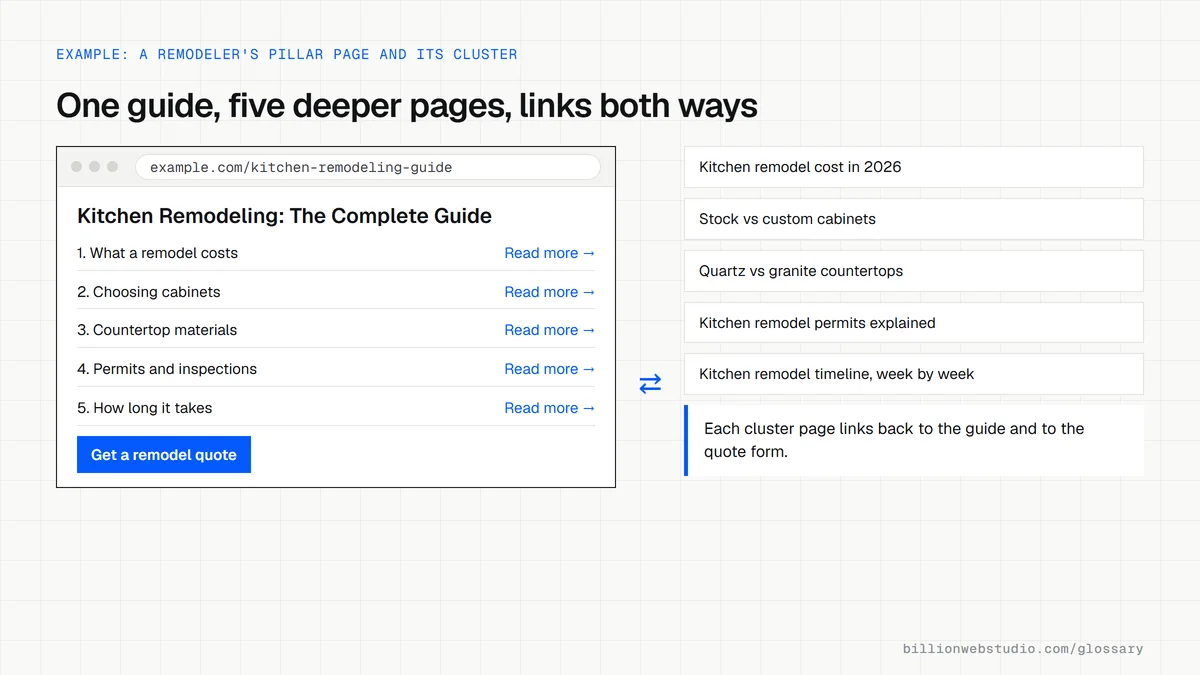
Think of a pillar page as the hub of a wheel. It gives a complete overview of a subject your customers care about, such as kitchen remodeling, and answers the main questions briefly. Each section then links out to a spoke: a separate article or service page on one narrower question, such as cabinet materials or remodeling permits. Every spoke links back to the hub.
The pillar and its cluster pages together are often called a topic cluster. The model comes from content marketing practice. It is a way of organizing pages, not a Google feature or a named ranking factor, and it works because it mirrors the way people explore a subject.
Why a pillar page matters for a business website
A pillar page gives scattered blog posts a structure. Instead of twenty loosely related articles competing with each other, you get one page aimed at the broad search and a set of pages for the specific ones, joined by clear internal links. Visitors find the next answer easily, and Google can see how your pages relate and which one is the main entry point for the topic.
An example of a pillar page
A solar installer publishes a pillar page titled Home Solar Panels: The Complete Guide. It covers costs, incentives, financing, installation steps and maintenance in short sections. Each section ends with a link to a deeper page, such as a solar tax credit explainer or a guide to battery storage, and each of those pages links back to the guide and to the installer's quote form.
Common pillar page mistakes
- Choosing a topic so broad, such as marketing, that one page cannot cover it usefully.
- Padding the page to hit a word count, when Google says it has no preferred word count.
- Publishing the pillar before any cluster pages exist, so it has nothing deeper to link to.
- Letting a cluster page target the same keyword as the pillar, which splits rankings between them.
- Forgetting to link the pillar to the service page or contact form that turns readers into inquiries.
Pillar page vs cluster page vs standalone blog post
| Pillar page | Cluster page | Standalone blog post | |
|---|---|---|---|
| Targets | A broad topic, such as kitchen remodeling | One subtopic, such as kitchen remodel permits | One question, often timely |
| Depth | A short overview of each subtopic | Full detail on its subtopic | As much as the question needs |
| Links to | Every cluster page and the service or quote page | The pillar and closely related cluster pages | Whatever is relevant |
| Updated | Whenever a cluster page is added | When its facts or prices change | Rarely |
| Found from | Main navigation or a resources hub | The pillar and its topic category | The blog archive |
How to check a pillar page and its cluster links
- Open the pillar page, press Ctrl+F (Cmd+F on a Mac) and search for the title of each cluster page to confirm the pillar links to every one of them.
- Open each cluster page and confirm it links back to the pillar with words that name the topic, not just click here.
- In Google Search Console, open Performance, click + Add filter, choose Queries, pick Queries containing and type the broad topic, such as kitchen remodel.
- Open the Pages tab under that filter. The pillar should collect most impressions for the broad phrase; several pages splitting them means they compete.
- Filter by Page instead, enter the pillar URL and read its Queries tab. Specific questions ranking on the pillar rather than their cluster page show which cluster pages need strengthening.
What good looks like: Every cluster page and the pillar link to each other, broad queries land mainly on the pillar, and specific queries land mainly on their own cluster page.
Free tool: Google Search Console
Questions to ask your web developer
“Which cluster pages will the pillar link to, and which search does each one own?”
A good answer: A written list with one main search phrase per page, checked so the pillar and its cluster pages never target the same phrase, plus the order they will be published in.
“How will a reader of the pillar page become an inquiry?”
A good answer: The pillar links to the matching service page and to a quote or contact form at natural points, and those clicks are tracked as GA4 key events so the page's lead value can be measured.
Pillar page: common questions
What is the difference between a pillar page and a blog post?
A blog post usually answers one specific question. A pillar page covers a whole topic at a high level and acts as a hub, linking to several posts and pages that go deeper. Pillar pages are updated over time and often sit in the main navigation or a resources section.
How long should a pillar page be?
As long as the topic needs and no longer. Google states that it has no preferred word count, so length is never the goal. Most pillar pages run longer than a typical post because they cover several subtopics, but each section should stay brief and hand the detail to a cluster page.
How many cluster pages does a pillar page need?
No set number applies. Start with the questions customers actually ask about the topic, and give a question its own cluster page only when it needs more than a paragraph to answer. A handful of strong cluster pages is a sensible start, adding more as you learn what people search for.
Sources
Want a website that gets this right?
Every Billion Web Studio build includes technical SEO, schema and speed work as standard, with a fixed quote within 1 business day.