Conversion and analytics
What Is a Lead Magnet?
A lead magnet is a free, useful resource, such as a checklist, guide, template or calculator, that a business offers on its website in exchange for a visitor's contact details, usually an email address.
What a lead magnet means
Most visitors are not ready to request a quote on their first visit. A lead magnet gives them a smaller, low-risk step: something valuable now, in return for permission to follow up. The best ones solve one narrow problem quickly, so the visitor gets a win in minutes and links that win with your business.
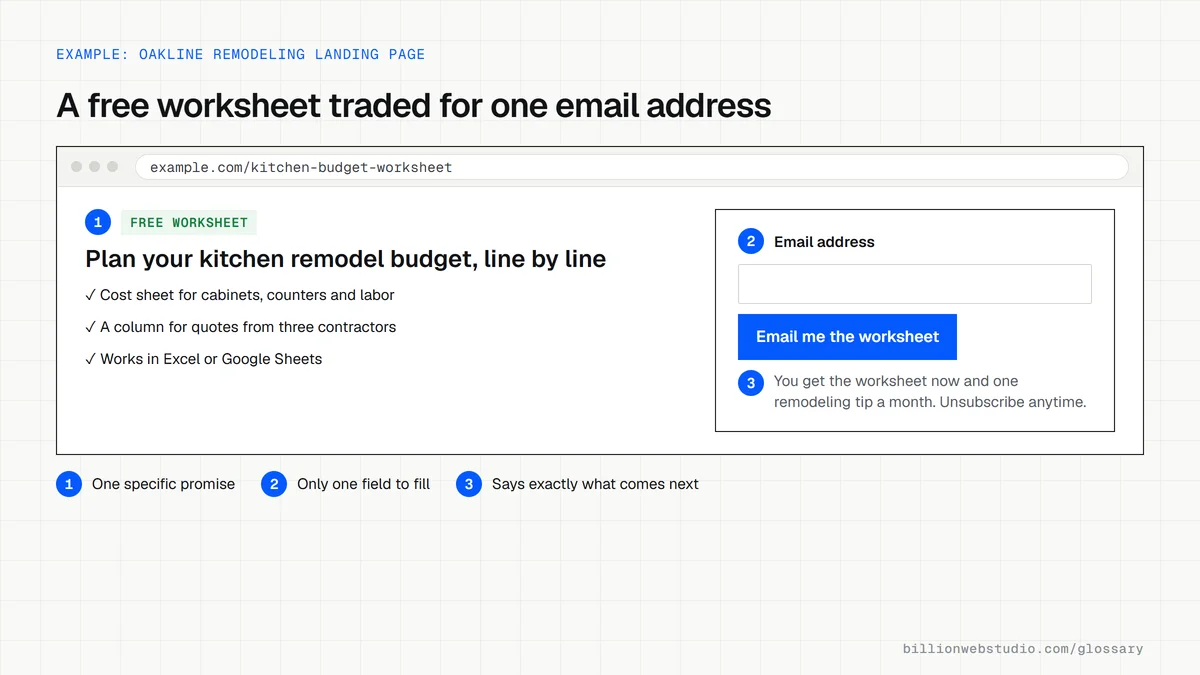
Why a lead magnet matters for a business website
Without a lead magnet, a visitor who is still researching leaves and may never come back. With one, you can stay in touch by email, answer their questions over time and be the obvious choice when they are ready. Lead magnets also reveal which topics your audience cares about most, based on which offers they take.
Lead magnet examples
- A roofing company offers a storm damage checklist homeowners can use before calling their insurer.
- A financial advisor offers a retirement savings worksheet in spreadsheet form.
- A B2B manufacturer offers a downloadable spec sheet and material comparison guide.
- A web agency offers a website launch checklist covering SEO, speed and tracking.
- A med spa offers a treatment cost estimator that emails a personalized summary.
Common lead magnet mistakes
- Offering something generic, like a newsletter, that gives no reason to sign up today.
- Making the resource so long that nobody finishes it.
- Asking for a phone number and company size when an email address would do.
- Collecting emails with no follow-up sequence, so the contacts go cold.
- Choosing a topic unrelated to what you sell, which attracts sign-ups who will never buy.
Copy this email-only sign-up form
<!-- Lead magnet form: ask only for what you need to send the file -->
<form action="/subscribe" method="post">
  <label for="lm-email">Email address</label>
  <input id="lm-email" name="email" type="email"
         autocomplete="email" required>

  <!-- Tells your email platform which offer this sign-up came from -->
  <input type="hidden" name="lead_source" value="kitchen-budget-worksheet">

  <button type="submit">Email me the worksheet</button>

  <p>You get the worksheet now and one remodeling tip a month.
     Unsubscribe anytime with one click.</p>
</form>
How to test your lead magnet like a new subscriber
- Open the landing page in a private window on your phone and sign up with an email address you have never used on your site.
- Time how long the download email takes to arrive, and note whether it lands in the main inbox, a promotions tab or spam.
- Open the resource from that email on your phone. The link should work and the file should be readable without zooming.
- When the next email in the sequence arrives, check it has a working unsubscribe link and your business postal address, which the US CAN-SPAM Act requires in commercial email.
- In your email platform, check the new contact is tagged with the name of the lead magnet, so you can compare which offers bring leads.
What good looks like: The resource arrives at once in the main inbox, opens cleanly on a phone, and is followed by short, relevant emails whose unsubscribe link works and is honored within 10 business days, as CAN-SPAM requires.
Free tool: FTC: CAN-SPAM Act compliance guide
Questions to ask your web developer
“What happens after someone downloads the lead magnet?”
A good answer: A written sequence of a few emails on the same topic as the resource, ending with one clear next step such as booking a call, plus a named person who follows up with engaged subscribers.
“How will we know which lead magnet produces customers, not just sign-ups?”
A good answer: Each form passes a lead source value into the email platform and CRM, so sign-ups can be traced through to quotes and sales rather than only counted.
“Will the form record consent the way our customers' region requires?”
A good answer: They connect the form directly to your email platform, store when and where each person signed up, and add a consent checkbox wherever local law requires one.
Lead magnet: common questions
What is the difference between a lead magnet and a CTA?
A lead magnet is the offer itself, such as a free guide. A call to action is the prompt that asks the visitor to take it, such as a Download the guide button. Every lead magnet needs a CTA, but most CTAs on a site point to other actions, like booking or buying.
Do lead magnets still work?
Yes, when the resource is specific and genuinely useful. Generic ebooks and vague newsletters give people little reason to sign up, while tools and checklists that solve a clear problem do. A lead magnet also needs relevant follow-up emails and a clear path to talk to your team.
Sources
Want a website that gets this right?
Every Billion Web Studio build includes technical SEO, schema and speed work as standard, with a fixed quote within 1 business day.