Conversion and analytics
What Are Local Services Ads (LSA)?
Local Services Ads (LSA) stands for Google Local Services Ads.
Local Services Ads (LSA) are Google ads for local service businesses, such as plumbers, lawyers and cleaners, that appear on Google Search and Maps and charge the advertiser for each lead, such as a call, message or booking, rather than for each click.
What Local Services Ads mean in plain English
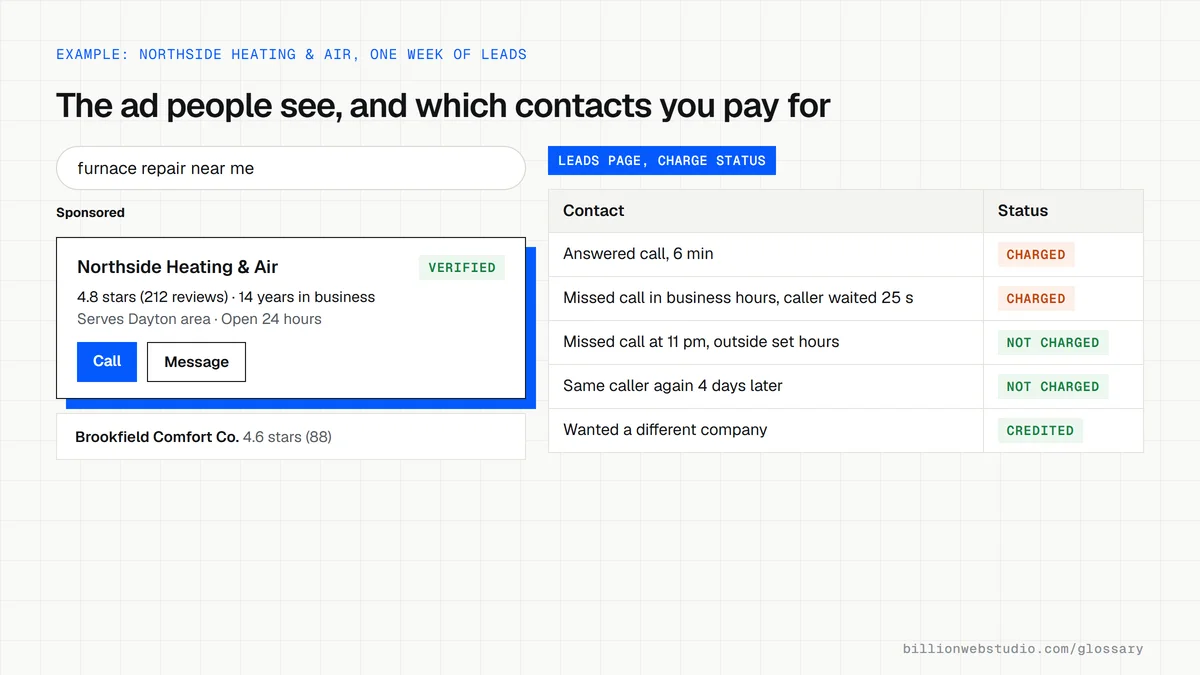
Local Services Ads show a business name, star rating, service area and verification badge at the top of relevant local searches. There are no keywords to choose: Google matches the ad to searches using the service categories and areas you select. The searcher can call, send a message or, in the United States and Canada, request a booking straight from the ad.
You set an average weekly budget, and Google charges when a valid lead comes in. A call counts when you speak with the customer, and a missed call during business hours is charged once the caller stays on the line for more than 20 seconds. Outside the EEA, Google reassesses charged leads for 30 days and may credit invalid ones.
Local Services Ads changes in 2025 and 2026
In August 2025, Google announced a single Google Verified badge to replace Google Guaranteed, Google Screened, License Verified by Google and the Money Back Guarantee, with the rollout starting that October. As of October 2026, Google is moving Local Services Ads into Google Ads as Performance Max campaigns with pay-per-lead goals, starting with select US home service categories in August 2026, with more accounts following in late 2026 and 2027.
Why Local Services Ads matter for a service business website
Many LSA leads never touch your website, because the customer calls straight from the ad. The site still matters: plenty of people look a business up before they call, so real photos, reviews and clear service areas back up the ad. Tracking LSA leads alongside website leads also shows your true cost per lead across every channel.
A Local Services Ads example
An HVAC company sets a weekly budget of $500 for furnace repair and AC installation across three counties. During a cold week, its ad appears above the regular search ads and brings 14 calls. Two callers wanted a different business, so the owner rates those leads as poor quality in the leads inbox and later checks whether Google credited them.
Common Local Services Ads mistakes
- Missing calls during business hours, since a missed call can still be charged after 20 seconds.
- Selecting service categories or areas you do not actually cover, which buys leads you cannot serve.
- Never rating leads or reporting the poor-quality ones in the leads inbox.
- Ignoring reviews, which appear next to the ad and shape whether people call.
- Comparing LSA leads with website leads without tracking both in the same way.
Local Services Ads vs Search ads vs a Business Profile
| Question | Local Services Ads | Google Ads search | Google Business Profile |
|---|---|---|---|
| What you pay for | Each valid lead: a call, message or booking | Each click on the ad | Nothing, the listing is free |
| How you are matched to searches | Service categories and areas you select | Keywords you choose | Relevance, distance and popularity |
| Same customer contacts you again | Not charged again while you keep interacting within 15 days | Each new click is charged | No charge |
| What builds trust in the listing | Reviews and the Google Verified badge | Your ad text and assets | Reviews, photos and posts |
| Your main ongoing work | Answer every call and review charged leads | Keywords, bids and landing pages | Keep hours, photos and replies current |
How to check what you paid for in Local Services Ads
- Sign in to your Local Services Ads account, select the menu icon in the top left and choose Leads.
- Set the date range to the last 30 days and read the Charge Status column: Charged, Not charged, In review or Credited.
- Open each charged lead and compare it with your job log, and listen to the call recording where your category and region offer recordings.
- For a lead that was not a real customer, select Rate this lead in the top right, choose Open in the survey and submit your feedback.
- Divide your LSA spend by the number of charged leads that became booked jobs to get your cost per booked job.
What good looks like: Every charged lead is a real customer asking for a service you offer in an area you serve. Credits for poor leads show as Credited and go back to your account balance, while the original charge still appears on the invoice.
Free tool: Local Services Ads Help: Rate a lead
Questions to ask your web developer
“How will LSA leads be tracked next to website leads?”
A good answer: Calls and messages from the Leads page go into the same sheet or CRM as website leads, with their charge status, so cost per booked job compares fairly across channels.
“Who answers calls during the business hours set in the account?”
A good answer: A named person or answering service covers every listed hour, and the hours in the account match the times someone can actually pick up.
“What happens to our account when Local Services Ads move into Google Ads?”
A good answer: They know the migration timing for your category and explain how budgets, lead history and conversion tracking carry over, with a date to review results afterward.
Local Services Ads (LSA): common questions
What is the difference between Local Services Ads and Google Ads?
Standard Google Ads search campaigns charge per click and let you choose keywords and write ad text. Local Services Ads charge per lead, use service categories instead of keywords, and show your reviews and verification badge. As of October 2026, Google is moving Local Services Ads into Google Ads as a Performance Max campaign type that keeps pay-per-lead billing.
Which businesses can use Local Services Ads?
Local Services Ads are offered to service businesses in the categories Google supports, such as home services like plumbing, HVAC and roofing, and professional services such as legal help. Availability depends on the country and the category, and a business must pass Google's screening and verification checks before the Google Verified badge appears.
Sources
- Local Services Help: Local Services Ads overview
- Local Services Help: How leads work
- Google blog: Google Verified makes it easier to find trusted local businesses (August 20, 2025)
- Google Ads Help: Local Services Ads transition to Performance Max campaigns with pay-per-lead goals
- Local Services Help: Understand the screening and verification process
- Local Services Ads Help: Lead charge status and rating leads
- Google Business Profile Help: Improve your local ranking
- Google Ads Help: Cost-per-click
Want a website that gets this right?
Every Billion Web Studio build includes technical SEO, schema and speed work as standard, with a fixed quote within 1 business day.