Building and hosting
What Is a Progressive Web App (PWA)?
Progressive web app (PWA) stands for Progressive Web App.
A progressive web app (PWA) is a website built with standard web technology that people can install on a phone or computer like an app, open in its own window and keep using offline or on a weak connection.
What a progressive web app means in plain English
MDN describes a PWA as an app built with web platform technologies that gives a user experience like a platform-specific app. It runs from one codebase on many devices, like a website, but can also be installed, work offline and run some tasks in the background, like an app.
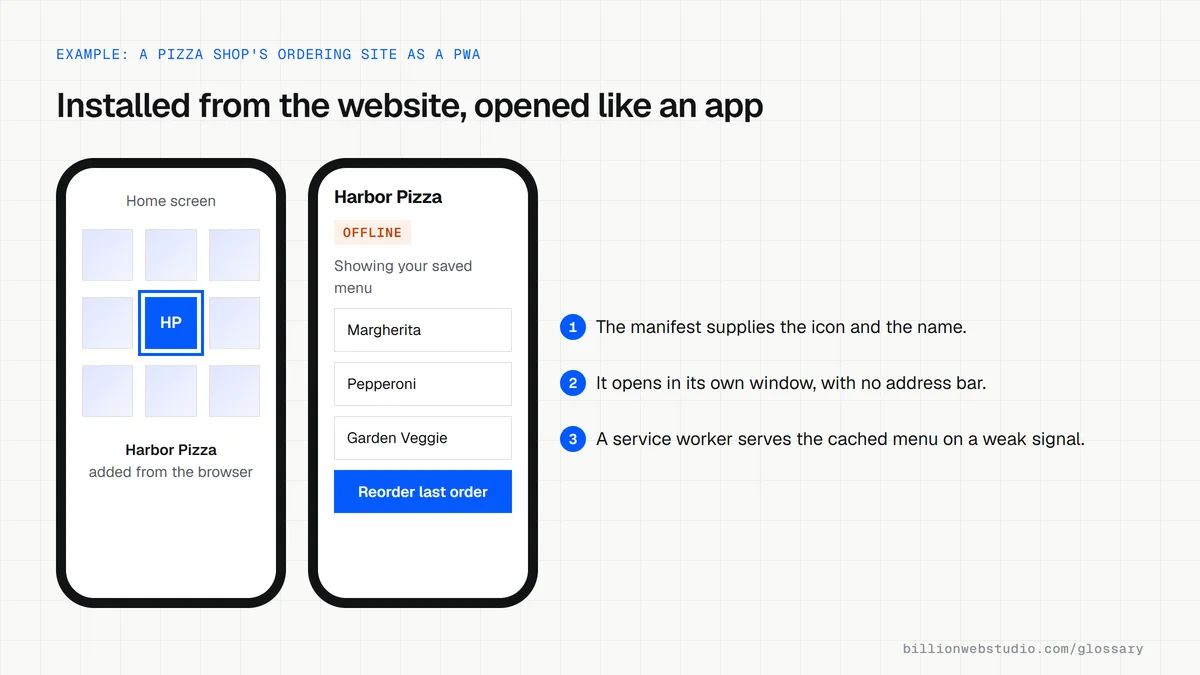
Three pieces make a site behave this way. A web app manifest gives the browser the app's name, icon and display style. A service worker is a script that caches files and handles requests, so screens still load without a network. And the site must be served over HTTPS.
Why a progressive web app matters for a business
Building separate iPhone and Android apps means two codebases, two review processes and two sets of updates. A PWA is one build that works in the browser and can also sit on the home screen. Customers can install it straight from your website without visiting an app store.
Feature support varies between operating systems and browsers. Push notifications, background sync and access to device hardware do not behave identically everywhere, so confirm support for the exact features you plan to rely on before choosing a PWA over a native app.
A progressive web app example
A restaurant group wants repeat customers to reorder quickly. Its ordering site becomes a PWA: diners tap Add to Home Screen once, then open the menu from an icon like any app. The menu and recent orders are cached, so the app opens instantly even with a poor signal, and updates go live without an app store release.
Common progressive web app mistakes
- Adding an install prompt before the visitor has had any reason to want the app.
- Caching pages so aggressively that customers keep seeing old prices or menus.
- Assuming every device supports every PWA feature without testing on real phones.
- Showing a blank screen offline instead of a helpful offline page.
Copy this web app manifest
{
  "name": "Harbor Pizza Ordering",
  "short_name": "Harbor Pizza",
  "start_url": "/order/",
  "scope": "/",
  "display": "standalone",
  "background_color": "#ffffff",
  "theme_color": "#b91c1c",
  "icons": [
    { "src": "/icons/icon-192.png", "sizes": "192x192", "type": "image/png" },
    { "src": "/icons/icon-512.png", "sizes": "512x512", "type": "image/png" },
    { "src": "/icons/icon-maskable-512.png", "sizes": "512x512", "type": "image/png", "purpose": "maskable" }
  ]
}
How to check whether a site works as a progressive web app
- Open the site in Chrome on a computer and look at the right end of the address bar. An install icon there means Chrome treats the site as installable.
- Press F12, open the Application tab and click Manifest. The Identity, Presentation and Icons sections should show the app name, start URL, display mode and both a 192px and a 512px icon.
- If an Installability section appears in that pane, read it: it lists the errors that block installation, such as an icon that fails to load.
- Click Service workers in the same tab, tick Offline and reload. You should see your own offline page or cached screens, not the browser's no-connection error.
- On a phone, install it (Share, then Add to Home Screen on iPhone; the menu, then Install app on Android Chrome) and open it from the icon to confirm it runs in its own window.
What good looks like: The site is served over HTTPS and its manifest has a name or short_name, a start_url, icons at 192px and 512px, and a display value of standalone, fullscreen, minimal-ui or window-controls-overlay, which are Chrome's install criteria.
Free tool: Chrome DevTools: Debug progressive web apps
Questions to ask your web developer
“What will the app show offline, and what will it never serve from cache?”
A good answer: A specific list: the app shell, menu and recent orders are cached, while prices, stock and checkout always come from the network, so nobody pays an outdated price.
“Which features have you tested on iPhone as well as Android?”
A good answer: They name each feature you rely on, such as installation, push notifications or background sync, and confirm it on current iOS and Android devices instead of assuming support.
“How do updates reach people who already installed it?”
A good answer: The service worker is versioned, a new version is picked up on the next visit, and people get a refresh prompt or the update on next launch without losing saved data.
Progressive web app (PWA): common questions
What is the difference between a PWA and a native app?
A PWA is a website that can be installed from the browser and runs on any device from one codebase. A native app is built separately for each operating system and installed from an app store. Native apps get deeper hardware access, while PWAs are cheaper to build and update.
Do progressive web apps work on iPhone?
Yes. On iPhone and iPad, people can add a PWA to the home screen from the browser's Share menu, and it then opens in its own window like an app. Some capabilities behave differently on Apple devices than on Android, so test the features you depend on.
Is a PWA good for SEO?
A PWA is still a website, so search engines can crawl and index its pages like any other site. SEO works well as long as each screen has its own URL and the content is present in the HTML that search engines receive, not hidden behind app-only interactions.
Sources
Want a website that gets this right?
Every Billion Web Studio build includes technical SEO, schema and speed work as standard, with a fixed quote within 1 business day.