Building and hosting
What Is a Sticky Header?
A sticky header is a website header, usually the logo, menu and a call or quote button, that stays pinned to the top of the screen as visitors scroll, so navigation and the main action remain within reach anywhere on the page.
What a sticky header means in plain English
Normally a header scrolls away with the rest of the page. A sticky header stays put. Developers usually build it with the CSS rule position: sticky, which MDN explains keeps the element in the normal page flow until a set offset is reached, then holds it at that spot. MDN notes the rule only works when a value such as top is set.
Some sites use position: fixed instead, which lifts the header out of the page flow entirely, so the content underneath needs padding to avoid being covered. A popular variation hides the header while visitors scroll down and slides it back the moment they scroll up.
Why a sticky header matters for conversions and accessibility
On long service pages, a header that keeps the phone number and a quote button in view means a visitor can act the instant they decide, without hunting back to the top. For local service businesses that take most inquiries by phone, that constant tap-to-call button is often the main reason to make a header sticky.
The cost is screen space, and accessibility rules care about it. WCAG 2.2 success criterion 2.4.11, Focus Not Obscured (Minimum), is Level AA and says a focused control must not be entirely hidden by content the author added. W3C lists sticky headers as a typical cause, which CSS scroll-padding can prevent.
A sticky header example
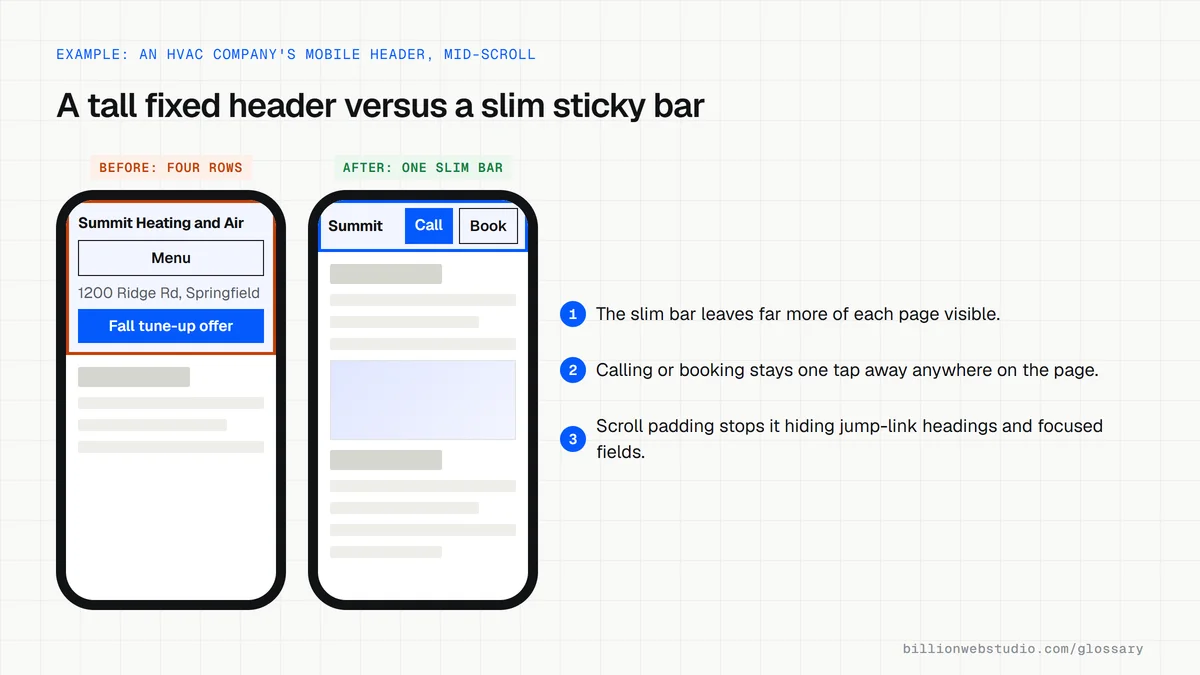
An HVAC company's mobile header was tall, holding the logo, a full menu button, an address line and a promotional banner, and it stayed fixed the whole time. The redesign keeps a slim sticky bar with only the logo, a Call button and a Book button, and drops the banner after the first screen. More of every page is visible, and calling takes one tap.
Common sticky header mistakes
- Making the header so tall on phones that it covers a large slice of the screen.
- Letting it cover headings when someone follows a jump link to a section of the page.
- Stacking a sticky header, a cookie banner and a chat widget so little content stays visible.
- Adding the header with JavaScript after load, which makes the page jump and adds layout shift.
- Never testing with the Tab key, so keyboard users lose sight of the link they are on.
Copy this sticky header starter
<style>
  /* Slim header that stays at the top once the page scrolls */
  .site-header {
    position: sticky;
    top: 0;            /* sticky does nothing without an offset */
    z-index: 50;
    display: flex;
    align-items: center;
    justify-content: space-between;
    min-height: 56px;
    padding: 8px 16px;
    background: #ffffff;
    border-bottom: 1px solid #e5e5e5;
  }
  /* Keep jump-link targets and focused fields clear of the header */
  html { scroll-padding-top: 72px; }
  /* Note: it will not stick if a parent element has overflow: hidden */
</style>

<header class="site-header">
  <a href="/" class="logo">Northside Plumbing</a>
  <a href="tel:+15125550123" class="call">Call now</a>
</header>
How to test a sticky header on phones and keyboards
- Open a long page in Chrome, press F12, then Ctrl+Shift+M (Cmd+Shift+M on a Mac) and pick a phone preset from the Dimensions menu.
- Scroll halfway down, then in the Elements panel hover over the header element. The tooltip shows its height in pixels, which you can compare with the screen height shown at the top.
- Click a jump link, such as a table of contents entry, and check the section heading lands below the header, not hidden under it.
- Turn the device toolbar off, click at the top of the page and press Tab repeatedly. Each focused link, button or field must stay at least partly visible, never fully behind the header.
- Open the Lighthouse tab and run a mobile report to check Cumulative Layout Shift, since a header inserted by script after load pushes content down.
What good looks like: The header is a small slice of the phone screen, keeps the call or book button in view, never completely hides a focused element (WCAG 2.2 success criterion 2.4.11, Level AA), and CLS is 0.1 or less.
Free tool: Chrome DevTools device mode
Questions to ask your web developer
“How does the header behave on a phone when visitors scroll down and back up?”
A good answer: A specific answer per screen size, for example: it shrinks to one bar with the logo and a call button, hides while scrolling down and returns on scroll up, shown to you on a real phone.
“How do you stop the header covering jump links and focused fields?”
A good answer: They set scroll-padding-top to at least the header's height, test with the Tab key, and point to WCAG 2.2 success criterion 2.4.11 Focus Not Obscured.
“Will taps on the header's call button be tracked?”
A good answer: Clicks on the tel: link in the header send a named event to GA4 that is marked as a key event, kept separate from the same button lower on the page so you can see which one people use.
Sticky header: common questions
What is the difference between a sticky header and a fixed header?
A sticky header, using position: sticky, sits in the normal page flow and only locks in place once you scroll past a set point. A fixed header, using position: fixed, is always pinned and removed from the flow, so the page needs extra spacing at the top to stop content hiding beneath it.
Are sticky headers good on mobile?
They can be, if they are slim. A compact bar with the logo and one or two key actions keeps calling or booking within reach. A tall header with several rows eats too much of a small screen, so many sites shrink the header or hide it while the visitor scrolls down.
Does a sticky header affect SEO?
The menu is the same HTML whether it sticks or not, so search engines read it the same way. The effects are indirect. A header injected late by a script can add layout shift, and one that hides content on phones can frustrate visitors and reduce inquiries.
Sources
Want a website that gets this right?
Every Billion Web Studio build includes technical SEO, schema and speed work as standard, with a fixed quote within 1 business day.