Building and hosting
What Is a Static Website?
A static website is a site made of prebuilt HTML files that the server sends to every visitor exactly as stored, without assembling each page from a database when it is requested. Static sites load quickly, cost little to host and offer attackers little to target.
What a static website means in plain English
MDN defines a static site as one that returns the same hard-coded content whenever a page is requested. The pages are finished files sitting on a server, ready to send. A dynamic site, by contrast, builds each page at request time by pulling content from a database into a template.
Static does not mean old-fashioned or plain. Modern tools called static site generators build the files automatically from templates and content, and the result can include animations, contact forms through a form service, and content editing through a headless CMS. The difference is when the page is built: once ahead of time, not on every visit.
Why a static website matters for a business
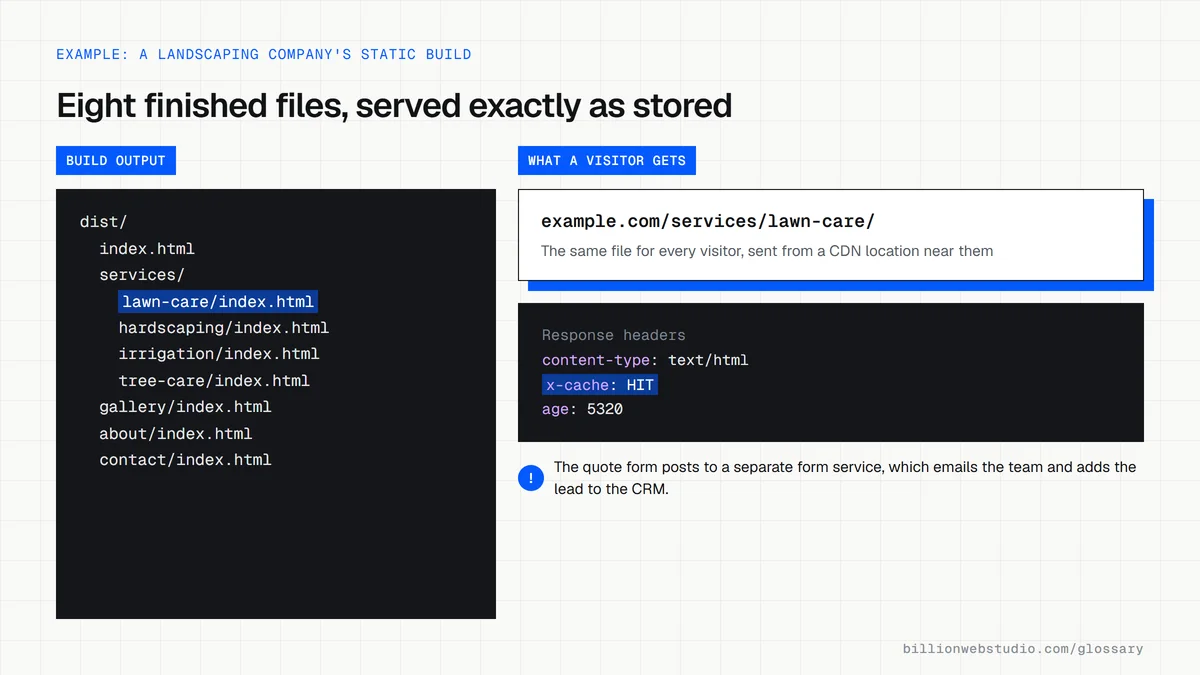
Because nothing has to be computed per visit, static pages can be copied to a content delivery network and served from locations close to each visitor. That usually means fast first loads, simple hosting and low monthly costs. With no live database or admin login on the public server, there is far less for an attacker to break into.
The limits show up when a site needs user accounts, personalized content or frequent edits by non-technical staff. Each content change needs a rebuild, which a good setup automates, but features such as member areas or live inventory call for a dynamic site or a web application.
A static website example
A landscaping company needs eight pages: home, four services, a gallery, an about page and a contact page. The developer builds it as a static site, deploys it to a CDN and connects the quote form to an email and CRM service. Pages appear almost instantly on phones, and hosting costs stay minimal.
Common static website mistakes
- Choosing static for a site that will soon need logins, a store or daily content updates.
- Giving the owner no way to edit text, so every small change waits on a developer.
- Forgetting that contact forms need a separate service to send and store submissions.
- Skipping redirects and sitemaps on the assumption that a simple site needs no technical SEO.
Static site vs database CMS vs web application
| Question | Static site | Database CMS (for example WordPress) | Web application |
|---|---|---|---|
| When pages are built | Ahead of time, at each publish | On request from a database, often cached | On request, with data for each user |
| What the public server runs | Files only | PHP or similar, a database and an admin login | Application code, a database and user accounts |
| How staff edit content | A headless CMS that triggers a rebuild | Built-in admin screens | Custom admin screens |
| Upkeep | Low: few moving parts | Core, theme and plugin updates | Ongoing development and security work |
| Fits | Brochure, service and portfolio sites | Sites with frequent posts and many editors | Portals, booking and tools behind a login |
How to check if a page is served as a static file
- Open the page in Chrome, press F12, click the Network tab and reload.
- Click the first row, which is the page document, and open the Headers tab. Under Response Headers, look for a cache header such as x-cache, cf-cache-status, x-vercel-cache or age.
- A value of HIT, or an age above zero, means a CDN sent a stored copy rather than building the page for this request.
- Run the page in PageSpeed Insights and read Time to First Byte in the real-user data.
- Submit a test inquiry through the contact form and confirm it reaches the inbox and the CRM, because a static site depends on a separate form service.
What good looks like: The HTML document comes from cache (HIT), field TTFB is 0.8 seconds or less, web.dev's good threshold, and the test inquiry arrives within minutes.
Free tool: PageSpeed Insights
Questions to ask your web developer
“How will our staff edit text and add pages without you?”
A good answer: They name the headless CMS or editing tool, show you its editing screen, and explain that saving triggers an automatic rebuild that is live within minutes.
“Where do form submissions go, and what happens if that service is down?”
A good answer: Submissions go to a named form service or serverless function, are copied to email and your CRM, have spam protection, and every entry is stored so nothing is lost if an email fails.
“What would make us outgrow a static setup?”
A good answer: A straight list: user accounts, live inventory, personalized prices or content changing many times a day, plus how the site would add those later without starting over.
Static website: common questions
Is a static website good for SEO?
It can be very good for SEO. Search engines receive complete HTML immediately, pages tend to load fast, and there is less that can break. Rankings still depend on content, titles, internal links, structured data and backlinks, so static hosting is a strong base rather than a ranking shortcut.
Can you update a static website without coding?
Yes, if it is connected to a content management system. Editors change text and images in a friendly dashboard, and the site rebuilds itself automatically. Without that setup, updates mean editing files directly, which usually requires a developer.
What is the difference between a static and a dynamic website?
A static website sends the same prebuilt file to every visitor. A dynamic website builds pages on request, often pulling content from a database and tailoring it to the user. Dynamic sites handle logins, carts and personalization, while static sites are simpler, cheaper and faster to serve.
Sources
Want a website that gets this right?
Every Billion Web Studio build includes technical SEO, schema and speed work as standard, with a fixed quote within 1 business day.