Building and hosting
What Is a Single Page Application (SPA)?
Single page application (SPA) stands for Single Page Application.
A single page application (SPA) is a website or web app that loads one HTML document once and then uses JavaScript to swap in new content as the user clicks, instead of requesting a fresh page from the server for every view.
What a single page application means in plain English
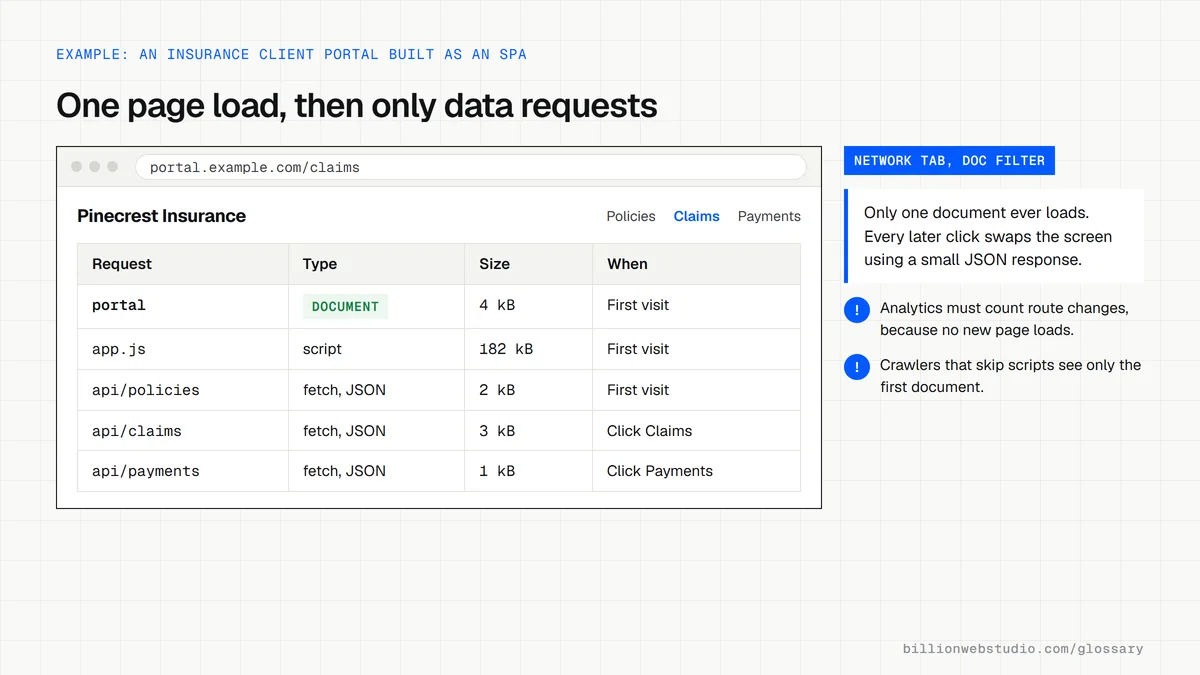
On a traditional site, every click sends the browser off to fetch a complete new page. In an SPA, the first visit downloads the application code, and after that the browser only asks the server for data, then redraws the part of the screen that changed. The address bar can still update, but the page itself never fully reloads.
MDN lists React, Angular and Vue as popular frameworks for building SPAs. The approach suits screens people use for a long session, such as dashboards, inboxes, booking tools and customer portals, where quick switching between views matters more than how fast the very first page appears.
Why a single page application matters for SEO and leads
MDN names the trade-offs plainly: SEO, managing state, implementing navigation and performance monitoring all take extra work in an SPA. If content only appears after JavaScript runs, crawlers that do not run scripts see an empty shell, and link previews on social platforms may show the wrong title or nothing at all.
Google's JavaScript SEO guidance asks SPAs to use the History API for routes rather than URL fragments, to make every link a real anchor element with an href, and to handle missing pages so they do not become soft 404 errors. Analytics also needs configuring, because a route change is not a page load.
A single page application example
An insurance agency launched its whole marketing site as a client-rendered SPA. Shared links all previewed with the homepage title, and service pages were slow to appear in search. The rebuild rendered the marketing pages on the server with Next.js and kept SPA behavior only inside the logged-in client portal, where policyholders flick between documents, claims and payments.
How to check whether an SPA is search-friendly
- View the page source of a key URL and confirm the main text is present before any script runs.
- Run the URL Inspection tool in Google Search Console and read the rendered HTML Google captured.
- Confirm each view has its own clean URL without a hash, plus a unique title and meta description.
- Request a URL that does not exist and check it returns a real 404 status or a noindex tag.
- Click through several routes with your analytics debug view open and confirm each one records a page view.
Single page application vs multi-page site vs hybrid
| Question | Single page application | Multi-page site | Hybrid (server-rendered first, app-style after) |
|---|---|---|---|
| First visit | Downloads the app code, then fetches data and draws the page | Server sends a complete HTML page | Server sends a complete HTML page, then scripts take over |
| Moving to another page | Swaps content without a full reload | Loads a full new page each time | Swaps content without a full reload |
| What crawlers receive | Often an empty shell unless prerendered | Full content in the HTML | Full content in the HTML |
| Analytics setup | Needs history-based or manual page views | Standard page load tracking works | Needs history-based page views after the first page |
| Typical fit | Dashboards, portals and booking tools behind a login | Brochure and service sites | Marketing sites and stores built on frameworks such as Next.js |
How to tell if a site is a single page application
- Open the site in Chrome, press F12, click the Network tab, then click the Doc filter so only page documents are listed.
- Click three or four menu links. If the address bar changes but no new document appears in the list, the site navigates as a single page application.
- Copy the address of an inner page, such as a service or claims screen, and open it in a new private window. It should load that exact view, not the homepage.
- In Google Analytics, go to Admin > Data collection and modification > Data streams, choose the web stream, click Enhanced measurement, then under Page views click Show advanced settings. Page changes based on browser history events should be on, unless page views are sent through Google Tag Manager.
What good looks like: Every view opens directly from its own URL in a fresh window, shows its own title in the browser tab, and analytics records exactly one page_view per route change.
Free tool: Google Analytics: Measure single-page applications
Questions to ask your web developer
“Which parts of the site need to be a single page application, and which should be server-rendered pages?”
A good answer: Public pages that need search traffic are server-rendered or static; app-style navigation is kept for logged-in or tool-like areas, where switching between views matters more than the first load.
“How will page views and key events be tracked when the URL changes without a reload?”
A good answer: They say whether GA4's browser history setting or a Tag Manager history trigger sends page_view, never both, and show DebugView recording one page_view per route.
“What status code does a URL that does not exist return?”
A good answer: A real 404 from the server, or, if the app must handle it in the browser, a noindex robots meta tag on the not found view, as Google's JavaScript SEO guidance describes.
Single page application (SPA): common questions
Are single page applications bad for SEO?
Not necessarily, but they need deliberate setup. Google can render JavaScript, yet its documentation still recommends server-side or pre-rendering, crawlable links and proper status codes. A marketing site that depends on search traffic is usually safer with server-rendered or static pages, keeping SPA behavior for logged-in tools.
What is the difference between a single page application and a multi-page application?
A multi-page application loads a new HTML document from the server on every click, which is how most business websites work. A single page application loads once and updates the screen with JavaScript. Multi-page sites are simpler for SEO, while SPAs feel smoother for app-like tasks.
Is React a single page application?
React is a JavaScript library, not an application. It is often used to build SPAs, but frameworks built on React, such as Next.js, can also render pages on the server or as static files. So a React site may or may not behave as a single page application.
Sources
Want a website that gets this right?
Every Billion Web Studio build includes technical SEO, schema and speed work as standard, with a fixed quote within 1 business day.