Building and hosting
What Is Uptime?
Uptime is the share of time a website or server is online and working, usually shown as a percentage over a month or year. A site with 99.9% uptime is reachable for all but about 43 minutes of a 30-day month.
What uptime means in plain English
Uptime measures availability. If your website loads correctly whenever someone tries to visit, it is up. If visitors get an error, a timeout or a blank page, it is down, and that period counts as downtime. Hosting companies quote uptime as a percentage, and the decimals matter, because each extra nine cuts the allowed downtime tenfold.
Over a 30-day month, 99% uptime still allows about 7 hours and 12 minutes of downtime, 99.9% allows about 43 minutes, and 99.99% allows about 4 minutes. Hosts often back these figures with a service level agreement (SLA), which usually promises account credits, not repayment of lost sales, if they miss the target.
Why uptime matters for your business
Downtime is lost business you rarely see. A visitor who hits an error page during your busiest hour does not leave a message; they call the next company. Paid ads keep charging for clicks that land on a broken site. Server errors also make Google crawl more slowly, and URLs that keep returning errors are eventually removed from its index.
An uptime example
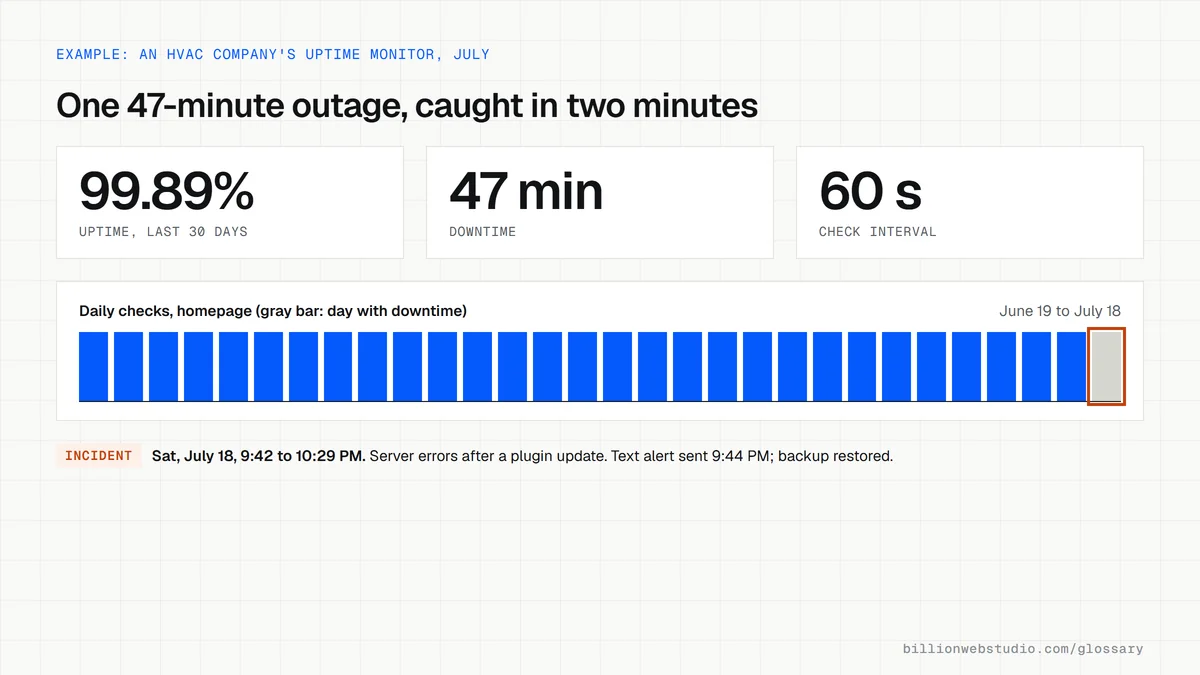
An HVAC contractor's site goes down on a Saturday night in July after a plugin update fails. Without monitoring, nobody notices until Monday. With an uptime monitor checking the homepage every minute, the owner gets a text alert within minutes, restores the latest backup, and the site is back before Sunday's emergency calls begin.
How to check your website uptime
- Set up an external uptime monitor that checks your homepage and contact page every few minutes.
- Send alerts to a phone, not only to an inbox nobody reads at night.
- Read your host's SLA to see what uptime it promises and what it offers if it falls short.
- Review monthly uptime reports and ask your developer about any outage longer than a few minutes.
- Keep recent backups so a failed update can be reversed quickly.
Work out your Uptime
Uptime to downtime calculator
How to check your website's uptime and outage history
- In Google Search Console, click Settings in the left menu, then Open report next to Crawl stats.
- Read the Host status panel and click it to see robots.txt fetching, DNS resolution and server connectivity for the last 90 days.
- In the same report, under By response, click Server error (5xx) to see the dates and URLs where Googlebot hit errors.
- Open your host's status page, usually linked from its support area, and match any incidents to the dates Search Console flagged.
- Enter your host's SLA figure in the calculator above to see the downtime it allows each month, and compare that with the outage minutes in your monitor's report.
What good looks like: Host status shows no significant availability issues in the past 90 days, the Server error (5xx) list is empty or one-off, and measured downtime stays inside what the SLA allows.
Free tool: Search Console Crawl Stats report
Questions to ask your web developer
“How is uptime measured in your SLA, and what counts as downtime?”
A good answer: They state the measurement source and interval, whether planned maintenance is excluded, and the credit for each missed level, all in writing.
“Who is alerted at 2 a.m., and how fast do you respond?”
A good answer: An external monitor checks every minute or few minutes from more than one location, texts or calls a named person, and they commit to a response time and send a monthly report of every incident.
“What is the recovery plan if the server fails completely?”
A good answer: Backups stored off the server on a set schedule, a restore they have tested with a known recovery time, and DNS that can be pointed at a replacement server quickly.
Uptime: common questions
What is a good uptime percentage for a website?
For a business website, 99.9% or better is a reasonable expectation from a quality host, which allows about 43 minutes of downtime in a 30-day month. Online stores and booking systems that earn money every hour often aim for 99.95% or higher.
What is the difference between uptime and downtime?
Uptime is the time your website is available and working; downtime is the time it is unreachable or returning errors. Together they make up the whole period measured, so 99.5% uptime means 0.5% downtime, or about 3.6 hours in a 30-day month.
Does website downtime affect SEO?
A short outage rarely causes lasting harm. Server errors make Google slow its crawling for a while, and it tries again later. If pages keep returning server errors over a long period, though, Google removes those URLs from its index, so extended outages need fixing quickly.
Sources
Want a website that gets this right?
Every Billion Web Studio build includes technical SEO, schema and speed work as standard, with a fixed quote within 1 business day.