Building and hosting
What Is a Web Application?
A web application is interactive software that runs in a web browser and does work for the user, such as booking an appointment, managing an account or editing a document, rather than only showing information. Gmail, online banking and Google Docs are web applications.
What a web application means in plain English
A brochure website mostly shows the same pages to everyone. A web application takes your input, stores it, and gives you back something personal: your orders, your saved quotes, your shared documents. You open it with a normal web address, so there is nothing to download from an app store.
Behind the screen, a web application usually has three layers. The frontend is what you see in the browser, the backend is code on a server that applies the business rules, and a database keeps the records. MDN describes this as a dynamic site, where pages are generated when needed instead of stored ready-made.
Why a web application matters for a business
A well-scoped web application can replace manual work that currently happens over email, phone and spreadsheets. Customer portals, instant quote calculators, online booking, dealer ordering and staff dashboards are all web applications, and each one can shorten the time between a customer's interest and a completed sale.
Web applications cost more than a marketing site to build and to run. They need user logins, data security, hosting that can process requests, and regular updates. Treat one as a product with an owner and a budget for ongoing work, not as a one-off launch.
A web application example
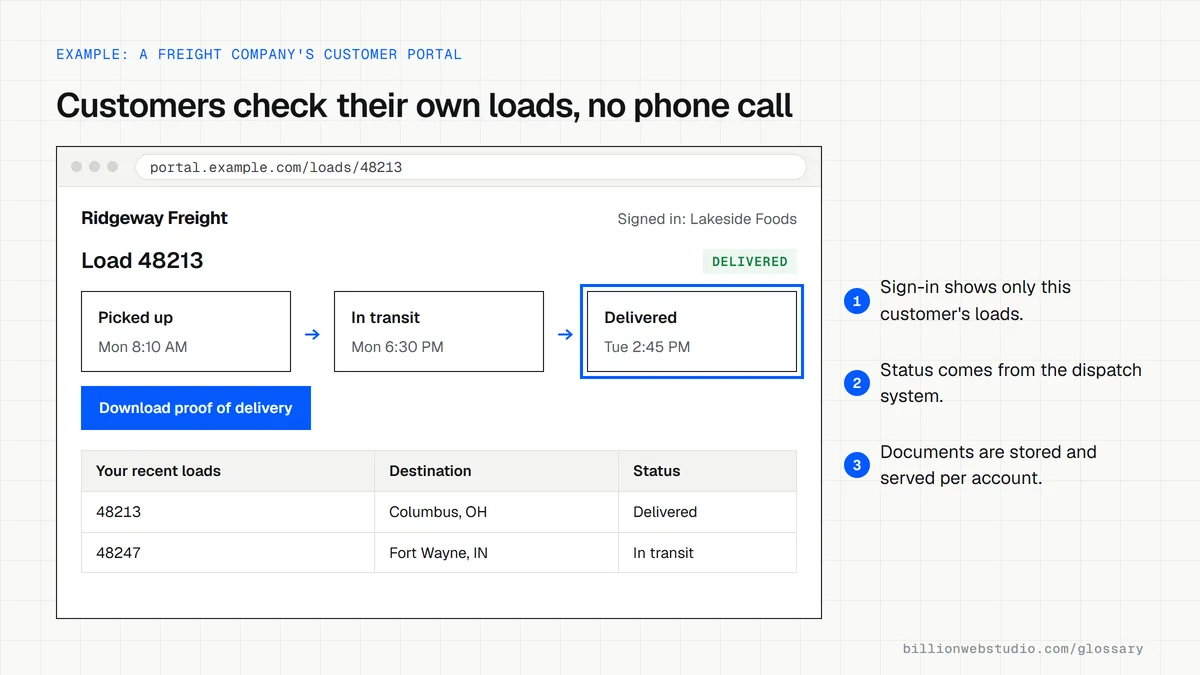
A regional trucking company spends hours each day answering calls that ask where a shipment is. It commissions a simple web application: customers sign in, enter a load number and see the latest status the dispatch team has recorded. Calls drop, dispatchers get time back, and customers can check delivery progress at any hour.
How to tell if you need a web application
- Customers or staff need to sign in and see information that belongs only to them.
- Your team copies the same data between forms, emails and spreadsheets every week.
- Visitors need a tailored answer, such as a price, availability or eligibility, rather than a static page.
- You can name the person who will own the tool after launch and decide on new features.
- You have checked that no existing software service already does the job well enough.
Copy this web application scope checklist
WEB APPLICATION SCOPE: Ridgeway Freight customer portal

1. Goal: customers check load status without calling dispatch
2. Users and roles
   - Customer: sign in, search own loads, download proof of delivery
   - Dispatcher: update load status, upload documents
   - Admin: invite users, remove access, view audit log
3. Screens: sign in, load search, load detail, documents, user admin
4. Data source: dispatch system, status synced every 15 minutes
5. Notifications: email to the customer when a load is delivered
6. Security: MFA for admins, hashed passwords, HTTPS only, daily backups
7. Not in version 1: online payments, native mobile app
8. Acceptance: our staff test each screen before sign-off and payment
9. Ownership: code repository, hosting and domain in our company's name
10. After launch: monthly support hours, response times, hosting cost
How to check a web application quote before you sign
- Find the user roles: the quote should name every type of user, such as customer, dispatcher and admin, and list what each one can see and do.
- Find the data and integrations: which existing systems the app reads from or writes to, such as accounting or dispatch software, and who provides access to them.
- Check ownership: the contract should give your company the source code, the code repository and the hosting accounts, and let you export your data in a standard format such as CSV.
- Check security: password storage, multi-factor sign-in for admins, backups, and testing against the OWASP Top 10 web application risks before launch.
- Check running costs and acceptance: hosting and third-party fees per month, a support plan with response times, and how you test and approve each milestone before paying for it.
What good looks like: Every feature is written as something a named user can do, code and data ownership pass to you, and the build price is shown separately from the yearly cost to run and maintain the app.
Free tool: OWASP Top 10 web application risks
Questions to ask your web developer
“What is in version one, and what waits for later?”
A good answer: A small first release that does the core job well, plus a written list of later features, so you launch sooner, learn from real users and avoid paying for features nobody uses.
“How will customer data and logins be protected?”
A good answer: Passwords are stored with a slow hashing algorithm such as Argon2id or bcrypt, admins sign in with multi-factor authentication, all traffic uses HTTPS, data is backed up, and the app is tested against the OWASP Top 10.
“What will it cost to run each month, and who maintains it?”
A good answer: An itemized monthly figure for hosting, paid services and support, plus how bug fixes, security updates and new features are scheduled and priced.
Web application: common questions
What is the difference between a website and a web application?
A website mainly presents information that is the same for every visitor, such as services, prices and contact details. A web application lets users do tasks, saves their data and responds to their input. Many business sites mix both: marketing pages plus an application area such as a portal.
Is a web app the same as a mobile app?
No. A web app runs in a browser on any device from a normal web address, while a native mobile app is installed from an app store and built for one operating system. A progressive web app sits between the two, since it can be installed from the browser.
What are some examples of web applications?
Everyday examples include Gmail, Google Docs, online banking, ecommerce checkouts, project management tools and booking systems. In a smaller business, a customer portal, a quote calculator or an internal job tracker that staff open in a browser are all web applications.
Sources
Want a website that gets this right?
Every Billion Web Studio build includes technical SEO, schema and speed work as standard, with a fixed quote within 1 business day.