Building and hosting
What Is a Staging Site?
A staging site is a private copy of a live website where developers build and test changes, such as new pages, plugin updates or a full redesign, before publishing them to the real site that customers see.
What a staging site means in plain English
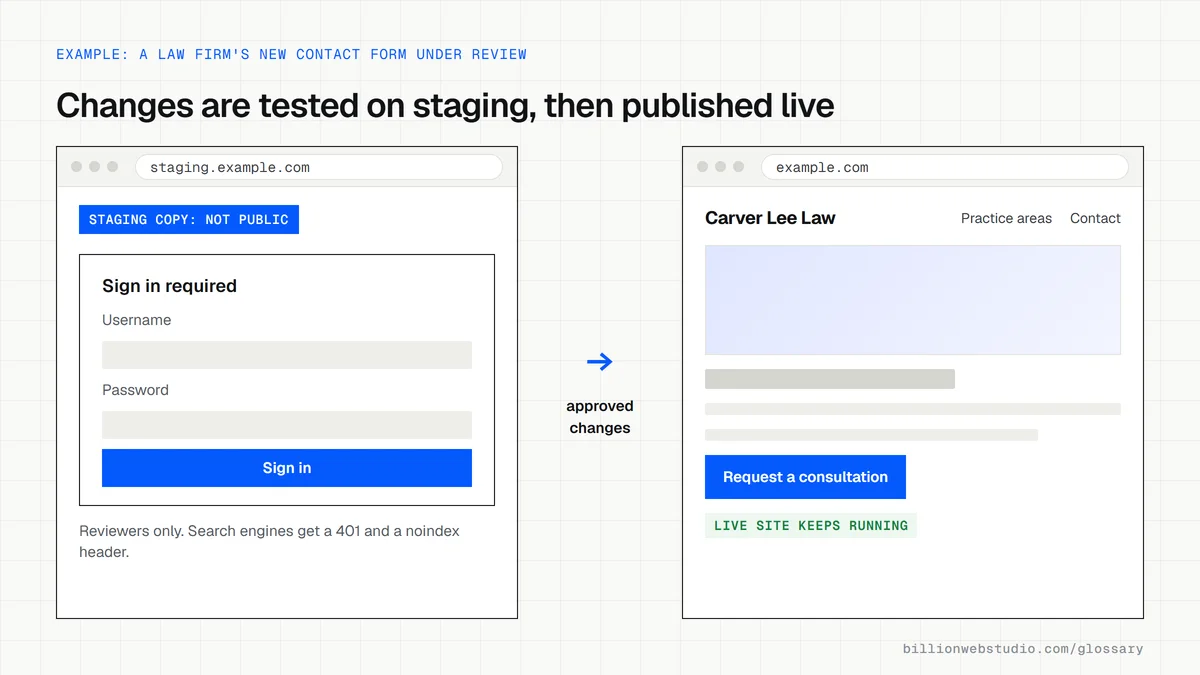
Think of it as a dress rehearsal. The live site, often called production, stays untouched while work happens on a duplicate with the same design, content and code. Developers install updates, try new features and fix bugs there. Once you approve the result, the changes move to the live site in one controlled step.
A staging site usually sits on a subdomain such as staging.example.com or on a temporary address supplied by your host, and many managed hosting plans include one-click staging. Larger teams add a local development copy on each developer's computer, so changes pass through development, then staging, then production.
Why a staging site matters for your business
Testing on a live site means customers meet broken layouts, failing forms and half-finished pages. A staging site removes that risk. You can review a redesign on your own phone, confirm the contact form still delivers leads and check that tracking fires, all before launch. If something goes wrong, the live site keeps running the whole time.
A staging site example
A law firm wants a new practice area section and a redesigned contact form. The developer builds both on a password-protected staging site. The managing partner reviews them on her phone, asks for two wording changes, and sends a test inquiry to confirm it reaches the intake inbox. Only then does the developer publish the changes to the live site.
Common staging site mistakes
- Leaving the staging site open to search engines, so Google indexes a duplicate of your website.
- Relying on robots.txt alone, when Google says robots.txt is not a way to keep pages out of its results.
- Copying staging over the live site and wiping orders, form entries or posts added since the copy was made.
- Carrying the staging noindex setting over to the live site by accident, which tells Google to drop your real pages.
- Approving changes on a desktop screen without testing them on real phones.
Copy this .htaccess lock for a staging site
# Staging only: never copy this file to the live site
# Create the password file first with:
#   htpasswd -c /home/example/.htpasswd-staging reviewer

# 1) Ask for a password before showing any page
AuthType Basic
AuthName "Staging: authorized reviewers only"
AuthUserFile /home/example/.htpasswd-staging
Require valid-user

# 2) Tell search engines not to index anything they do reach
<IfModule mod_headers.c>
  Header always set X-Robots-Tag "noindex, nofollow"
</IfModule>
How to check your staging site is private and safe
- Open the staging address in a private browser window. It should ask for a username and password before showing anything at all.
- Search Google for site:staging.example.com, using your own staging address. Any results mean the copy has been indexed; lock it, then use Removals in Search Console to hide those URLs quickly.
- On the live site, view page source and search for noindex. It must not appear on public pages. In WordPress, also confirm Settings > Reading has Discourage search engines from indexing this site unticked.
- In WordPress, open Tools > Site Health > Info on both copies and compare the WordPress version, the PHP version under Server and the database version, so a test on staging means the same thing on live.
What good looks like: Staging answers anyone not signed in with a password prompt (HTTP 401), a site: search returns no staging pages, live pages carry no noindex, and both copies run the same software versions.
Free tool: Search Console Removals tool
Questions to ask your web developer
“How is staging protected from search engines and the public?”
A good answer: Password protection at the server level, through HTTP authentication or the host's built-in staging lock, not robots.txt alone, with a noindex header as a second layer.
“How do you publish from staging without losing live orders and form entries?”
A good answer: Code and design changes are pushed to live without overwriting the live database; if content must move, they say exactly what, and they take a backup immediately before publishing.
“When was staging last refreshed from the live site?”
A good answer: They copy live to staging before each larger change, so tests run against current plugins, content and software, and they remove or mask customers' personal data in the copy.
Staging site: common questions
How do I stop Google indexing my staging site?
Put the staging site behind a password so crawlers cannot reach it at all. Google's documentation names password protection and the noindex rule as the ways to keep pages out of search. A robots.txt block alone is not enough, because links from elsewhere can still get a blocked URL indexed.
Is a staging site the same as a test site?
Mostly, yes. Both are non-public copies used to check changes. Teams often use development or test for the early working copy and staging for the final copy that mirrors the live site exactly, where the last review happens before anything is published.
Sources
Want a website that gets this right?
Every Billion Web Studio build includes technical SEO, schema and speed work as standard, with a fixed quote within 1 business day.